Wednesday, November 19, 2008

Continuous Integration System Roundup

Continuous Integration Systems are one of the most important tools for agile software development. They automate the process of building and testing. A lot of people seem to have realized their importance and there are quite a few products in this arena. I already used Hudson and CruiseControl, but for OpenMRS we need to find one which is best suited to our needs. So I started out about 3 weeks back to create this roundup of continuous integration servers. This should be a useful roundup for any project with similar requirements.

Why does OpenMRS need a Continuous Integration System?

Any software development effort needs to take care that regression doesn’t happen with new code changes. Often a change in the API/module core results in breaking of modules dependent on an earlier method. A Continuous Integration System will rebuild OpenMRS after a change is committed and provide information on how that change is affecting related code.

OpenMRS would also benefit from an easy to understand UI that Continuous Integration Systems provide for number of failing tests. The number of passing or failing Unit Tests will indicate the quality of a build and help implementers/testers realize the stability of a build. We can also set some goals on how many test methods we need to write before an API method can be finalized or deprecated.

The work done in different branches and modules can be monitored and looked at easily by the community.

Building of OpenMRS Installer using NBI can be automated and new users can directly test with the latest build of OpenMRS using the cross-platform installer.

Thus to summarize, a continuous integration system will bring better release quality, more transparency, quicker bug finding and fixing, simplicity and TDD frame-of-mind.

Disadvantages for OpenMRS in using Continuous Integration System

  • Additional Load on Servers
  • Not every developer is motivated to write unit tests ;-)

Features that OpenMRS needs (Not exhaustive)

  1. Easy to monitor tests and easy to understand dashboard
  2. Support for SVN and Ant
  3. Dependency integration
  4. Email/RSS/IRC notifications when a build fails or bad code is committed
  5. Warning flags when a committed code doesn’t follow coding rules (naming, newline format,etc.)
  6. Allow code committers to modify build and test parameters from the GUI
  7. Optimal Performance
  8. Price & Open-source development

Comparison of Continuous Integration Systems:

  CruiseControl Continuum TeamCity Bamboo Hudson
Monitoring UI Dashboard introduced since v2.7 is not intuitive Dashboard only shows tests Advanced UI & dashboard. Advanced UI, Detailed reporting out-of-the-box, Intuitive Simple Dashboard, Plugins enhance reporting, Intuitive, somewhat detailed
SCM Support All Support SVN
Dependency Integration Scripts need to be written for each new dependency. Tracking different versions of dependency jars is very complex Easy for Maven2.0+ projects, but not so easy for other types of projects Dependency can be managed easily. Advanced UI for dependency management Dependency management is easy and intuitive. Different versions of same library not automated. Creating test/build plans allows dependency of different versions Dependency management is easy to configure. file fingerprinting simplifies identification of different versions. Automatically can detect and build project dependencies
Email/RSS/IRC Emails. Plugins - RSS, blog, IM with Jabber Email, IRC, IM with Jabber, MSN Email, Jabber, RSS, external HTML widget Emails, RSS, IM Notification using Jabber or OpenFire Plugin – Emails, RSS, IRC, Jabber, Google Calender, Twitter
Code Quality and Patterns Not very easy to define Could not find a way Can be defined with plugin for IntelliJ IDEA Managed through test plans. Manual test plans have to be created Plugin provides UI. Test plans can be created manually out-of-the-box
Security and User Management Easy to configure with different roles Roles can be easily defined Roles can be easily defined Simplistic UI for user build plan management. Easy integration with JIRA Easy to configure roles for users
Performance Fast Fast Somewhat slower in comparison, but includes a lot of features Fast in build and integration. Slightly slower in reports. Includes lots of features that may not be used. Distributed builds with slaves speeds up performance Comparatively lightweight out-of-the-box, but requires plugins. Distributed builds with slaves speeds up performance
Pricing Free & OpenSource. Paid version called Cruise available. Free & OpenSource Professional version is free, but enterprise is paid Free for opensource projects Free & OpenSource

Netbeans 6.5 Final Released

After some delay in the release due to quality issues, Netbeans 6.5 is out for download. It is netbeans 128 2 indeed a feature-rich build and some great changes have been added for this new release. Along with the new features, I can vouch that Netbeans 6.5 is also a pretty stable release since I was part of NetCAT 6.5 (Netbeans Community Acceptance Program).

The list of new features can be found here… My favorite features are the improvements in Database Query, Python, HTTP Client Monitor, JavaScript Debugger and PHP. If you are a developer from the php world, I would really suggest that you take a closer look at Netbeans 6.5. I love the documentation and code hints that Netbeans will give you.

Netbeans also completed 10yrs a few weeks back and celebrate by downloading Netbeans 6.5 here.

Friday, November 14, 2008

Indian Flag on the Moon

It is a glorious moment for Indian Space Research Organization (ISRO) and India, for it has become the 4th country to have landed on the moon. Today, just hours back Chandrayaan-1's Moon Impact Probe (MIP) landed on the moon's surface and carries the Indian flag to the moon's surface.

India becomes the fourth country along with US, Russia and European Union (not really a country ;-)) to reach the surface of the moon. The 35-kg MIP hit the moon's surface at 21:31hrs after it was lauched 25mins earlier from Chandrayaan-1, which is currently orbitting the moon and sending images of the moon's surface to ISRO. The MIP is one of the 11 probe that Chandrayaan-1 is carrying for various exploration activities on the moon. According to ISRO officials, the MIP landing was perfect and worked exactly as planned.

After the landing, ISRO chairman G Madhavan Nair said, "The Moon was favourable to us. We have travelled all the way to the Moon. We have given Moon to India". It is indeed one of the greatest scientific achievements in India's history and everyone is elated...

I'm not quite sure how India received the moon with this mission, as quoted by the elated chief. I thought the white disk that I've been looking at since childhood was the moon ;-) and its been in view from India for centuries!! Next time when I look through a telescope on the moon's surface, I'll try to find the Indian flag!! Anyways, now we are all waiting for India's manned mission to the moon which has become somewhat of a race with China's moon mission.

Thursday, November 13, 2008

Gmail Voice Chat & Video Rocks

Google has pulled off yet another spectacular with web applications... Yahoo have been trying to do this for sometime now, Ebay wanted to do this with Skype after their buy... but it can be said Google has reached their first with quality voice chat and video chat from a web app directly.

To use voice and video chat from Gmail, you have to install a browser addon called GoogleVoiceAndVideo (the size is pretty large: 447KB) and this enables Voice and Video chat from within Gmail, just like the current Instant Messaging (IM) window within Gmail. While you are checking your emails, you can chat from anywhere in the world. You don't need to have that client application installed.

Gmail had text chatting in the web app for a year or so and this helped gain some market share in the IM world. Google Talk and Gmail chat are still long way behind MSN Messenger and Yahoo Messengers usage, but continuous improvements like this may help Google gain some market share in the IM market...

The Voice Chat and Video Chat uses a proprietary technology called "Vidyo technology"... The quality is pretty good and is nearly same as the GTalk desktop application. Obviously like Gmail's chat, there are some bugs in Voice chat as well and sometimes the connection doesn't happen the first time. But most times the voice was clear and crisp. For a first day after launch the service was pretty good.

I often use Skype for Voice and video chat. Skype has got a Linux client and its voice is one of the best in terms of quality. Gmail's voice doesn't work with Linux. Both Skype and Gmail's voice does not use Session Initiation Protocol (SIP), which I would have liked to see, to allow inter-interoperability between different VoIP providers. Nevertheless, bringing it to the browser is a new improvement that will bring ease-of-use to the users.

Wednesday, October 29, 2008

SocioDroid is Ready for Release

Finally after months of polishing and testing, we are ready to release SocioDroid, the location-based social networking application that we have made for Android’s Market. It should up for download by the next week

I could not blog much over the last month because of the hectic schedule for completing SocioDroid. But with that finished now, I’ll be back blogging more regularly…

Friday, September 5, 2008

Programming: The finest steel has to go through the hottest fire

As the college season is in full flow, I'm back to my philosophical self and I've something for my students... Last week, I was conducting the regular Assembly Programming practicals, where I'm supposed to teach students 8085/8086/8051 ASM programming. Now, as much as I love programming and finding solutions to problem, I also love another thing: Creating problems for others to solve... and even if I know the answers, I would never give away the answer... come what may!!

So we started with all the instructions, available registers and memory allocation. Somewhere down the line, we started with a program to multiply 2 numbers. Now, as simple as I thought it was, my students didn't seem to think the same way. I told them that repeated addition was actually multiplication and they affirmatively nodded their heads, but the program wouldn't just come out from them. After close to an hour and me giving them numerous hints, we were still stuck at the loop!! They demonstrated it easily in a single line of C or C++ or Java, but ASM wasn't just clicking. That's when I affirmed, "Don't worry, programming doesn't come naturally to anyone... We all learn it our own way!!" And the class was stunned, similar to what I've seen at my office's training sessions... and the next question most of the times is, "Then how does it come naturally to you ??"...

"The finest steel has to go through the hottest fire!"... I read it somewhere, but then that's what is true about your individual talents. A singer's voice, a painter's hand, a composer's notes, a poet's verse... all may be claimed to have come from God or by birth, but its the desire to overcome obstacles and practice is what makes them achieve perfection.

Programming is very much an acquired skill, just like most things in life. Even logic for that matter doesn't come by birth. As we observe others follow a pattern of doing things, we follow that same pattern. The more we do the same thing in a way that is acceptable to our intellect, the more it becomes part of our existence and more natural the action becomes. When we first learn to speak, we probably think its harder than anything we have done before. Now as we know to speak, its easier than easy. Same is with programming. The more code that we observe, the more code we write, programming becomes more natural. Whoever says that logic to solve problems came easy, is either boasting his own ego or hasn't thought logically about it.

I was at the vegetable vendor the other day, who was talking of a way to solve the Bihar floods which made some 20million people homeless. His solution sounded really promising and as I know him for some years now, I knew he was intelligent. Huh... I wondered if programming would come naturally to him. He had never seen or used a computer ever but had passed high school. So if he could find a solution, it would mean that programming (read: finding solutions) came naturally to him. So, while he was selling vegetables, I sat beside him and blabbered the same things, I had told to my students at that lecture, but this time it was in Hindi and avoiding most tech-words. While I was speaking, I didn't even know if he was listening... He was busy selling vegetables, with his ~10yr old son and the aunties that came by kept smiling while looking at me. After a while, I asked him if he could multiple 2 numbers, given the instructions I explained... He thought for a while, picked up a few ladies finger (those long green vegetables), which he represented as instructions and explained me a perfect program to multiply numbers, not just 8-bit or 16-bit that would fit in a register-pair, but a multiplication program that would store larger numbers in ordered memory locations... Wow... that was superb!!... Unbelievable and brilliant, I said to myself!! I told him real instructions like ADD r1 r2, MOV r M,  ... and I told him to use those instructions and make a program to calculate modulus of a number. Hmmm... he thought for a while, but this time couldn't find a solution. He asked me many questions though, which he thought would give him an answer... But alas, no solution was found!!

I went back home and realized that may be it is the mumbo-jumbo words that divert our conscious efforts to find a solution. It may very well be the emotion of success that stops us from continuing to find the next problem and its solution. My students had passed earlier classes with 90% and more marks and were among the best students academically in the city.  Did that success get to them ??... Whatever it was, I realized persistence to find an answer to a problem gave us much better understanding of ourselves... May be programming teaches us to understand ourselves better than the problem at hand!!

Wednesday, September 3, 2008

A Look At Free/OpenSource Cross-Platform Installers

Software Distribution is an essential part of Software Development and can sometimes be the first impression that can make or break the user's opinion about a software. We, as software programmers forget the importance of easy distribution and easy installation of software that we develop. We do not understand the problems that a new computer user or a non-programmer may face. And I experienced this first hand about 2 weeks back, when a physician friend of mine heard that I was working on OpenMRS.

I was lucky enough to work on OpenMRS this summer and learnt a lot more about Medical Informatics during this period than I expected. Hearing this, my friend openrmswanted to install OpenMRS at his clinic which already used Tally (hehe... isn't that innovative??) for storing patient records, observations and prescriptions. He practices at Kolkata, visits different hospitals and sometimes the patients he attended at a hospital come to his clinic. When I told him that OpenMRS was a webapp, he got all excited and I narrated him all the features that OpenMRS could provide and help him manage his patients better through the web, only if he could host OpenMRS from his clinic. I'll skip the other interesting parts and his extra-terrestrial expressions ;-), since we are actually talking about software distribution.

So then came the day when I was about to leave office and he was in his clinic trying to install OpenMRS. It was Independence Day and the clinic was closed but he was excited to experience the new-age medical informatics :-)) When I first got his call he had downloaded the Windows Installer. I was pretty sure it was for an older version and hence told him to instead download the OpenMRS Appliance, which is a VM Image that can be run from one of the virtual machine softwares. Yaw Anokwa made this wonderful Virtual Image with Ubuntu + All Necessary Stuff (tomcat, mysql, demo data) and OpenMRS running. You just have to have VirtualBox or VMPlayer or VmWare Workstation and load the VMimage and wait for Ubuntu to start. It is simple, fast and safe to play with... But for novice users, I just realized it wasn't easy enough. My friend installed VirtualBox and loaded the image. It booted fine, but the network wasn't working and OpenMRS webapp could not be reached from the Windows host. After being on call for close to an hour, we just couldn't make the networking work!! I advised him to install VMPlayer instead and run the image. This time everything ran fine, but some changes had to be made in the Norton 360 Firewall. He kept complaining that Windows XP was punishably slow and then I realized that his 512Mb wasn't enough to virtualize :-( ... So we were back to where it all started!! The Windows Installer that OpenMRS distributes is based on Bitrock. He first tried the OpenMRS 1.1 Installer, but it is an older version that hasn't been upgraded for a year or so... Everything installed fine and he was happy to use it, but it didn't have the features I talked about that were added in newer releases of OpenMRS. I walked him through the manual installation and finally we managed to get OpenMRS up-and-running at 2am in the morning and he having spent about 8hrs on it. Last week when I asked him, he still wasn't using OpenMRS for his clinic and hospital. May be the first experience made him bitter!!

With that episode in my mind, I pledged him that within the next month or so I'll give him and easy to install setup and he'll be happy using OpenMRS. And that's when began my chase to find an easy to use, cross-platform installer framework. OpenMRS has lots of implementations on different platforms (Windows, Linux and Mac) and hence I wanted the installer to be cross-platform. At my office, we generally use Windows Installer or NSIS for making installers. But those are only for Windows. These 2 frameworks are so simple and extensible to use that I was thinking if there was something similar and cross-platform, I could make an OpenMRS Installer in an hour. But sadly, that wasn't the case... I tried a variety of installer frameworks, but couldn't find any of them as simple as NSIS or Windows Installer (msi). The following are the installer frameworks I tried working on:

Installer Framework Short Description Problems
1.) Antigen Antigen (Ant Installer Generator) is a tool to take an Ant build script, combine it with a GUI and wrap it up as an executable jar file. Its primary purpose is to create powerful graphical installers from Ant scripts. Couldn't get it to execute ant-calls at lots of places. Didn't work in openSuSE 11.0 due to some incomplete ant configurations. Hasn't been updated in a long time
2.) IzPack IzPack-generated installers require Java. They are simple, efficient and fast to use. Simple executable deployment is best done through IzPack. Isn't very powerful. Good for simple image deployment, but isn't highly configurable and powerful.
3.) OpenInstaller A newer cross-platform installer framework that is completely customizable and written in Java. Glassfish uses this installer framework. Not much documentation. Complex to implement and doesn't look native on all platforms
4.) Netbeans Installer (nbi) A completely customizable and powerful installer framework. Configuration Logic is written in Java and can be used to do anything and everything that Java programs can do. Old documentation. Requires some effort to get up and running with all the scripts.

So finally, I decided to work on using the Netbeans Installer. Netbeans Installer already has components like Tomcat, MySQL, Glassfish, OpenESB and their deployment scripts. And I thought it will simplify my effort... Dmitry Lipin of Sun Microsystems, the lead developer of the NBI team has been of great help over the past weeks and has helped a lot in explaining about nbi... While I was building the installer, 2 other colleagues of mine got interested in OpenMRS and have helped build some parts and want to contribute to OpenMRS code in a larger way!!

I have successfully been able to build an Installer/Uninstaller that can deploy Tomcat/Glassfish, MySQL and the OpenMRS web application on Windows, Linux, OSX, Solaris. The demo data set, JRE/JDK and starting the respective servers are yet to be completed.

Update: The OpenMRS Windows Installer based on Bitrock has been upgraded to install the latest version of OpenMRS. Is it useful for the OpenMRS community to have a cross-platform installer?? Or do the Windows guys only need an Installer ??

Students Review Contest for MySQL & Glassfish

Sun Microsystems has announced a students review contest for MySQL and Glassfish, where students have to develop an application using MySQL and Glassfish. The project has to be part of the java.net website and a review has to be written on MySQL and Glasssfish.

The contest is useful for students who are learning to develop web application and will also help Sun if students get interested in these products. The contest has the following prizes to be won:

  • A chance to win a grand prize of $500 in Visa debit card, and
  • Five chances to win a prize of $250 in Visa debit card

Other than the prizes, students should also be interested in the contest because its a nice learning experience and students will also improve their writing skills by blogging. There is also a certificate that is given to all the winners and its good to show-off you accolades. I won the 2nd prize on the students reviews contest last time and it was an interesting contest to participate.

Chhandomay Mandal manages these student contests and he's very polite and always ready to help. Ask him questions here.

Review: Google Chrome

Today, Google released its open-source browser called Google Chrome to the world, after making us feel in 2006 that it was an April Fool’s Joke. Yesterday, in an announcement, it disclosed the features of Google Chrome and claimed that we require a new browser because the web has changed. As soon as it was released, I downloaded it and here are my observations after using it for the last 4 hrs.

The first thing you notice is that it’s an online installer and still requires ~450Kb (for comparisons: utorrent is half the size and can download the whole world for you!!) . It’s only released for Windows at the moment and will require sometime before its released for Linux. The online download was pretty slow for my connection, but I realized that may be half the internet users were downloading it and that can be daunting even for a biggie like Google.

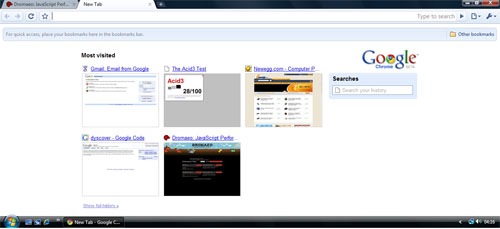
Finally the downloader finished and I was ready to surf on Google Chrome. First thing you’ll notice that it occupies nearly all available screen space. No menubar with File, Edit and the like!! And there is the Opera like UI with SpeedDial for most visited websites and Search History. Also the Address Bar is pretty efficient with all the quick searching and intelligent suggestions.

chrome-speedial

I was expecting Chrome to be memory hog, but it really is pretty light on the memory usage. With less than 10 tabs open, it surely uses less memory than Opera, Safari and surely Firefox. As the tabs increase Chrome seems to take up as much memory as other browsers. The Browser TaskManager, which can be found when you right click on the open Taskbar or TitleBar is another very useful addition to the browser. But what’s interesting to note that with so many security and stability improvements like separate processes and JavaScript sandbox, Chrome has done an excellent job at keeping the memory usage low. May be if addons are introduced, it’ll screw Chrome as well, but for now it’s doing good!!

Google_Chrome

There aren’t many things to be set in the Options that other browsers don’t have, but the search management was interesting. Since, I am from India, it showed me the popular Indian search engines. Yahoo India, MSN India, Rediff, Guruji were the available search engines and that was interesting because it’s always efficient to have a localized search.

This in my opinion is the most important part for a web browser. Like a phone should be best at voice transmission and quality, a browser should be best at displaying websites accurately and swiftly. Chrome uses Webkit (aka Apple Safari’s Engine) for rendering web pages and I wasn’t expecting many differences from Safari. But I found a few changes between the released version of Safari and Chrome. May be Chrome uses a newer version or something. Chrome scores 76/100 on the ACID3 Web Standards test which isn’t really bad, but I was still expecting 100% as Webkit and Opera have already reached 100% in their development products.

JavaScript performance is super fast. You can look at the benchmarks here. The team from Denmark has done an awesome job and Chrome's JavaScript performance is the best among all the browsers.

I'll write more about it later... but you can read what other people at GigaOm, TechCrunch, TheInq and Gizmodo are saying. Its all over the web and no kidding Google OS is really here to stay!!

Google Chrome's Beats Others at JavaScript Performance

With Google Chrome released, one of its most awesome features is the excellent JavaScript performance. It is a complete new re-write of the JavaScript VM and uses what is called the V8 Engine by the Google developers who worked on the new JavaScript engine. Here is a JavaScript Performance Analysis for developers to look at comparing different browsers.

Google uses a lot of AJAX and the new V8 engine is the king in JavaScript performance done using Dromaeo :

Browser Time (lower the better)
Chrome 0.2.149.27 488.80ms
Firefox 3.0.1 1775.00ms
Opera 9.52 1767.60ms
Safari 3.1.2 2075.00ms

The memory usage of Chrome is also pretty good and the built-in task manager for looking at the memory/CPU usage of tabs is interesting and useful. It can also help in analyzing which tab is creating some kind of menace or using more memory. You can close that tab and get some free memory. This is just an initial preview, but the JavaScript performance is top-notch!!