Showing posts with label IDE. Show all posts

Monday, January 28, 2013

Try Netbeans 7.3 RC1

The Netbeans 7.3 RC1 is out for everyone to try. After a lot of hardwork from the Netbeans developers and testing and feedback from the NetCAT community, the latest release of Netbeans is out… for the larger community to accept.

Download from here: http://bits.netbeans.org/netbeans/7.3/rc1/

As has been the tradition, the community will decide if the release is good enough through the Community Acceptance Survey. You’ll need the netbeans.org account to complete the survey. But your feedback is invaluable.

Tuesday, November 9, 2010

Netbeans Community Testing for 7.0 starts

Netbeans has just started its Community Acceptance Program (NetCAT 7.0) for Netbeans 7.0. Basically developers who are using Netbeans as their IDE need to download latest builds and report bugs. Good experience to get involved with testing and learn more about Netbeans. Also makes some friends with community and developers at Sun Microsystems.

Helps improve the IDE you use daily!!

Go HERE: http://wiki.netbeans.org/NetCAT

Saturday, June 6, 2009

Netbeans 6.7 RC2 Released & Your Feedback Required

The new and shiny Netbeans 6.7 RC2 was released today and if you haven’t tried it out yet, please go and download it. It has host of new features which you cannetbeans 128 1 read here. My favorite feature in Netbeans 6.7 has been the out-of-the-box Maven integration and the ability to create Hudson continuous integration servers.

But more importantly, after you have downloaded Netbeans 6.7 RC2 and played with it enough, please give feedback to the Netbeans developer team about the release. There is a survey called the Community Acceptance survey which is integral to guarantee that the release is acceptable to the community. Isn’t that what open-source software is all about – the community. Please fill in the survey and give your very important feedback.

Wednesday, November 19, 2008

Netbeans 6.5 Final Released

After some delay in the release due to quality issues, Netbeans 6.5 is out for download. It is netbeans 128 2 indeed a feature-rich build and some great changes have been added for this new release. Along with the new features, I can vouch that Netbeans 6.5 is also a pretty stable release since I was part of NetCAT 6.5 (Netbeans Community Acceptance Program).

The list of new features can be found here… My favorite features are the improvements in Database Query, Python, HTTP Client Monitor, JavaScript Debugger and PHP. If you are a developer from the php world, I would really suggest that you take a closer look at Netbeans 6.5. I love the documentation and code hints that Netbeans will give you.

Netbeans also completed 10yrs a few weeks back and celebrate by downloading Netbeans 6.5 here.

Monday, May 19, 2008

Netbeans 6.1 Vs Visual Studio 2008

Its been a while that Netbeans 6.1 has been released and I thought it would be a good time to update my previous comparison between Visual Studio 2008 and NetBeans 6.0. Netbeans 6.0 added major features and NetBeans 6.1 comparatively is a minor upgrade, but nonetheless added lots of new improvements. Visual Studio 2008 was also in beta at that time. In light of new improvements and changes, I thought it'd be good to have an updated comparison between the two IDEs.

We need to understand that each IDE has something better and makes the developer more productive. Also, please keep in mind that I'm not comparing .NET and Java here, but only 2 IDEs, so we discuss features that can be applied to both languages/platforms.

Feature
Netbeans 6.1
Visual Studio 2008
Comments
Supported Languages C/C++, Java, Ruby, Php, Javascript, HTML/CSS, JSP, JavaFX, XSL, WSDL, UML, Groovy, Scala, Prolog, Tcl C/C++, C#, VB.net, XAML, HTML/CSS, JavaScript, LINQ (Language INtegrated Query), ASP.net, XML/XSLT. Both Visual Studio and Netbeans are extensible and can support new programming languages.

VS2008 uses languages services through which VS supports languages like Ruby, Python and F#. These are not out-of-the-box though and are difficult to add to the IDE. You even have to pay some bucks to get those languages integrated with VS and different vendors sell configured IDEs for those languages.

Netbeans on the other hand has an excellent plugin system and finding and installing new language support is simple and easy. The plugin manager shows available plugins that support the new languages and anyone can create/install these new plugins free of cost.
Supported OS/Platforms Windows, Linux, Unix, Solaris (SPARC, x86/x64), Mac OSX (Intel, PowerPC) Windows and different versions of Windows Netbeans 6.1 can be installed and run on a host of different platforms. It's open-source and it's Java. So, it generally means it can run anywhere with the JRE installed. VS2008 on the other hand is only targeted towards the windows developer.
Code Completion Excellent code completion for a host of different languages and understands lot more language docs. Fast code completion, but less options at a time. Need to use arrow keys. Visual Studio 2008 has a snappier code completion compared to Netbeans 6.1. Code completion and hints speed has improved in 6.1, over previous versions, but still slower than VS2008.

VS2008 requires using the arrows to scroll through different parameters of methods while Netbeans shows all at one go. Thus, learning through Netbeans is better for newer programmers, who want to find the best method.
Source Code Editor Editing code is simple and easy. Provides different events when you right-click on the component and code can be written for that specific event. Editing is simple and easy. Switching between the designer and code screen is double-clicking the control Source code editing is equally good in both. Netbeans 6.1 has a better feature where it can highlight a variable that used at different places. So you can easily identify the lines at which the variables are used when you are writing code.

Refactoring code is slightly better in Netbeans and offers a lot more options compared to VS2008. Moving code is slightly better in Netbeans 6.1 than VS2008.

Visual Studio's code editing is lot more integrated across different types of projects. Netbeans still seems to be separate IDE for Java EE and Java SE or Java ME development. Like #region works on all projects for code folding, but Netbeans doesn't have such a common code folding (i.e. <editor-fold> doesn't work in all projects). 

Netbeans 6.1 has an excellent JavaScript Editor which is on par with VS2008's Intellisense JScript & AJAX Editor. The JavaScript docs integration in Netbeans 6.1 is better and code hints are better in Netbeans 6.1. Check this video to see the strength of the new JaavScript editor in Netbeans 6.1.
GUI and RAD Tools Netbeans Matisse, JSF Components, Database Application, Beans Binding, Excellent UML design tools, Mobile Designer, BPEL designer are some RAD tools not found in VS2008.

Java ME GUI development is excellent. Excellent device management in Netbeans 6.1. SVG support helps create great looking scalable mobile applications. Useful common components from Netbeans for MIDP.
WinForms, ASP Form designer are great. XAML visual designer, Database schema managers, VB-XML bindings, Vista UAC manager are some of the enhancements to the VS2008's RAD/GUI tools. Both IDEs are probably the best GUI builders and RAD tools. VS2008 Team System Database Edition has excellent database-code integration tools. LINQ code generators are another excellent feature in VS, not found in Netbeans. Netbeans plans to add similar features in Netbeans 6.5 and it makes more sense to add these features, since MySQL is now part of Sun Microsystems.

Visual Studio's VB designer was excellent and probably helped VB reach great popularity. Today Microsoft expects same with XAML designer which can import designs made in Microsoft Blend. Winforms and ASP forms are great as always, may be sometimes better than Netbeans. You can create the Ribbon UI of Office 2007 very easily using VS2008.

Netbeans until version 4 not much of a RAD tool, but today is probably the best RAD Java IDE out-of-the-box. JSF web app designer is great, maybe not be better than ASP forms, but its not behind as more JSF components are added. Swing Application Framework and Database applications are awesome and you can build amazing dB driven apps in minutes. Check out the video and you'll realize how?? Netbeans 6.1 features an even better Mobile Application Designer for JavaME (J2ME), which can design screens and play with SVG menus. Haven't seen a simpler mobile app designer ever, with nice flow designer. RAD tools are something netBeans 6.1 scores higher than most other IDE
Compiler /Loader / Debugger Newer Lexer makes faster runtime compilation, JavaScript debugger with Phobos support and jMaki. GWT is also supported. Parallel compilation on multicore systems, Standard Template Library (STL) for C++ devs to use .net framework, Web Services hosting for WCF-based apps.

Debugging AJAX scripts and AJAX components within ASP.net pages are excellent.
Multicore compilation in VS2008 does improve performance by a good 25-30% over previous versions on C# apps. I wonder how much of multi-processors or multicore, the java compiler uses. Really couldn't compare compiler benchmarks since they are different languages.

Visual Studio 2008 brings integrates web services hosting, which earlier had to be done separately by the users. netBeans has tomcat 6 and glassfish v2 integrated, so VS2008 comes on par with netBeans 6.1.
Netbeans 6.1 still takes about 30sec to start whereas VS2008 starts in 20sec. But for Netbeans it really depends on how many modules you've installed. I've seen Netbeans load within 20s with only the basic modules installed.
Profiling NetBeans 6.1 has a profiler integrated and a really good one too. VS2008 improves load testing capabilities by providing a multiple machine graph view that brings together the test results, performance, and health of all the machines under test. A new area in VS2008 is the ability to drive system performance tuning and diagnostics through the VS test tools. This enables developers to run profiling during tests.

Profiler is great addition to Netbeans. While coding you can experiment and choose the best algorithms/implementations by checking memory, processes through the profiler. A load analyzer like Mercury's LoadRunner is a highly specialized 3rd-party tool, but people who want simple stuff should really be happy with the Netbeans profiler.
Designing / UML UML, BPEL, Flow Designers for Mobile apps and web apps. Not much Designing tools, but Visual Studio 2008 Team System does have some improvements. Team System does have nice code tracking features. Netbeans scores pretty high on this one. Although you can always use 3rd-party software, but its great to have it in the IDE itself. VS2008 is not much of a software designers tool, although the Visual Studio Team System is a great improvement. IBM's Rational is great, but then for the money-saver there's Netbeans UML tools.

Code comparison and tracking isn't available in Netbeans. VS 2008's Code Metrics does an excellent job at analyzing code and reporting about code. Excellent stats can be found through Code Metrics

Testing/Maintenance
& Collaboration
CVS, Subversion and Mercurial are integrated in Netbeans 6.1. Unit Testing tools have slightly improved, Source Control System is added to Team System Unit Testing is excellent in Netbeans compared to VS2008. Ant tools are useful, but VS2008 creates scripts in Team System that can do nearly similar things.

CVS, Subversion and Mercurial make Collaboration Tools in Netbeans better than VS2008. Clearcase is also available as a plugin for Netbeans.
Installation Size & Price Netbeans 6.1 has increased in size, but is very small compared to VS2008. Netbeans 6.1 available with different bundles.

Netbeans can be downloaded free online or you can request a free DVD to be shipped.
Visual Studio installation size is huge and so is the size for the setup program.

It is also costly. But developers can try Express Editions free of cost to get the basic IDE.

Not much here to say, but VS2008 has .Net Framework 3.5 integrated with it and is a requirement. Also SilverLight CLR is added. A lot of other required libraries for WPF and WCF, which makes it larger in size.

After MySQL buy, we also have Netbeans 6.1 bundle available with MySQL. Netbeans 6.1 bundles are also available with JDK 6.
Misc Specialities Visual Studio 2008 has a something called "Visual Studio 2008 Shell". Its just like the Netbeans RCP or Eclipse platform. It allows developers to create their own IDEs based on the platform and we know how successful eclipse has been to do that. Read here for the discussion

Netbeans 6.1 also has Ruby on Rails Template for making quick blogs. Netbeans 6.1 has derby as an integrated database (since JDK 6 provides derby out-of-the-box). It means you can have databases embedded within your application and no requirement for an external database server like SQL Server or MySQL. Netbeans 6.1 is ideally suited for creating Web services. Axis2 is supported for Web Services in Netbeans 6.1. Netbeans also allows faster creation of apps that make use of web services. Developers can simply drag and drop operations under those services into a POJO, Servlet, JSP or RESTful web service and the IDE will generate all the plumbing code to access those services.

VS 2008 does not include specific tools for editing WCF's XML configuration files. After Microsoft Blend import, web designs cannot be exported back to Blend.

The performance improvement in Netbeans 6.1 is a welcome change. Performance has improved as much as 40% in Netbeans 6.1 compared to Netbeans 6.0. Visual Studio on the other hand has slowed down over the years starting from VS.NET.

Both the IDEs still need to improve a lot more on RIA development with the focus slowly shifting towards a more desktop looking web. Expression Blend is moving pretty good for Microsoft and is an excellent tool for XAML/Silverlight designing. On the other hand, Netbeans isn't doing enough to support JavaFX Script yet. With all the talk about JavaFX at JavaOne 2008, we hope to see JavaFX come better in Netbeans 7!!

Monday, April 28, 2008

netBeans 6.1 Final Released

The guys from netBeans have released the final version of netBeans 6.1 after ironing out a lot of bugs. Its an awesome release and the speed increase is pretty nb-logo-frontpage awesome. NetBeans 6.1 is not just about performance improvement but also has a few new features along the way.

Whats New In NetBeans 6.1

  • JavaScript support.
  • Spring Framework Support.
  • New MySQL support in Database Explorer. This feature allows you to register a MySQL Server, view databases, view, create, and delete databases, easily create and open connections to these databases, and to launch the administration tool for MySQL. This also allows you to easily create NetBeans sample databases so that following tutorials, blogs, and so on is significantly easier.
  • Support for Java Beans. You can now view Java Bean patterns in the Navigator and BeanInfo Editor.
  • JSF CRUD Generator. With this feature, you can generate a JavaServer Faces CRUD application from JPA entity classes.
  • Javadoc Code Completion. Editing of javadoc comments is more convenient with code completion.
  • Shareability of projects. This new feature in Java SE, Java Web, and all Java EE project types allows you to create projects that share definitions of libraries. That in turn allows you to create self-contained projects or sets of projects that can easily be built from the command line, on continuous integration servers, and by users of other IDEs without problems.
  • Existing infrastructure has been enhanced to support window transparency (on platforms that provide it).
  • Javadoc and sources association. Now any JAR item on the project classpath can be associated with its Javadoc and sources too.
  • Inspect Members and Hierarchy Windows. Inspect Members and Hierarchy actions now work when the caret in the Java Editor is on a Java class for which there is no source available.
  • On Demand Binding Attribute for Visual Web JSF projects.
  • Axis2 support for web services.
  • SOAP UI integration for Web Service testing and monitoring.

The full list of features are here... Download it from here and have fun with the coding!!

NetBeans 6.5 will be the next version of netBeans and the developers want to improve the database connectivity in that version. And its not just for MySQL, but a lot of SQL improvements as well as drivers for not just JDBC. You can read all about it here.

Friday, February 8, 2008

NetBeans 6.0.1 Released

A bugfix update has been released for NetBeans known as the netBeans 6.0.1. It resolves a few bugs in the netBeans 6 final released about 3 months back. nb-logo

The entire list of fixes can be found here. The latest of GlassFish v2 UR1 is also part of netBeans 6.0.1

You can download the latest release from here.

Monday, December 10, 2007

WYTIWYG - The Challenge of Custom Software

What You See Is What You Get (WYSIWYG or 'wizywig') is probably the best thing to happen to desktop publishing or web authoring. WYSIWYG enables you to view your output while you are making the stuff. A nice paradigm to put your creative ideas to paper. Thanks to the GUI Builder in RAD tools like Visual Basic or WinForms or netBeans Matisse, this WYSIWYG paradigm is brought to the developer as well. But these GUI Builders only cover the part where you are designing the GUI. What about the part where you are designing the business logic, the real things that get done in the background ?

I was recently working on a project that would enable a client to publish his magazines based on what data is stored in the database. It was kind of a report generation software, but with lots of automated formatting based on the database content. Like if the article was about a horse, it had to be taken from the database and formatted in a specific way whereas if it was about the jockey, then it would have a different formatting. The client had fully imagined how the magazine would look like and how the pages would be formatted. But we as developers had to meet the challenge of trying to sketch what the client was imagining. We were trying to give the client what he was thinking... We were supposed to say, "What You Think Is What You Get" (WYTIWYG) !!

I'm sure as creative minds we have always faced this challenge of taking someone's imagination and putting it to life. When it's your own imagination its easy to execute but when you have to understand and convey someone else's imagination it really gets complicated. And software development is all about meeting this challenge.

UML 2.0 has 13 diagrams and each of them are used to covey that imagination, but how many times have you come to new project and even after looking at all the diagrams, never figured out how to go about it from there?? And when you have a quick deadline to meet, it gets even tougher.

But during the above mentioned project, I realized that WYTIWYG is more about marketing than it is about true development. The reason I say this is because quite a lot of times, if you have good convincing skills you can change the way your client is thinking. This implies that you can always make someone else think what you want them to think. I guess some intellectual said, "You can take the horse to water, but you can't make it drink"... I would dare to disagree and say that if you have the skills you can make the horse drink as well...

May be some day we'll have AI so strong that the computer will be partially able to understand what we are thinking. May be after it's understood our thinking, it can create what we are thinking. But until that's done, improve your convincing skills... most probably, it'll be more useful that all your programming skills...

Monday, December 3, 2007

netBeans 6.0 Final Released

The much awaited and anticipated netBeans 6.0 has been released and can be downloaded from here. You may also want to look at the revamped website which seems to be having all the details about the changes, documentation and plugins updated to point to the release of the final netbeans 6.0 build.

If you have been following my coverage, about the different changes made through the different builds of netbeans 6.0, then you already know how much has improved and this final build is of excellent quality.

netBeans 6.0 is a huge released with an integration of host of products that have been brought together as part of the netBeans package. Below is the screenshot of the download page which has different builds for different needs.

netBeans downlaod

Will test and write a few tutorials about the new tools in netBeans 6.0 later. So please check back and enjoy the tutorials!

Tuesday, November 27, 2007

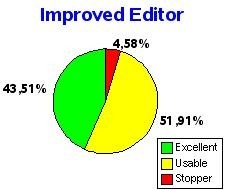
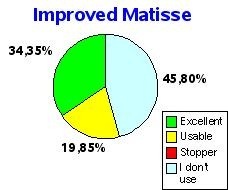
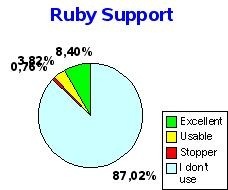
Results from NetCAT 6.0 Community Acceptance Survey

The survey gives an idea about how the community of netBeans 6.0 users have responded to the development of netBeans 6.0. Initially the survey was meant to be for the NETCAT users only, but was later opened to everyone from the netBeans community. The results seem to be fairly acceptable to the community...

editormatisse ruby

Of all the different parts of netBeans 6.0, The new Editor seems to have the largest number of showstoppers. But most users have responded positively to the work on the editor and seem to agree that improvements can be further done on the next release.

The Swing GUI Builder doesn't seem to have a lot of users from the community, but I know that quite a lot of new users as well as teams love this feature. Along with the Swing Application Framework, the GUI builder is an excellent feature from netBeans 6.0

As for Ruby/JRuby support in netBeans 6.0, I completely love the work the netBeans team has put on Ruby. A lot of Java developers think of Ruby as a competitor, but certainly not the netBeans team. One comment from the survey says that "Ruby is the flavor of the month scripting language". Just goes to show the normal Java developer's hostility.

There are other results from the survey on new Javascript Editor, Profiling and Consolidation & Installation. Read the full survey results here.

Sunday, November 18, 2007

Visual Studio 2008 To RTM On 19th Nov

Microsoft has finished all of its work on the highly anticipated Visual Studio 2008 and will be Released-To-Manufacturing (RTM) on 19th Nov, 2007, which is tomorrow. Visual Studio 2008 is the most popular development platform for Windows and Microsoft has made this version specifically for development of Windows Vista. Visual Studio 2008 comes bundled with .NET framework 3.5 which I covered earlier. Visual Studio 2008 comes after 3 years and developers are excited for LINQ, XAML Visual Designer and few other new features that are part of the .NET Framework.

The MSDN Subscription Blog notes that it'll be available for download to MSDN subscribers very soon and I expect it to be sometime next week soon after the RTM. Earlier, on Nov 7th, Microsoft had announced that the Team System of Visual Studio 2008 will be shipped at the end of November. The Team System is the largest of the Visual Studio Suite and is specifically designed for Team Collaboration in mind.

Jeff Beehler, Team System Chief Of Staff, said: "We're very close to shipping Team System 2008 and expect to make it available by the end of this month. This will include all of the team editions (Development, Database, Test, Architect, Suite) as well as the Load Test Agent and of course Team Foundation Server."

Tuesday, October 9, 2007

AMD Joins Eclipse Foundation

We do use a lot of different IDEs within our organization and like I mentioned earlier in my Visual Studio 2008 vs netBeans comparison, I'm not an IDE fanatic... Eclipse is a very popular IDE that we use in our organization. So, have a few friends at Eclipse.

Just heard that AMD will be joining hands with Eclipse's team. AMD has recently given support to a few software projects and openSuSE seems to be one of them. Eclipse leaders will be announcing this new friendship with AMD at the Eclipse Summit Europe.

The exact details of what interest AMD has in Eclipse is yet to be understood, but may be we'll have some announcement at the summit on what the exact collaboration is all about. Will there be any money exchanged... is also another question?? Eclipse is not just an IDE, but also popular as a platform on which other companies have made different tools. BEA and IBM quickly come to mind, when talking of using Eclipse as a platform to make developer tools!!

Let's wait and see what AMD gets from this partnership!! May be some compiler advantage or plugin for AMD's processors in store... Or just some community goodwill

Thursday, September 6, 2007

Visual Studio 2008 Vs netBeans 6.0


A lot of developers I know, in my organization as well as outside, are fanatic lovers of their favourite IDE. Just like programming language fanatics, IDE fanatics maintain that their IDE is all what they need. But in my experience, IDEs like programming languages are only as good as the developer.

In my previous blog entry here, I noted that Visual Studio 2008 and netBeans 6.0 are completely different IDEs and cater to different developers. But we need to understand that each IDE has something better and makes the developer more productive. Also, please keep in mind that I'm not comparing .NET and Java here, but only 2 IDEs, so we discuss features that can be applied to both languages/platforms. Learning things from the "other" person's IDE will finally make "us" more productive. With that philosophy in mind, lets look into the comparison of 2 IDEs that will be released in 2-3 months time.


Feature
Visual Studio 2008
netBeans 6.0
Comments
Supported LanguagesC/C++, C#, VB.net, XAML, HTML/CSS, Javascript, LINQ (Language INtegrated Query), ASP.net, XML/XSLT, C/C++, Java, Ruby, Php, Javascript, HTML/CSS, JSP, JavaFX, XSL, WSDL, UML

J# support has been removed from Visual Studio. So all, Java-like developers can come back home to Java. netBeans 6.0 supports a lot more languages and has an excellent plugin system to support many other languages.


LINQ is new to VS2008 where you can write SQL-like queries in the programs to communicate with databases and files. XAML gets a superb visual designer in VS2008.

Supported OS/PlatformsWindows and different versions of WindowsWindows, Linux, Unix, Solaris (SPARC, x86/x64), Mac OSX (Intel, PowerPC)netBeans 6.0 can be installed and run on a host of different platforms. It's open-source and it's Java. So, it generally means it can run anywhere with a VM. VS2008 on the other hand is only targetted towards the windows developer.
Code CompletionFast code completion, but less options at a time. Need to use arrow keys.Code completion, but shows all methods, variables available at once.

Both netBeans and VS2008 have excellent code completion. Visual Studio still is a little faster in showing method names, parameters but shows only one method at a time and you have to use arrows to check different method parameters. netBeans 6 on the other hand has improved from earlier version in speed, but still lacks the speed of VS. netBeans can show all the methods with different parameters at a time, so the developer can choose faster which overridded method to use.


Eclipse does something even better with Ctrl+Shift+R. It will show all types/resource available. Which means if u write NPE, it'll show NullPointerException and NoPermissionException and you can choose. Even refactoring in eclipse is great.

Source Code EditorEditing is simple and easy. Switching between the designer and code screen is double-clicking the controlEditing code is simple and easy. netBeans provides different events when you right-click on the component and code can be written for that specific event.

Source code editing is equally good in both. netBeans 6.0 has a better feature where it can highlight a variable that used at different places. So you can easily identify the lines at which the variables are used when you are writing code.

GUI and RAD ToolsWinForms, ASP Form designer are great. XAML visual designer, Database schema managers, VB-XML bindings, Vista UAC manager are some of the enhancements to the VS2008's RAD/GUI tools.netBeans Matisse, JSF Components, Database Application, Beans Binding, Excellent UML design tools, Mobile Designer, BPEL designer are some RAD tools not found in VS2008

Visual Studio's VB designer was excellent and probably helped VB reach great popularity. Today Microsoft expects same with XAML designer which can import designs made in Microsoft Blend. Winforms and ASP forms are great as always, may be sometimes better than netBeans. You can create the Ribbon UI of Office 2007 very easily using VS2008.


netBeans until version 4 not much of a RAD tool, but today is probably the best RAD Java IDE out-of-the-box. JSF web app designer is great, maybe not be better than ASP forms, but its not behind as more JSF components are added. Swing Application Framework and Database applications are awesome and you can build amazing dB driven apps in minutes. Check out the video and you'll realize how?? netBeans 6.0 features an even better Mobile Application Designer for JavaME (J2ME), which can design screens and play with SVG menus. Haven't seen a simpler mobile app designer ever, with nice flow designer. RAD tools are something netBeans 6.0 scores higher than most other IDE

Compiler /Loader / DebuggerParallel compilation on multicore systems, Standard Template Library (STL) for C++ devs to use .net framework, Web Services hosting for WCF-based apps.Newer Lexer makes faster runtime compilation, Javascript debugger with Phobos support and jMaki

Multicore compilation in VS2008 does improve performance by a good 25-30% over previous versions on C# apps. I wonder how much of multi-processors or multicore, the java compiler uses. Really couldn't compare compiler benchmarks since they are different languages.


Visual Studio 2008 brings integrates web services hosting, which earlier had to be done separately by the users. netBeans has tomcat 6 and glassfish v2 integrated, so VS2008 comes on par with netBeans 6.0. Both VS2008 and netBeans 6.0 have newer javascript debugger which is a happy relief to me since previously debugging javascript was a complete pain!!

ProfilingVS2008 improves load testing capabilities by providing a multiple machine graph view that brings together the test results, performance, and health of all the machines under test.netBeans 6.0 has a profiler integrated and a really good one too.

A new area in VS2008 is the ability to drive system performance tuning
and diagnostics through the VS test tools. This enables developers to run
profiling during tests.


Profiler is great addition to netBeans. While coding you can experiment and choose the best algorithms/implementations by checking memory, processes through the profiler. A load analyzer like Mercury's LoadRunner is a highly specialized 3rd-party tool, but people who want simple stuff should really be happy with the netBeans 6 profiler.

Designing / UMLNot much Designing tools, but Visual Studio 2008 Team System does have some improvements. Team System does have nice code tracking features.UML, BPEL, Flow Designers for Mobile apps and web apps.

netBeans scores pretty high on this one. Although you can always use 3rd-party softwares, its great to have it in the IDE itself. VS2008 is not much of a software designers tool, although the Visual Studio Team System is a great improvement. IBM's Rational is great, but then for the lesser there's netBeans UML tools.


Code comparison and tracking isnt available in netBeans. Eclipse does have it and is excellent for comparing codes, but not as good as VS2008.

Testing/MaintainanceUnit Testing tools have slightly improved, Source Control System is added to Team SystemCVS is integrated.

Unit Testing is excellent in netBeans compared to VS2008. Ant tools are useful, but VS2008 creates scripts in Team System that can do nearly similar things.


CVS is better in netBeans and even better in eclipse compared to VS2008.

Installation SizeVisual Studio installation size is huge and so is the size for the setup programnetBeans 6.0 has increased in size, but is very small compared to VS2008Not much here to say, but VS2008 has .Net Framework 3.5 integrated with it and is a requirement. Also SilverLight CLR is added. A lot of other required libraries for WPF and WCF, which makes it larger in size.
Misc Specialities

Visual Studio 2008 has a something called "Visual Studio 2008 Shell". Its just like the netBeans RCP or Eclipse platform. It allows developers to create their own IDEs based on the platform and we know how successful eclipse has been to do that. Read here for the discussion


netBeans 6.0 also have Ruby on Rails Template for making quick blogs. netBeans 6.0 has derby as an integrated database (although JDK 6 has derby). It means you can have databases embedded within your application and no requirement for an external database server like SQL Server or MySQL.


VS 2008 does not include specific tools for editing WCF's XML configuration files. After Microsoft Blend import, web designs cannot be exported back to Blend.


Not much has changed in VS2008 interms of code editing. For a VS.NET Vs Eclipse comparison read here. Another thing of notice is that Visual Studio 6.0 was very fast, but Visual Studio 2008 seemed very slow (starting from VS.NET). In comparison to that, netBeans 6.0's performance has increased (or remained nearly same) compared to previous versions.I'm sure to have missed a few things which other friends have pointed out, but then most differences I missed out have more to do with the language than theIDE. Eclipse developers should really understand that I have just made comparisons with it in places where VS2008 and netBeans are on the same ground, but eclipse does it better. Goodbye to all, and remember the IDE is only as good as the developer using it!!

Happy Coding!!