Showing posts with label open source. Show all posts

Thursday, March 21, 2013

Shout or Leave? - Open-source community governance

I’ve often thought that open-source contributions are towards “social good”, but I also realize it is a fairly naïve way to look at the open-source world. I was listening to a friend’s frustration of getting people to work together. She is a social worker and now in a political party is trying to make people work together to do “social good”. Participating closely in 3 fairly large open-source communities and following a few others closely, she asked me how I saw it works in the world of open-source. That’s where I thought it might be good to post my thoughts.

Open-source in its literal definition is just putting your code out. Doesn’t mean anything more. Thoughequality-vs-justice we have associated a few implicit connotations with the concept. Particularly, that there is an open, bazaar-like mode of working, which can be thought of as similar to the concept of democracy. But as we can see from the political conditions in different parts of the world, democracy isn’t one single thing. It is indeed a group of people working together towards a common goal, ideally each person having an equal weight of vote. But as the world is not idealistic, the more pragmatic meritocracy is acceptable. The open-source world looks at meritocracy through a number of aspects like code contributions, advocacy, documentations etc. with the general focus being towards getting work done. Yet, most research and discussion around open-source misses out on the aspect of power, tradition and culture of the communities that political scientists and sociologists have talked about for a long time. Open-source communities like other human networks have a vision of meritocracy and sometimes evangelize this vision, but often find it hard to practice.

Some open-source communities do have a BDFL, while others generally play by the resources rule. Resources include money, people, ideas and the group that possess these are generally considered more powerful. Some companies because of their “cool” products automatically make “cool” suggestions to the community and their work is “cooler” than the average contributor’s work. Because a developer works for a “cool” company, does not necessarily mean that every developer from that company has better skills than your average contributor. Some open-source communities value context-of-use, while others value “de-contextualization”. Many researchers have highlighted that domain-specific open-source software communities are better suited by being contextual. While, this challenge of being contextual and translating the contextual knowledge to a de-contextual developer, is also well studied, it is really not well enacted in domain-specific open-source community governance. Governance relates to decisions that define expectations, grant power, or verify performance. It consists of either a separate process or part of decision-making or leadership processes. Thus, when the next time you read about OSS 2.0, realize that governance plays a vital role in the challenge of domain-specific open-source communities.

Open-source communities are typically expected to work around an open-source license, some code of conduct pages and roles of developers. These alone, as we see from functioning democracies is fairly inadequate – judiciary, legislature, and executive. Media is often considered the 4th pillar of democracy. A vehicle that allows voices to reflect on how the other 3-pillars are doing. Good governance often comes from the fact that reflective voices are heard, understood and acted upon.

Yet, power plays an important role in sustainability or growth of a community. As an independent contributor (just as a citizen in democracy), one can either look at the power play, raise voice so that others see it or get fed up and leave.

Monday, January 28, 2013

Try Netbeans 7.3 RC1

The Netbeans 7.3 RC1 is out for everyone to try. After a lot of hardwork from the Netbeans developers and testing and feedback from the NetCAT community, the latest release of Netbeans is out… for the larger community to accept.

Download from here: http://bits.netbeans.org/netbeans/7.3/rc1/

As has been the tradition, the community will decide if the release is good enough through the Community Acceptance Survey. You’ll need the netbeans.org account to complete the survey. But your feedback is invaluable.

Wednesday, September 26, 2012

NetCAT 7.2 goodies and 7.3 just got started

The Netbeans Community Acceptance Testing (NetCAT) for v7.2 concluded at the end of July 2012. It was a very productive testing process for the Netbeans community. Details about the NetCAT 7.2 are here. Beyond improving the quality of our favourite IDE, depending on how much you have contributed, Oracle also gives out goodies to the participants.

netbeans-goodies

The goodies I received this time around includes a very large towel, a nice t-shirt, 2GB memory stick, notebook and pen, an acknowledgement letter detailing my contributions and points to the program and this new Oracle-branded mint!! Strong mint!! At least from the envelope, Sun is still alive… Hurray!!

If you’d like to get similar goodies or just improve the quality of Netbeans, participate in the NetCAT 7.3 which started 10 days back. Its not too late to participate. Signup to the mailing list and add yourself to this wiki page. You’ll get points for participating in discussions over email/forums, reporting bugs, participating in surveys and following a manual testing script by being part of Tribes that test specific functionality. So its not very hard… you just have to simply use the daily or beta builds and give feedback to the developers. Go for it!!

Friday, January 27, 2012

NetCAT goodies

Some people might have followed on the blog that I had been participating in the NetbeansDSC00501 Community Acceptance Test (NetCAT) program for the 7.1 release. The release in my opinion is one of the most stable versions of Netbeans ever. This should be attributed to the co-operative effort between the developers, quality managers, community of testers and Jiri Kovalsky, who manages the NetCAT program.

There are some points for bugs, fixes, RFE, feedback, surveys etc. during the alpha and beta phase of the development and the NetCAT final tally for 7.1 is here. The best part in my opinion during this NetCAT release compared to earlier years was the quick bug fixes delivered by the Netbeans Engineering Team.

I also got some goodies for participating in NetCAT.

Monday, August 16, 2010

Netbeans UML Moves to Community

Today after the hand over conference call, we are proud to be the first set of community developers (The Since 2010 developers) of the Netbeans UML plugin. I’ve been a fan of the Netbeans UML plugin, as it was simple and helped produce neat looking UML diagrams, without a lot of fuss. When the Netbeans developers from Sun decided to abandon the UML plugin, I was pretty disappointed. Nevetheless, a few weeks earlier, some members of the Netbeans community were contacted to get involved in reviving the module and I was among the interested developers.

The primary goal of the community developers will be to create a stable release that can be put back on the Plugin Center. This means eliminating the P1 bugs and then P2 bugs which are listed on the dashboard against UML. I hope we can do this before the next release of Netbeans, which is Netbeans 6.10. There are about 3 P1 bugs and 19 P2 bugs today and I’m sure there are more coming on the way as we move to committing fixes and reaching code that works with Netbeans 6.9… It is indeed a milestone that UML has been handed over to the community. Next is the tough part of make it available to the users, so that they can then start filing more bugs and enhancement request and make our contributions more interesting. The developer wiki pages will be updated soon as we start committing code.

NetBeans IDE UML Features is listed under Netbeans 6.9 Features

I guess we aren’t yet here, but we wanna be there soon…

Saturday, August 7, 2010

Tabbed Interface to OpenMRS Global Properties

I’ve always hated to scroll through long lists when trying to find the thing I’m looking for. Computer interfaces which are designed as long list and give you a hard time to look through all of the things without a filter is definitely bad design. But even with a text field filter, long lists take a lot of time to load... The two applications that I’m working with these days, OpenMRS and DHIS2, both have these long lists that in my opinion are a pain to use.

The DHIS2 uses lists for data elements, indicators, users and these are not divided into pages. There is a text filter, but the time it takes to load the page when the list is long is excruciating. One of the recent examples, where we had over 5000 users in DHIS2 Punjab mobile application, it was excruciatingly slow to load that list of users. And then finding through that list to change anything is also quite slow and painful.

Similarly in OpenMRS, one of the things I often use for our modules is the global properties. Modules can use the global properties infrastructure to store options and it is a quick solution when you want to store some settings that can be configured by the user for your module. But as the number of modules or the number of options in a module increases, it becomes a pain to search the exact option from that long list of options. It also does not have a text filter, but you can always use the browser search to reach what you are looking for and text filters, don’t really solve much. Infact, may be the text filter in your application does not have a shortcut, while Ctrl+F would quickly give you a browser search text field.

Nevertheless, a quick hack by our developer Viet Nguyen (the JavaScript Ninja), was an OpenMRS module called moduleoptions. This is his first module, just to understand the OpenMRS framework and to me is quite a useful thing. It divides the global properties in tabs and makes the properties more manageable in my opinion. It provides better management to the long list of global properties and looks more convenient to use. It was developed in a few hours time and is definitely something that I would want to see as default when managing global properties. Below is a screenshot of how the global properties looks now:

module-options-screenshot

Tuesday, February 2, 2010

The first axe on Sun after Oracle acquisition

Although the hardware business and the way of working at Sun Microsystems would continue as outlined in a detailed 5hr marathon by Oracle Boss Larry Ellison, we have the first victim of the merger... and its the not-so-successful "Kenai" project hosting services from Sun Microsystems. According to the announcement, "It's with a sad heart that we have to announce that the Kenai.com domain will be shutdown as part of the consolidation of project hosting sites now that Sun is a wholly owned subsidiary of Oracle."

Kenai.com was never a good launch... Not a lot of marketing, nor a lot of support or projects jumped into their bandwagon. But it was kind of a nice set of features that Kenai.com was providing. It had source-code hosting with version control where you could choose between Subversion, Mercurial or Git. Issue tracking you could choose between JIRA and Bugzilla. It also provided you with mailing lists, wiki, forums, downloads, chat room etc. Basically covering most of the part of the web infrastructure that today open-source projects want. Nothing innovative or original, you get all of those at other places and probably somewhat better packaged, but Kenai definitely gave a lot of choices.

The announcement also mentions:
Project Kenai has always existed as two different things: Kenai the infrastructure, and Kenai the website (Kenai.com).  While it has come time to close the domain of Kenai.com, the infrastructure (which is already used under NetBeans.org) will live on to support other domains in the future.

So, you see the real added advantage for using Kenai was for developers and projects using Netbeans 6.8 because it was very nicely integrated. You could manage issues, code, forums etc from inside Netbeans. Nevertheless, its the death of one of the failed products of Sun Microsystems. This may just be the beginning where we see many axes chopping failed projects. Hopefully none of the huge, monolith trees get chopped, only because they aren't fetching money!

Friday, January 29, 2010

High-Res Dock Icons from Netbeans

I often use Netbeans and hence want that on my desktop. This time when I dragged to the desktop, it looked a bit out of touch... Edgy icon didn't look to good for  my favorite IDE. Luckily I knew Netbeans ships an icns file for the OSX.

The icns (Apple icon format) - as wiki states "supports icons of 16×16, 32×32, 48×48, 128×128, 256×256 and 512×512 pixels, with both 1- and 8-bit alpha channels and multiple image states (example: open and closed folders). The fixed-size icons can be scaled by the operating system and displayed at any intermediate size"

So, I go ahead and install "icnsutils" which gives me the nifty tool icns2png. Then I run the tool:
icns2png -x -s 128 -d 32 netbeans.icns
...and get a nice 128x128 32-bit png file. This I use as the icon for the launcher or use it at the dock.

Linux Mint 8 is Perfect for me

Over the last 12 yrs that I've been using Linux never has a distribution impressed me this good. I keep experimenting with distributions when they are released. From Mandrake to Mandriva, Redhat to Fedora, SuSE to openSUSE and even Debian to Ubuntu... I thought I had seen it all. All the time I kept coming back to SuSE, but this time it seems different. I tried Linux Mint and I guess I will be sticking to it for long.

Over these years, everytime I've felt something is missing and I will need some bloody configuration to make something work, but Linux mint is one distribution which suites me perfectly. It has video/audio codecs, flash, Java out-of-the box. Nice looking fonts, simple installation, everything I would want to have from an OS. Photoshop was available through the Wine Doors. All the devices worked, volumes were perfect, performance was good...

I needed Cheese... Click on menu, in filter i write cheese... it shows install cheese, I click and enter password... cheese installed and I click the photo!! Perfect...

Sunday, January 24, 2010

Freedom to Innovate

This one brings me back to blogging:

Don’t we all want to be free??

Saturday, August 8, 2009

OpenOffice Moving to Microsoft’s “Ribbon” Interface

Although a host of online word processors have come up, OpenOffice has been the only real competitor to Microsoft’s Office Productivity Suite. It is widely regarded as “one day will beat Microsoft” dream for most open-source evangelists. It supports Microsoft Office formats and provides great compatibility to edit documents and presentations in Linux. Infact, its been one of the goals of OpenOffice to be like Microsoft Office so that people can easily switch to it and get the same features for “free”.

And moving in that direction, in the next release, they are planning to copy the Ribbon interface of Office 2007. The Ribbon Interface has been one of the most talked about UI changes, some people hate it while others love it. In Windows 7, Microsoft has moved some basic applications like Paint, Notepad to the Ribbon interface. May be OpenOffice is just trying to get ready for Windows 7.

Ooo 

Try the new interface demo for Impress (Powerpoint alternative) with the new ribbon-like interface.

Saturday, June 6, 2009

Netbeans 6.7 RC2 Released & Your Feedback Required

The new and shiny Netbeans 6.7 RC2 was released today and if you haven’t tried it out yet, please go and download it. It has host of new features which you cannetbeans 128 1 read here. My favorite feature in Netbeans 6.7 has been the out-of-the-box Maven integration and the ability to create Hudson continuous integration servers.

But more importantly, after you have downloaded Netbeans 6.7 RC2 and played with it enough, please give feedback to the Netbeans developer team about the release. There is a survey called the Community Acceptance survey which is integral to guarantee that the release is acceptable to the community. Isn’t that what open-source software is all about – the community. Please fill in the survey and give your very important feedback.

Monday, June 1, 2009

The Mobile Phone Tool for Indian HMIS

As you have already found out, I haven’t been blogging lately because of the travel and development work I have been doing for HISP India. One of the new developments that I have been working over the last 3 months is a mobile phone application for routine health data collection, obscurely called “Mobile-SCDRT”. Its a Java ME MIDP that runs on all those commodity mobile phones and is used by a community health Sub-Center for Data Reporting and Transmission (SCDRT). Now you know where that obscure acronym came from and I am unsure who gave it that “wanna-be” name.

That apart, the mobile application is being deployed part of a pilot in the 5 states of Himachal Pradesh, Kerala, Rajasthan, Nagaland and Gujarat. As part of the pilot 200 health workers from the above states receive a Nokia 3110c mobile phone with the application installed and use the application to report the routine health-related data that is collected by the Government of India as part of Health Management Information System (HMIS).

The following is an architectural overview of how the application works for those of you interested in the technical details:

clip_image002

So, DHIS2 is where the data gets added after being sent from the mobile phone and in DHIS2 you can do all the analysis and “use of data” for health program decisions. There are other nitty-gritty details of the application and lots of new learnings for me, but I’ll leave that to another blog entry for another day.

We have started the pilot in 2 states: Himachal Pradesh and Kerala. Its been running for close to a month now in these 2 states and from the looks of it, people are happy and excited to use it. Recalling an incident from the launch in Kerala:- When just about 15 minutes of looking into the application, a JPHN (Junior Public Health Nurse - as health workers are called in Kerala) could explain the whole application, its use and reporting procedure to her colleagues better than most of us could. It was a wonderful and humbling experience for us to see that people were so much wanting to use the application and learnt it so quickly. It was satisfying to see that it was helping the health worker to make her reporting process more efficient. What was more rewarding for her, as I understand now, was the job perk that she thought she got in the mobile phone. The mobile phone was not just a tool for reporting, but also something that she would use for calls and show it to her kids and family. Few JPHNs were instantly taking photographs of our launch using the mobile phones we provided. I hope I can have many such satisfying moments through my work in health informatics.

But not everything was perfect in all this. I for one realized, that logistics required for a project of this magnitude is not an easy job. Having a team of people in the state and within us at Delhi is a challenge. Discussions of inefficiencies and incapability of the team is a burden in itself to manage. Not everyone may have the goal to change the world and some might even be in it for the money. As for the logistics, we learnt early in the pilot at Himachal Pradesh that a “Step-by-Step” reference manual on using the application was a necessity for the health worker which she can refer to, when she’s at her home and using the application to report. Then there was the purchase of state-specific SIM cards and allocating mobile phone numbers to each health-worker and her reporting office. All this requires lots of planning and managing the logistics and repeated changing of plans has been a tough one for me.

The technical preparation of installing the application, creating the database and installing the server at the primary health centers, block hospitals and district health offices have also been somewhat of a mismanagement. Its been a complex process involving people with different work cultures and behaviors. But in the end the 2 pilots have been successful because its been an opportunity for health workers to report data more efficiently. Final results of the pilot await us, but the start has been great!

Wednesday, May 13, 2009

Realpolitik of Health Management Information System

HMIS or Health Management Information System has been quite a buzz-word around the Indian health machinery for sometime now. Its just that health-workers are now starting to understand. From the lay-man’s point-of-view, HMIS is a system of managing health related information. It is the process of collecting health-related data, making sense of that data to become information, understanding the relevance of information and making plans on how to use the information.

HMIS being an information system, surely has the scope of being managed through computers and it is done pan-India using an application called DHIS 2 (District Health Information Software v2). DHIS2 is an open-source Java web application and it is free for anyone to use. Free as in Freedom and free as in beer. And this has caused a stir of sorts because there aren’t a lot of things that you get free in life. I am sure some philosopher’s would be quick to tell me that nothing in life is free and so its true with DHIS as well!! But its for fact, cheaper than most other pieces of software competing in the HMIS space.

But we are not here to talk about DHIS, we are here to know the realpolitik of HMIS. Since NRHM (National Rural Health Mission) has poured in money into the health sector, lot of things have changed. It has improved health infrastructure, changed government’s outlook towards public health, generated employment and done a lot more. But it has also brought in realpolitik.

Realpolitik is a theory of politics that focuses on considerations of power, not ideals, morals, or principles. Its “real” instead of “idealistic” and that is sometimes not a bad thing. Politics, in-fact isn’t a bad thing at all!! Health forever has been idealistic, doctors forever revered as people who save lives and government health machinery thought as part of goodwill governance. With these ideals, the Constitution of India enlists “Health as a state matter”. But who has the money and who gives the money, when we are talking about health??

Software systems have enormously increased the reach and speed of information exchange and data collection for health. DHIS2 and pro-HMIS crowd has created a nation-wide awareness on the usefulness of software systems for health monitoring. This has led to a power struggle within different groups not just within the government, but NGOs working in the health sector and consulting groups that work with the states. The power game has just begun with software and technology proving as powerful weapons for whosoever wants to use it. In this hype for HMIS, simple portals that capture data for national level have fetched huge chunks of money and each day additional money is spent on building many more such systems. Then there is the power struggle to capture the market on who trains the cadre of health workers on these new technological advances that has somehow no relevance on health services.

I am just starting to see the “realpolitik”, which is definitely not bad as an ideology... Its just that health always seemed like a noble cause. I am now seeing it as a realist.

Saturday, March 14, 2009

Working for HISP India on Health Informatics

I haven't been blogging for quite a while now, but the reason is partly because I'm moving into a new job and also not getting enough motivation to blog. But I thought it's a good time that I start to blogging again and what better topic that introducing my new job.

I have joined HISP India (Health Information System Programme) as a Director of Research and Development. I will be working with the National Health Systems Resource Center (NHSRC), a part of the Ministry of Health & Family Welfare of India. Our primary job at the moment is Health Management Information System (HMIS) for the National Rural Health Mission (NRHM). I know it sounds like a lot of abbreviations, but thats the thing about government organizations I guess!!

My primary test starts with a pilot test of a mobile application for data entry for DHIS 2. I will in the next few weeks talk about DHIS 2, but also talk about other research areas that I will be working on and hopefully get ideas from you guys on how I could improve the health of people in rural India through technology. Lots more to talk about, but may be more in the next few weeks on all technology

Wednesday, November 19, 2008

Continuous Integration System Roundup

Continuous Integration Systems are one of the most important tools for agile software development. They automate the process of building and testing. A lot of people seem to have realized their importance and there are quite a few products in this arena. I already used Hudson and CruiseControl, but for OpenMRS we need to find one which is best suited to our needs. So I started out about 3 weeks back to create this roundup of continuous integration servers. This should be a useful roundup for any project with similar requirements.

Why does OpenMRS need a Continuous Integration System?

Any software development effort needs to take care that regression doesn’t happen with new code changes. Often a change in the API/module core results in breaking of modules dependent on an earlier method. A Continuous Integration System will rebuild OpenMRS after a change is committed and provide information on how that change is affecting related code.

OpenMRS would also benefit from an easy to understand UI that Continuous Integration Systems provide for number of failing tests. The number of passing or failing Unit Tests will indicate the quality of a build and help implementers/testers realize the stability of a build. We can also set some goals on how many test methods we need to write before an API method can be finalized or deprecated.

The work done in different branches and modules can be monitored and looked at easily by the community.

Building of OpenMRS Installer using NBI can be automated and new users can directly test with the latest build of OpenMRS using the cross-platform installer.

Thus to summarize, a continuous integration system will bring better release quality, more transparency, quicker bug finding and fixing, simplicity and TDD frame-of-mind.

Disadvantages for OpenMRS in using Continuous Integration System

  • Additional Load on Servers
  • Not every developer is motivated to write unit tests ;-)

Features that OpenMRS needs (Not exhaustive)

  1. Easy to monitor tests and easy to understand dashboard
  2. Support for SVN and Ant
  3. Dependency integration
  4. Email/RSS/IRC notifications when a build fails or bad code is committed
  5. Warning flags when a committed code doesn’t follow coding rules (naming, newline format,etc.)
  6. Allow code committers to modify build and test parameters from the GUI
  7. Optimal Performance
  8. Price & Open-source development

Comparison of Continuous Integration Systems:

  CruiseControl Continuum TeamCity Bamboo Hudson
Monitoring UI Dashboard introduced since v2.7 is not intuitive Dashboard only shows tests Advanced UI & dashboard. Advanced UI, Detailed reporting out-of-the-box, Intuitive Simple Dashboard, Plugins enhance reporting, Intuitive, somewhat detailed
SCM Support All Support SVN
Dependency Integration Scripts need to be written for each new dependency. Tracking different versions of dependency jars is very complex Easy for Maven2.0+ projects, but not so easy for other types of projects Dependency can be managed easily. Advanced UI for dependency management Dependency management is easy and intuitive. Different versions of same library not automated. Creating test/build plans allows dependency of different versions Dependency management is easy to configure. file fingerprinting simplifies identification of different versions. Automatically can detect and build project dependencies
Email/RSS/IRC Emails. Plugins - RSS, blog, IM with Jabber Email, IRC, IM with Jabber, MSN Email, Jabber, RSS, external HTML widget Emails, RSS, IM Notification using Jabber or OpenFire Plugin – Emails, RSS, IRC, Jabber, Google Calender, Twitter
Code Quality and Patterns Not very easy to define Could not find a way Can be defined with plugin for IntelliJ IDEA Managed through test plans. Manual test plans have to be created Plugin provides UI. Test plans can be created manually out-of-the-box
Security and User Management Easy to configure with different roles Roles can be easily defined Roles can be easily defined Simplistic UI for user build plan management. Easy integration with JIRA Easy to configure roles for users
Performance Fast Fast Somewhat slower in comparison, but includes a lot of features Fast in build and integration. Slightly slower in reports. Includes lots of features that may not be used. Distributed builds with slaves speeds up performance Comparatively lightweight out-of-the-box, but requires plugins. Distributed builds with slaves speeds up performance
Pricing Free & OpenSource. Paid version called Cruise available. Free & OpenSource Professional version is free, but enterprise is paid Free for opensource projects Free & OpenSource

Netbeans 6.5 Final Released

After some delay in the release due to quality issues, Netbeans 6.5 is out for download. It is netbeans 128 2 indeed a feature-rich build and some great changes have been added for this new release. Along with the new features, I can vouch that Netbeans 6.5 is also a pretty stable release since I was part of NetCAT 6.5 (Netbeans Community Acceptance Program).

The list of new features can be found here… My favorite features are the improvements in Database Query, Python, HTTP Client Monitor, JavaScript Debugger and PHP. If you are a developer from the php world, I would really suggest that you take a closer look at Netbeans 6.5. I love the documentation and code hints that Netbeans will give you.

Netbeans also completed 10yrs a few weeks back and celebrate by downloading Netbeans 6.5 here.

Wednesday, September 3, 2008

A Look At Free/OpenSource Cross-Platform Installers

Software Distribution is an essential part of Software Development and can sometimes be the first impression that can make or break the user's opinion about a software. We, as software programmers forget the importance of easy distribution and easy installation of software that we develop. We do not understand the problems that a new computer user or a non-programmer may face. And I experienced this first hand about 2 weeks back, when a physician friend of mine heard that I was working on OpenMRS.

I was lucky enough to work on OpenMRS this summer and learnt a lot more about Medical Informatics during this period than I expected. Hearing this, my friend openrmswanted to install OpenMRS at his clinic which already used Tally (hehe... isn't that innovative??) for storing patient records, observations and prescriptions. He practices at Kolkata, visits different hospitals and sometimes the patients he attended at a hospital come to his clinic. When I told him that OpenMRS was a webapp, he got all excited and I narrated him all the features that OpenMRS could provide and help him manage his patients better through the web, only if he could host OpenMRS from his clinic. I'll skip the other interesting parts and his extra-terrestrial expressions ;-), since we are actually talking about software distribution.

So then came the day when I was about to leave office and he was in his clinic trying to install OpenMRS. It was Independence Day and the clinic was closed but he was excited to experience the new-age medical informatics :-)) When I first got his call he had downloaded the Windows Installer. I was pretty sure it was for an older version and hence told him to instead download the OpenMRS Appliance, which is a VM Image that can be run from one of the virtual machine softwares. Yaw Anokwa made this wonderful Virtual Image with Ubuntu + All Necessary Stuff (tomcat, mysql, demo data) and OpenMRS running. You just have to have VirtualBox or VMPlayer or VmWare Workstation and load the VMimage and wait for Ubuntu to start. It is simple, fast and safe to play with... But for novice users, I just realized it wasn't easy enough. My friend installed VirtualBox and loaded the image. It booted fine, but the network wasn't working and OpenMRS webapp could not be reached from the Windows host. After being on call for close to an hour, we just couldn't make the networking work!! I advised him to install VMPlayer instead and run the image. This time everything ran fine, but some changes had to be made in the Norton 360 Firewall. He kept complaining that Windows XP was punishably slow and then I realized that his 512Mb wasn't enough to virtualize :-( ... So we were back to where it all started!! The Windows Installer that OpenMRS distributes is based on Bitrock. He first tried the OpenMRS 1.1 Installer, but it is an older version that hasn't been upgraded for a year or so... Everything installed fine and he was happy to use it, but it didn't have the features I talked about that were added in newer releases of OpenMRS. I walked him through the manual installation and finally we managed to get OpenMRS up-and-running at 2am in the morning and he having spent about 8hrs on it. Last week when I asked him, he still wasn't using OpenMRS for his clinic and hospital. May be the first experience made him bitter!!

With that episode in my mind, I pledged him that within the next month or so I'll give him and easy to install setup and he'll be happy using OpenMRS. And that's when began my chase to find an easy to use, cross-platform installer framework. OpenMRS has lots of implementations on different platforms (Windows, Linux and Mac) and hence I wanted the installer to be cross-platform. At my office, we generally use Windows Installer or NSIS for making installers. But those are only for Windows. These 2 frameworks are so simple and extensible to use that I was thinking if there was something similar and cross-platform, I could make an OpenMRS Installer in an hour. But sadly, that wasn't the case... I tried a variety of installer frameworks, but couldn't find any of them as simple as NSIS or Windows Installer (msi). The following are the installer frameworks I tried working on:

Installer Framework Short Description Problems
1.) Antigen Antigen (Ant Installer Generator) is a tool to take an Ant build script, combine it with a GUI and wrap it up as an executable jar file. Its primary purpose is to create powerful graphical installers from Ant scripts. Couldn't get it to execute ant-calls at lots of places. Didn't work in openSuSE 11.0 due to some incomplete ant configurations. Hasn't been updated in a long time
2.) IzPack IzPack-generated installers require Java. They are simple, efficient and fast to use. Simple executable deployment is best done through IzPack. Isn't very powerful. Good for simple image deployment, but isn't highly configurable and powerful.
3.) OpenInstaller A newer cross-platform installer framework that is completely customizable and written in Java. Glassfish uses this installer framework. Not much documentation. Complex to implement and doesn't look native on all platforms
4.) Netbeans Installer (nbi) A completely customizable and powerful installer framework. Configuration Logic is written in Java and can be used to do anything and everything that Java programs can do. Old documentation. Requires some effort to get up and running with all the scripts.

So finally, I decided to work on using the Netbeans Installer. Netbeans Installer already has components like Tomcat, MySQL, Glassfish, OpenESB and their deployment scripts. And I thought it will simplify my effort... Dmitry Lipin of Sun Microsystems, the lead developer of the NBI team has been of great help over the past weeks and has helped a lot in explaining about nbi... While I was building the installer, 2 other colleagues of mine got interested in OpenMRS and have helped build some parts and want to contribute to OpenMRS code in a larger way!!

I have successfully been able to build an Installer/Uninstaller that can deploy Tomcat/Glassfish, MySQL and the OpenMRS web application on Windows, Linux, OSX, Solaris. The demo data set, JRE/JDK and starting the respective servers are yet to be completed.

Update: The OpenMRS Windows Installer based on Bitrock has been upgraded to install the latest version of OpenMRS. Is it useful for the OpenMRS community to have a cross-platform installer?? Or do the Windows guys only need an Installer ??

Review: Google Chrome

Today, Google released its open-source browser called Google Chrome to the world, after making us feel in 2006 that it was an April Fool’s Joke. Yesterday, in an announcement, it disclosed the features of Google Chrome and claimed that we require a new browser because the web has changed. As soon as it was released, I downloaded it and here are my observations after using it for the last 4 hrs.

The first thing you notice is that it’s an online installer and still requires ~450Kb (for comparisons: utorrent is half the size and can download the whole world for you!!) . It’s only released for Windows at the moment and will require sometime before its released for Linux. The online download was pretty slow for my connection, but I realized that may be half the internet users were downloading it and that can be daunting even for a biggie like Google.

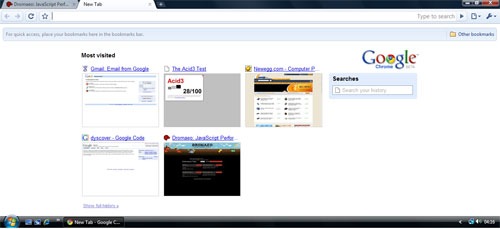
Finally the downloader finished and I was ready to surf on Google Chrome. First thing you’ll notice that it occupies nearly all available screen space. No menubar with File, Edit and the like!! And there is the Opera like UI with SpeedDial for most visited websites and Search History. Also the Address Bar is pretty efficient with all the quick searching and intelligent suggestions.

chrome-speedial

I was expecting Chrome to be memory hog, but it really is pretty light on the memory usage. With less than 10 tabs open, it surely uses less memory than Opera, Safari and surely Firefox. As the tabs increase Chrome seems to take up as much memory as other browsers. The Browser TaskManager, which can be found when you right click on the open Taskbar or TitleBar is another very useful addition to the browser. But what’s interesting to note that with so many security and stability improvements like separate processes and JavaScript sandbox, Chrome has done an excellent job at keeping the memory usage low. May be if addons are introduced, it’ll screw Chrome as well, but for now it’s doing good!!

Google_Chrome

There aren’t many things to be set in the Options that other browsers don’t have, but the search management was interesting. Since, I am from India, it showed me the popular Indian search engines. Yahoo India, MSN India, Rediff, Guruji were the available search engines and that was interesting because it’s always efficient to have a localized search.

This in my opinion is the most important part for a web browser. Like a phone should be best at voice transmission and quality, a browser should be best at displaying websites accurately and swiftly. Chrome uses Webkit (aka Apple Safari’s Engine) for rendering web pages and I wasn’t expecting many differences from Safari. But I found a few changes between the released version of Safari and Chrome. May be Chrome uses a newer version or something. Chrome scores 76/100 on the ACID3 Web Standards test which isn’t really bad, but I was still expecting 100% as Webkit and Opera have already reached 100% in their development products.

JavaScript performance is super fast. You can look at the benchmarks here. The team from Denmark has done an awesome job and Chrome's JavaScript performance is the best among all the browsers.

I'll write more about it later... but you can read what other people at GigaOm, TechCrunch, TheInq and Gizmodo are saying. Its all over the web and no kidding Google OS is really here to stay!!

Wednesday, August 13, 2008

Netbeans 6.5 Beta Released

Netbeans, “the only IDE that you need” is undergoing a major overhaul and the new version is called Netbeans 6.5. Today after weeks of development and testing, Netbeans passed a few test criteria and has been decided to be stable enough by the Netbeans team to be called a Beta. Now begins the real stabilizing process and ironing out the bugs that remain.

netbeans6.5

Since, I’ve been doing the Netbeans Community Acceptance Testing (NETCAT 6.5) Program, I’ve been closely watching how the entire development has gone through. New features were quickly implemented and each development team co-ordinated with all the quality managers and community to get the best features out in this version. Congratulations to the Netbeans development team on the release and I’m sure a lot of other developers are excited to use the new features.

The following are some noteworthy features, and the complete list can be found here:

1.) PHP – Php support has vastly improved and will ship out-of-the-box with Netbeans, unlike previously where a plugin from the plugin center had to be installed.

2.) Database Tools – The new database tools for designing queries, viewing connections, tables, views, procedures is great. It still a work in progress, but I must say its a pretty good job for a first-time release.

3.) Glassfish v3 has been integrated with Netbeans 6.5 and Glasshfish v3 is surely more sleeker, faster and modular than v2.

4.) There are host of other improvements like Groovy and Grails, SQL Editor Improvements (code completion, save/recall queries, and more), RESTful web services from database tables or from JPA entities, JavaScript debugging on Firefox 2 and IE.

You can download the beta from here and please report any errors that prop up in your work. Enjoy the build and happy coding!!