Showing posts with label Linux. Show all posts

Wednesday, March 6, 2013

You Aint Virtualized Till You’ve Used Archipel

I’ve setup a few virtualized environments starting from the good old Xen in 2004. Good web-based, remote management of the VMs has been a sore point for me, since you needed to have some Gtk or Qt app to do all the VM management stuff. Not that the desktop virtual machine management isn’t robust, but its just that when you are travelling and you just want to restart the VM quickly, a web interface does the work quickly.

Another thing about VM management is being able to look at resources in real-time use. There are people out there who love the command-line stuff, but I like a GUI for real-time resource management. Are there too many simultaneous users, high-latency requests, reporting occupying too much CPU? So SSH into a server through the command-line just doesn’t cut it for me.

I recently discovered the Archipel project, when trying to setup a virtualized environment for an NGO without system admin, who don’t need to know qemu, libvirt etc. The goal is that in a few clicks you’d have a virtual machine ready to be used. Another click to restart a VM. Another click to clone an existing VM. Increase or decrease VM memory or CPU cores etc. by moving some sliders. Isn’t that what linode or Amazon EC2 offers you ask?… But I have my own server in a local datacenter, which turns out to be much more ROI-effective and performance effective than those providers in the long-term.

Archipel does all of the above and much more. It is an excellent XMPP-based VM orchestration tool:

Archipel is a solution to manage and supervise virtual machines. No matter if you have a few locally on your computer or thousands through data centers, Archipel is a central solution to manage them all. You can perform all basic virtualization commands and many other things like live migration, VMCasts, packages, etc.

All you have to do is setup eJabberd-based XMPP server, make some configuration like the qemu host and it will find all the VMs from your list. You can even manage multiple hosts with multiple VMs from one eJabberd server. That’s not all. Most of the commands are like chatting to a bot and then it runs commands on libvirt. How cool is that?!? Being able to chat with your Hypervisor!!

On the client-side, you have to install a set of webpages on Apache and this can be on the same host as eJabberd or separate. The pages on this client-side app uses websockets or BOSH and has a nice looking UI. This allows real-time view of the virtual machines and the hosts. I also some the built-in VNC client that uses only JavaScript. So you do not have to install any client on the local machine. It all runs from the web browser. There is some lag, but if you’ve got a good machine and a browser with good internet connection, it works quite well.

There are some bugs in the client app that keep showing up, but all in all this is an excellent system. Virtual machine management cannot be easier than this… This is indeed the future of virtual machine orchestration.

Wednesday, August 4, 2010

Fixing Wireless in OpenSuSE 11.3 and Dell Studio Laptops

The new and shiny OpenSuSE 11.3 was released on 15th July, 2010 and I was eagerly waiting because it promised to give a preview of the GNOME 3.0 and LXDE desktops on the DVD. As with my forgetful self, I forgot about the release, until now when I had to create an openSuse based appliance (but this one is long story for another day)… Nevertheless, I downloaded the DVD image yesterday and was ready to install it.

After the installation like I always do with the Dell Laptops (which have the Broadcom wifi chipset), go and download the Broadcom proprietary ‘wl’ drivers from packman repo. But this time, the 1-click install button didn’t work and gave some error message. Nevermind, I got the rpm and installed it. Rebooted the machine, but couldn’t find the wireless on… Odd I wondered and went to YAST and checked what was the issue… I discovered that starting from OpenSuSE 11.3, the ssb module is bundled with the kernel to deal with the Broadcom chipsets, but then Broadcom changed the hardware address and hence the driver doesn’t work correctly. Also because there are two options (wl and ssb), I couldn’t get the wireless automatically working after installing the ‘wl’ like it otherwise does.

Thus, I realized that ssb and its dependencies need to be blacklisted and only then wl will be the only one available in the kernel and things will work well… Thus, the following steps need to be followed:

1.) create a file 50-Broadcom-wl-blacklist.conf, if it does not exist with the following content:

blacklist bcm43xx
blacklist ssb
blacklist b43
blacklist ndiswrapper

2.) install the Broadcom-wl, if you haven’t already installed. Download it from the above linked packman repo. If you had already installed it, then do the following:

rmmod bcm43xx
rmmod b43
rmmod ssb
insmod wl

3.) reboot

This should only load wl into the kernel and should show the wireless in the network manager or ifup, whichever you may want to use.

Wednesday, April 28, 2010

Headphone in Linux on Dell laptop

The newer alsa sound in Linux kernel has an issue with the headphone jack... Most distributions have issues with the newer Dell, Asus and other laptops which have the Intel 5 series or H55, P55 etc chipsets. These use the IDT codecs and work well on the normal laptop speakers.

I got a Dell 1749 recently and had issues with alsa configuration which resulted in no sound from the headphone. The same problem with other dell studio and XPS laptops that are using that chipset. Adding model=dell-m6 in the /etc/modprobe.d/sound (or /etc/modprobe.d/50-sound.conf in opensuse 11.2) will solve the issue.

Friday, January 29, 2010

High-Res Dock Icons from Netbeans

I often use Netbeans and hence want that on my desktop. This time when I dragged to the desktop, it looked a bit out of touch... Edgy icon didn't look to good for  my favorite IDE. Luckily I knew Netbeans ships an icns file for the OSX.

The icns (Apple icon format) - as wiki states "supports icons of 16×16, 32×32, 48×48, 128×128, 256×256 and 512×512 pixels, with both 1- and 8-bit alpha channels and multiple image states (example: open and closed folders). The fixed-size icons can be scaled by the operating system and displayed at any intermediate size"

So, I go ahead and install "icnsutils" which gives me the nifty tool icns2png. Then I run the tool:
icns2png -x -s 128 -d 32 netbeans.icns
...and get a nice 128x128 32-bit png file. This I use as the icon for the launcher or use it at the dock.

Linux Mint 8 is Perfect for me

Over the last 12 yrs that I've been using Linux never has a distribution impressed me this good. I keep experimenting with distributions when they are released. From Mandrake to Mandriva, Redhat to Fedora, SuSE to openSUSE and even Debian to Ubuntu... I thought I had seen it all. All the time I kept coming back to SuSE, but this time it seems different. I tried Linux Mint and I guess I will be sticking to it for long.

Over these years, everytime I've felt something is missing and I will need some bloody configuration to make something work, but Linux mint is one distribution which suites me perfectly. It has video/audio codecs, flash, Java out-of-the box. Nice looking fonts, simple installation, everything I would want to have from an OS. Photoshop was available through the Wine Doors. All the devices worked, volumes were perfect, performance was good...

I needed Cheese... Click on menu, in filter i write cheese... it shows install cheese, I click and enter password... cheese installed and I click the photo!! Perfect...

Wednesday, July 16, 2008

Linus Thinks “OpenBSD crowd is a bunch of masturbating monkeys”

If you’ve had some pain fixing a Windows issue, I’m sure you’ve heard of the word “Linux” from one of the other “geeks” that visit around forums, helpinglinux_logo people out. Linus Trovalds was the person who started the Linux operating system project and owns the copyright to the name, “Linux”. Recently when discussing a security issue in the Linux kernel, Linus did some disrespectful “name-calling” in a public readable mailing list.

The following is an excerpt from the mail:

Security people are often the black-and-white kind of people that I can't stand. I think the OpenBSD crowd is a bunch of masturbating monkeys, in that they make such a big deal about concentrating on security to the point where they pretty much admit that nothing else matters to them.

Linus is known to be a little outspoken and as a person who can be little rude at times, but when you treat other competitive developers with so much disrespect, it obviously means there is something wrong with him or his team. Linus invented the Linux OS, but today there are lots of other developers who are working hard towards improving Linux. The other developers do all the hardwork these days and Linus just supervises and controls which patches are to be applied to the kernel and what direction the Linux kernel should follow.

Look at the backdrop of events happening at Linux and OpenBSD, you’ll realize why Linus is a little upset with OpenBSD/BSD in general. The last release of FreeBSD v7.0, which is based on OpenBSD’s trunk4 and is a spectacular release with performance better than Linux on most grounds. Also, a lot of other Linux developers are in constant debate with Linus on what direction Linux should take. Someday its about the schedular or one day its about the security. There is some unrest in the Linux community, which feels the desktop neglect in terms of efforts in the kernel.

You can read his insane reply here and the whole discussion here.

But whatever the problem, such harsh words are completely unacceptable from the leader of such a big community of developers and users. Linus definitely needs some spiritual counselling to heal his internal turmoil.

Thursday, July 3, 2008

Xandros Acquires Linspire

Xandros, the maker of windows-like Linux, today announced that it has acquired another windows-like Linux called Linspire. Xandros has got a bit of popularity lately from a few OEM deals and that has made it expand its coffers a bit. The main goal of acquiring Linspire is the software installing and distribution system called “Click-And-Run”, which allows installing software from a online repository with a single-click

Linspire was probably one of the first Linux distribution to openly claim that it wanted to be like Windows. It was earlier called Lindows and then due to some Microsoft lawsuit got its name changed to Linspire. But even a name change didn’t inspire a lot of linux geeks and the audience for Linspire remains small till date.

Click-And-Run (CnR) though is one really nice innovation from Linspire. It inspired the openSuSE guys to develop something similar called “1-Click Install”, which is one of my favorite features in openSuSE 11.0.

Monday, June 23, 2008

Review: openSuSE 11.0

On the 19th of June 2008, openSuSE 11.0 was released and I was very excited about the new release because my experience with openSuSE 10.3 has been very good and I have been following the development of openSuSE 11.0 closely. In the meantime, I have tried Ubuntu 8.04, Kubuntu, Fedora 9, openSolaris 2008.05, but somehow I’ve been coming back to openSuSE 10.3 because of some or the other nagging problem with the other distros...

Download

I downloaded openSuSE 11.0 the moment it was released and I have to say that the release was very professionally co-ordinated. There were launch events all around the globe where people received their openSUSE 11.0 DVDs and with the counter running all the time, everyone knew when to get their download managers ready. The mirrors were fast and the torrents seemed to have enough seeders. I finished the 4.3GB DVD iso by 20th morning (IST) in just about 4hrs time. There is also a single Live CD KDE iso, GNOME iso as well as a MiniCD (71 MB) for Network installation...

Installation: Image-based Deployment and Sleek

The openSuSE site has a nice installation guide with screenshots and it doesn’t make sense for me to go through the same thing again. But two things are special in openSuSE 11.0 that are worth mention. The first is that they have a gorgeous installation GUI, the best looking installation for any operating system ever!! Its easy to install and intuitive. The second the use of image deployment for the installation of GNOME. This really speeds up the installation if you are just using the basic GNOME-based setup. I generally prefer KDE, but for the test I installed the GNOME and it was fast... really really fast! I was shown the GNOME desktop with all the preferred software installed in straight 15 minutes. That’s faster than any other distro that I’ve ever installed. It was an amazing experience to see such a fast installation!

SuSE11-ImageDeploy

Like previous version, openSuSE 11.0 comes with a variety of useful non-opensource software like flashplayer, java 1.6.0_u6, fonts, Adobe reader 8, etc. Along with these I also installed Jdk6 update 10 (the awesome new Java Plugin), Mono, Netbeans 6.1, GlassFish for my OpenMRS performance test... KDE 4.0 is also there as a separate choice of GUI when installing along with KDE 3.5.9, GNOME 2.22. Since I have never been able to stably run KDE 4.0 and have always switched back to KDE 3.5, I thought I’d try KDE 4.0 in openSUSE 11.0

SuSE11-KDE4

I was pleasantly surprised that KDE 4.0 “just worked”. I had my first KDE 4.0 crash after 1.5 hrs of use whereas earlier it was before 20 min that the SigEnv or Segmentation Fault would throw up. I still didn’t want any crashes and hence I’m back to using KDE 3.5.9. But KDE 4 is really coming good!

As soon as I finished installing, everyone at home wanted me to record the Euro 2008 matches and soon I needed VLC to be installed. I went to videolan.org/vlc and clicked on the SuSE link... and I was greeted with a 1-Click Install button.

SuSE11-VLC-1Click

This was one of the really awesome openSUSE things that was first brought in openSUSE 10.3 and has been improved in openSuSE 11.0. I clicked on it and the installation was finished really quickly.

Improved Installation with YaST

That’s when I realized the most important update to openSuSE 11.0 which is the improved speed of YaST. No other distro has such an easy administration tool where nearly everything can be administered. And in openSuSE 11.0 everything in the YaST module just works. RPM installation is fast and adding community repositories is easy. I am a big fan of apt-get in Ubuntu, but openSUSE 11.0 software installation is just as easy now...

SuSE11-CommunityRepo2 SuSE11-CommunityRepo1

Every piece of hardware worked

I have lots of hardware, old and new on which I often install and test different distros, Windows, OSx86 etc. openSuSE worked with every bit of hardware that was thrown at it out of the box. Every distro struggled with the UMTS 3G card on a laptop, but surprisingly openSuSE 11.0 made it work. Few other distros had trouble with the legacy Nvidia Quadro GoGL card on another laptop, but openSuSE 11.0 worked... Old printers, USB devices, Firewire everything worked. Even the Barcode Reader with PS2-USB converter worked on the USB port which wouldn’t work on Ubuntu 8.04 or other newer distros.

The only change was that on my desktop Intel DG965RY board the surround sound wasn’t working. I followed the Audio Troubleshooting doc, added the model=dell-3stack and all my speakers started trumpeting!

Compiz-Fusion and the Bling

Last time I was not happy with the stability of Compiz-Fusion on openSuSE 10.3. For Ubuntu 8.04, Compiz-Fusion worked well and so I knew it was something to do with the new kernel module driver on my system. With openSuSE 11.0, Compiz-Fusion works perfectly and is able to show all its features. A nice little configuration screen helps manage the amount of effects that you wish to enable. I personally don’t enable effects, but its a good show-off to make people standup and appreciate open-source beauty.

SuSE11-Compiz SuSE11-Sphere

Other features and improvements

  • Linux kernel 2.6.25
  • glibc 2.8
  • GCC 4.3
  • 200 other new features

Conclusion

You can’t miss the ease of use and the sleek looks that openSuSE 11.0 brings to the desktop. Its the perfect distro for a new user coming to linux. For the old pros, openSUSE 11.0 is fast and brings in ease of administration and software installation. Novell support is pretty good for big organizations that can buy a boxed product from them. Xen is my favorite for virtualization and it has good integration and management in YaST. But the strength and momentum of openSUSE is definitely in the desktop space. Earlier, openSuSE lacked the community backing that Ubuntu has generated in a short timespan, but with new initiatives and better responses at openSuSE forums, the openSuSE community and grown leaps and bounds. openSuSE 11.0 has grown from strength to strength and is one of the best ways to give competition to Windows on the desktop!

Other screenshots

gnome-desktop The GNOME Desktop KDE-desktop The KDE Desktop
Cube-atlantis Compiz-Fusion Cube Atlantis Plugin Animation-burn Compiz-Fusion Burn Animation

Thursday, February 28, 2008

FreeBSD 7.0 Released. 15% better than Linux

The world knows quite a lot about Linux, but before Linux there was a branch from AT&T Unix called the Berkeley Software Distribution (BSD). After a lot of bsd changes to the code, we have something which is completely free and its called the FreeBSD. Unlike Unix which is proprietary FreeBSD is free in terms of money as well as source-code.

Today, the FreeBSD team announced the availability of version 7.0. It is the stable build of the kernel and contains a host of improvements in performance, security and has a lot of bug fixes. According to the release notes, the performance in multiprocessor systems has increased dramatically and when compared to Linux performs about 15% better. This means that compared to previous versions of FreeBSD, the performance is even greater since Linux performed better than FreeBSD previously.

Scheduler, Filesystem and Networking have all been improved in this release. You can download from FTP here or through Bittorrent here.


For a complete list of new features and known problems, please see the online release notes and errata list, available at:

http://www.FreeBSD.org/releases/7.0R/relnotes.html
http://www.FreeBSD.org/releases/7.0R/errata.html

Thursday, November 8, 2007

Why Did RedHat Choose OpenJDK ?

RedHat just got itself into the openJDK community and this is apparently big news. Even Jonathan Schwartz, thinks its a momentum for Java!! I'm sure most of you remember the open letters that were written to Sun to make Java open source... OpenJDK was Sun's response to those letters. But all this is history... RedHat's promise has just taken its first step to contribute openly to Java...

But just integrating openJDK with its distribution is not going to help Java... not that Linux never had JRE (Java Runtime Environment). Every DVD distribution with had non-OSS software included jre or anyone could download it from Sun's website.

So what's RedHat going to do with an openJDK?? Firstly, it will be able to test compatibility with Sun's JDK 6 and make sure Java remains "Write Once Run Anywhere"... Only time will tell if it remains this way with the other JDKs

Secondly openJDK does not have classes that are Sun proprietary. RedHat will contribute open-source variants of these classes... I'm wondering how much time will it take to reinvent the wheel ;-)

Thirdly, it had to do it since it was one of those that pressurized Sun to open source Java. I'm wondering why it took RedHat so much time to join the openJDK community if it had it in mind since long!!

All those explanations do not make much sense to me... Sun was already doing very good with all the work in keeping Java version-compatible and language changes didn't have steep learning curves. Any answers from you guys why RedHat's joined openJDK??

Friday, October 19, 2007

Windows Programs Sometimes Run Faster On Linux Than XP

A popular myth among old linux users is that they need to dual-boot because their fav windows program does not work in Linux. I tell them, there's wine and cadega and they tell me the performance of these are slower than Windows... and this post is to break this myth!!

Recently, after my openSuSE 10.3 review, I asked a friend to start using Linux instead of Windows. And the old debate again came up. I opened a rar file using WinRar using Wine and even to my surprise, the file opened 5 secs faster in Linux than Windows XP (a 700Mb file ==> Windows XP took 46secs and Wine on openSuSE took 41secs)... I didnt really expect that much of a difference, but it actually did and I was pleasantly surprised. I tried another 1Gb file and there was a 6sec difference... Your results may vary, but it does say something... Doesn't it??

Not that every windows program works faster in Linux using Wine, but atleast some do. People who dont play games, can really be happy with the performance that Wine gives on Windows programs.

I found these benchmark on Wine's site. I haven't tried all those programs, but then there may be some truth to it. I'll also try the comparison on Vista and analyze the results. Don't believe me or the wine's benchmarks blindly, you'll be pleasantly amazed...

Thursday, October 18, 2007

Ubuntu's 3rd Birthday & 7 Reasons To Fame

Ubuntu 7.10 was released 2 days back. I have used Ubuntu since the first version and have always loved working on it. According to most online surveys on Linux, Ubuntu is the most popular Linux distribution. I don't completely rely on distrowatch's popularity list, but then it's a good indication of what Linux people are using when they visit distrowatch.

3 Happy Ubuntu Years

Ubuntu's first release was on 20th October 2004. Tomorrow will be Ubuntu's 3rd Birthday. Anyone who has heard Linux, knows the popularity that Ubuntu gained in a very short period of just 3 years. When it started, I remember Ubuntu to be just a fork from the Debian Team. The first released really didn't make me believe it'll be as big as it's today. But after the 2nd released and the publicity effort that was put into it, I knew it'll be the big distro in the coming years. Read about "The Ubuntu Story" for more.

We analyze a few reasons to the success of Ubuntu and think about what lies in the future for Ubuntu and open-source!!

7 Reasons For Ubuntu's Sucess

1.) Publicity: I attribute the biggest reasons for the success of Ubuntu to be it's marketing and well publicized effort. Not that Ubuntu is a good product. But even good quality stuff requires marketing, so that it atleast reaches the consumer's eye. Ubuntu's developer team as well as Mark Shuttleworth have done considerable amount of work to tell everyone about Ubuntu. Mark's money and effort has to be acknowledged in all this fame for Ubuntu.

2.) Philosophy: Ubuntu as a name is as much a philosophy as is open-source and freedom. Read here, about the interpretation of Ubuntu. The philosophy of helping the other person and the community is another very important reason for the sucess of Ubuntu. Ubuntu's philosophy is summarized in the 3 points from their own site:
  1. Every computer user should have the freedom to download, run, copy, distribute, study, share, change and improve their software for any purpose, without paying licensing fees.

  2. Every computer user should be able to use their software in the language of their choice.

  3. Every computer user should be given every opportunity to use software, even if they work under a disability.
3.) Free of cost: Another lame, but true explanation for the success of Ubuntu is it's free... and free here means you don't pay money!! You can easily think of all Linux's being free, but then we have had distros which require you to pay money. Some charge for support, some for software installation, some for the packaging. Ubuntu also has commercial support, but a strong community means you have a lot of people who want to help you solve the issues for free!!

4.) Ship It: Another important reason for the success of Ubuntu is that they ship CDs to you free of cost, anywhere around the world. Yeah, most people download it, but for the branding and logo stamped on the CD, a lot of people want it shipped. These CDs not only are good show-offs, but also are another form of publicity for Ubuntu. People who don't know the Linux world or Ubuntu, get curious when they find a CD with the nice Ubuntu logo and some nice guys/gals in a round formation... ;-)

5.) Synaptic (Apt): For people who thought Linux was tough and software installation was a pain, please use apt-get!! Installing software off the net was never so simple and apt-get is synonymous with installing anything on Ubuntu. It does all the dependency scanning and gets the packages installed on your computer. Fedora has yum, openSuSE has yast+online repositories, but there's something about apt that it requires lesser steps to install a package.

6.) Debian based: Not the most important reason, as there are host of other debain-based distros, but then being debian-based has its advantage for Ubuntu. Lot of packages are already available for debian and debain developers quite an experienced bunch of geeks.

7.) User community: The user community for Ubuntu is the strongest and it has been the case from the very beginning of the project. Somehow every Ubuntu user has spread the word of mouth and helped make Ubuntu popular. No other community of a Linux distro is as tightly-knit as Ubuntu and believe me I have seen a lot of community-driven projects over the years.

Future of Ubuntu & Open-Source Software (OSS)

For success, some luck and external factors do play an important role. Ubuntu's success is also somewhat dependent on these. Novell sponsors openSuSE while RedHat sponsors Fedora. Both have their tie-ups with proprietary software makers. Some OSS evangelist's do not approve of such relationships and thus love Ubuntu more than others.

Normally, the Ubuntu distro is released twice every year. In 2006, Ubuntu also started something called Long Term Support (LTS), which is released every 18 months. These versions are considered to be more suitable for large corporations that do not upgrade very often and require long-term support for an OS. The next LTS will be 8.04 released in April 2008.

Ubuntu is special example of OSS, because it's got popular quickly. Along with Firefox, it is probably the best success story of desktop OSS. For the future success of OSS, its important that projects like these become a success. There is quite a lot of work to be done, but Ubuntu's just started the engine... and there is a long road to success...

Wednesday, October 10, 2007

New Linux Kernel v2.6.23 Released

I got an email just now from a colleague that, the new Linux kernel v2.6.23 was released today. This released was greatly delayed due to a lot of bugfixing and some noise regarding the process schedular.

For those who haven't followed the story read here, about the CFS Vs SD. Linus finally chose to integrate CFS and this is the first major release of the kernel with the CFS process schedular.

The ChangeLog at linux.org, will be able to give you complete details of a lot of improvements in this kernel. If the changeLog seems a little complex, the summary can be read here at Kernelnewbies. We expect this kernel to be rolled into major distros in the coming months!!


This is a group photo from the Kernel Summit 2007 at Cambridge U.K. (courtesy: LWN.net) Was trying to lookup for a friend there, couldn't find him!!

Update: The guys at Phoronix.com have done some preliminary benchmarks on the new kernel and it doesn't show as much performance. Its truly preliminary, so take it with a pinch of salt!!

Tuesday, October 9, 2007

Review: openSuSE 10.3

For the last 10+ yrs, I have spent quite a lot of my PC experience on SuSE beginning with v4.2.
openSuse 10.3 was released 4th Oct, 2007. A lot has improved over the years and I've seen how SuSE has improved with every new version. My last linux installation & review was Shift Linux 0.5 RC2 some days back and I was eagerly waiting for openSuSE 10.3 to be released. I have been following the development of v10.3 and installed a few milestones builds on the way to the final release.

What's New
There are a plethora of improvements in openSuSE 10.3. I wouldn't go through all the changes, since the link explains everything. But I wouldn't mind mentioning my special favorites in this version. 1-Click Install, Official Repository List, Improvements in YAST, Compiz-Fusion, KDE4 Games... These are some of my favorite enhancements in openSuSE 10.3.

Installation
Over the years, Linux installation has simplified and become user-friendly. SuSE was probably the pioneers in simple, intuitive GUI installation through a tool called YAST. It's my favorite system administration and configuration tool among all distros. In openSuSE 10.3, YAST has some interesting improvements. Its faster and better integrated. One example of this is, when you right-click on an rpm in konquerer's file browsing, you'll see an install option. This will call yast and install the package.

I downloaded the i386 DVD version from Bittorrent. openSuSE 10.3 is also available in CD versions of KDE and GNOME. Burned the DVD and booted. And yes, I was happy to see the "Green Welcome Screen" (see below). The green of the chameleon is back and it looks great! Then, it asks me to choose if I wish to boot from HDD or Install. I selected "installation" and the linux kernel loaded and the installation started. Other than the openSuSE branding, the loading process is the same like other distros, with a loading process happening the background of a graphical screen (image 2, below) (click on the images to see a larger version)


The Green Welcome
Boot Selector
Linux Loading
Language Selection
After, the loading completes, YAST starts up the installation. YAST shows a language selection screen and contains Bengali, Gujrati, Hindi, Marathi, Sindhi, Tamil among the Indian Languages. This should be helpful for the uptake of Linux in India, since the recently passed an order in India makes it mandatory to use free-software in schools. The next few screens ask for installation type and desktop environment.

I like KDE and hence installed it as my default environment. You can check the screenshot below which shows the default packages that are installed. openSuSE 10.3 installs a few non-opensource stuff like flash player, agfa-fonts, jdk 1.5.0, jdk-plugin in the default and asks the user for agreeing to some license agreement. The default installation size is 2.2GB, not too much, not too small!! Expert Settings tab on this screen allowed me to change grub bootloader settings. People will multi-boot can change the default from openSuse to anything else.

It also shows -
Processor: 2x Intel(R) Core(TM)2 CPU 6300 @ 2.13Ghz &
Main Memory: 512 MB


Default Packages
OS Starting
openSuSE 10.3 Desktop
openSuSE AutoUpdater Applet
The file-copying process starts and takes about 20min to complete on my system. In the meantime I read the release notes. The following are from the release notes:


==> By default, the new YaST gtk front-end runs on the GNOME desktop, and the YaST qt front-end on all the other desktops.

==> GNOME 2 is installed under the /usr file system hierarchy since openSUSE 10 3 and KDE 4 now follows KDE 3 will stay in /opt for compatibly reasons


The desktop looks neat and clean. The Beagle Search, Clipper and AutoUpdater Applet and placed in the tray icons at startup. Every piece of hardware from my system was detected including webcam, HP Printer, USB Cable Modem, Wireless Router...

The AutoUpdater Applet is an interesting addition to openSuSE 10.3 and is extremely useful for quick updating and bug fixes. It uses YAST's modules (which inturn uses zypper) in the background and works pretty good, checking from openSuSE's official update repository. It downloaded 12 updates, including security and package updates and installed it, without me having to worry about anything...

1-Click Install: 1-Click Install is an extremely useful feature included in openSuSE 10.3. Completely rocking... and is the need of the hour for success of linux on the desktop. apt-get is easy, but then this is even better. I installed the Compiz Fusion through the 1-Click Install link provided on openSuSE website. Clicking on links for 1-Click Install opens a .ymp file and the associated application is called "YAST Meta Package Handler". In reality, it required 3 clicks, but one was "Next" and other was a security warning. Both good things, right?? I think Linspire tried something similar, but openSuse's technique looks slick and is FREE!! Great work Benjamin Weber and other devs!!


1-Click Install
Compiz 3D-Cube
Compiz-Fusion Burn Animation
Compiz-Fusion Explode Animation
openSUSE 10.3 contains the latest Compiz 0.5.4 installed by default and Compiz Fusion (Compiz + Beryl) is available in the official online repository. Like I said, I installed it in 1-Click. The default installation of Compiz means that a lot of people don't have to bang their heads with the download and installation. I'm not a fan of 3D effects on desktop, since I dont see much productivity gains. But for those who love it, just a single command (gnome-xgl-switch --enable-xgl) activates Compiz, and a restart later, we are ready to play with the 3D Cube etc...!! Few other screenshots of Compiz Fusion and different animations and effects are above. The Cube also does bounce and do a lot other stuff. Check here. But I found Compiz-Fusion to be a little slower. May be the System RAM was low, but then I didn't expect it throw segmentation faults on KDE.

KDE 4 Preview
openSuSE 10.3 DVD includes a preview of KDE4 which is still under heavy development. Its unstable and hence is an optional install. By default, openSuSE 10.3 comes with games from KDE4. The games have interesting look and feel and has great graphics for arcade and board games. Check the screenshot below.


KDE4 Games
Buggy KDE4 Desktop
OpenOffice 2.3.0
Improved YAST
The KDE4 I downloaded off the SVN was unstable and after 2 downloads, I wasnt able to see the desktop manager correctly (check the screenshot above). It didnt show the icons correctly, not was I able to load Oxygen. Some problem with Oxygen's installation I guess...

Conclusion:
After watching openSuSE 10.3 from its early days in development, I think the developers at openSuSE have done a great job. After the review finished I was sure that for a newcomer to the linux world openSuSE 10.3 is the best place to be. With Autoupdater, 1-Click Install, Easy Repository Management, Easy Software & System Administration, you can not go wrong with openSuSE 10.3. So does it mean it's perfect?? No, still a lot has to be done in terms of Compiz-Fusion performance and stability. Sometimes my system slowed down with Compiz-Fusion running. Other times KDE threw a Sig Fault when Compiz-Fusion started. KDE4 needs to be fixed. It has promised quite a lot of features and hopefully it doesn't become a burden on stability.

All In All, openSuSE 10.3 is highly recommended and is among the best distros released this year!

Saturday, September 29, 2007

Review: Shift Linux 0.5 - Neowin's Linux

I've been a linux user for 10+ years and have contributed a lot of code and bug reports to different distros (distributions) over time. Just lately, I heard about a new distro over at Neowin.net called ShiftLinux. It is a community effort from Neowin users to create a Linux distribution... And as soon as I heard, I wondered why another distribution? But soon realized, more people coming to the Linux world, would mean a better future for Linux.

From the Shift Linux website:
Neowin's Shift Linux is designed to give the user an experience of being part of the Neowin community as well as having a simple, easy-to-use Live CD that can be installed to your hard drive, if you enjoy the way our distribution works. Shift is a free, GPL-based Linux distribution that can be freely distributed or modified. There are no restrictions with Shift.
Shift Linux 0.5 (RC-2) includes three fully branded versions: KDE, Gnome, and Flux, all Live CDs. Included in this version are most of the most popular packages to include wireless support and a desktop installer. In addition, we have newly created packages such as:


  1. k3b (All Versions)
  2. Rhythmbox (All versions)
  3. Bluetooth Support (All versions)
  4. HP Printer Drivers (All versions)
  5. Power management and laptop detection (All versions)
  6. NTFS Read/Write support (All versions)
  7. Envy (All versions)
  8. New branding!
  9. Extremely fast...You'll forget it's a CD in 5 minutes.

Based on Morphix Linux, Shift is Debian based and I decided to try the latest ShiftLinux 0.5 RC2. Most stuff are going to be the same between this one and 0.5 Final to be released on 10th Nov,2007. I prefer to use KDE, and hence got the KDE version. The distro can be downloaded from Neowin's server or via Bittorrent. I used Bittorrent to download but to my dissapointment, found only 2 seeds. I was expecting a few more seeds (it's a yr old, so may be the initial excitement is over). But the download was pretty fast.

List of apps that non-KDE:
  1. Office: Gnumeric Spreadsheet, AbiWord Word Processor
  2. Multimedia: Audacity, Rhythmbox, VLC Player, XMMS, Xine
  3. Internet: Gaim Messenger, Icedove, Iceweasel, XChat
  4. Graphics: GIMP, Kooka Scan & OCR, XSane, xpdf
  5. Others: Python 2.4, Synaptic, Apt. For people with graphic cards, ShiftLinux uses Ubuntu's Envy Script for ATI and nVidia Graphics Driver.
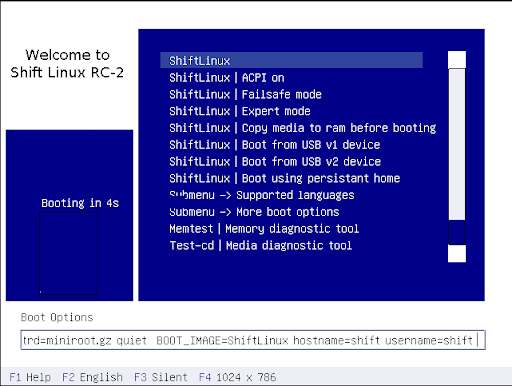
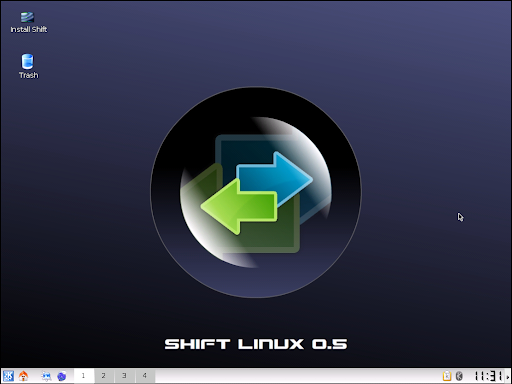
Burned a CD and booted... Here is what the branding looks like (click on the images to see a larger version)


Shift Linux's Boot ScreenShift Linux Desktop
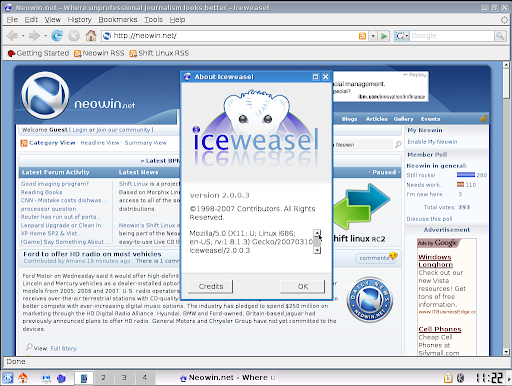
It boots to a nice looking screen and a ShiftLinux wallpaper. May be some info on those "2 arrows" from the logo would have been great since we aren't very familiar with this distro!! ShiftLinux uses a truly free, Firefox modified, IceWeasel browser. Uses Icedove as the mail client. Thus, ShiftLinux truly adheres to the "completely free" ideology of Debian!!


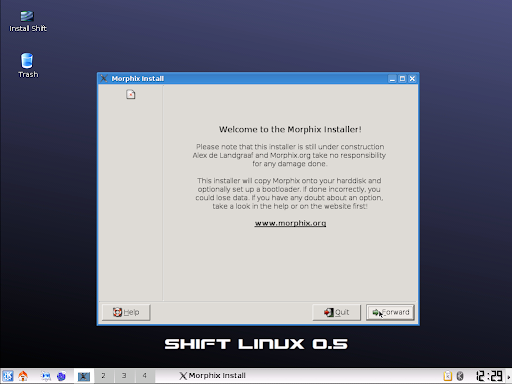
Shift Linux's BrowserShift Linux's HDD Installer
The LiveCD for ShiftLinux is excellent. Its Fast, Light & Zippy, Good Looking. Its quite fast and really doesn't feel like a LiveCD when running. Internet connection was working fine and so was my HP printer. But it seems so much like Morphix and I couldn't stop asking myself, is it Morphix-2 or ShiftLinux. The developers from Neowin have really not changed much...

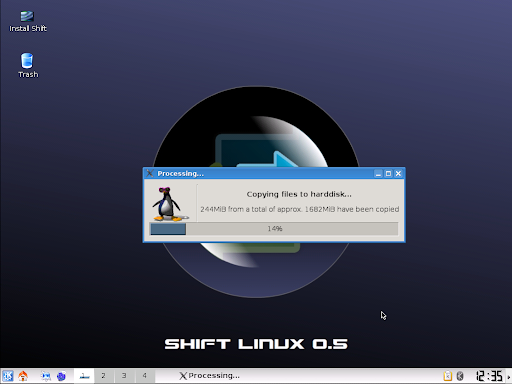
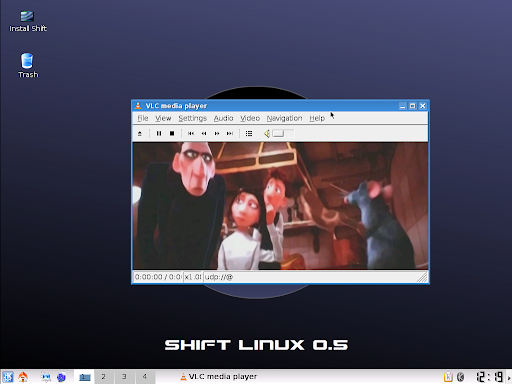
Below you can see, streaming from another machine to VLC, running from ShiftLinux LiveCD... it was smooth, not a single stutter!! Happy with the LiveCD's performance, I thought to try the HDD install. There is a nice shortcut on the desktop and is simple for even newbies. Not much configuration to do other than the partitioner GUI. 1682Mb total on HDD. After the copying is completed, I created user accounts which was Step 6. But after that, it wouldn't show step 7 and the installer closes on its own. Tried booting from the HDD, but nothing happens. The HDD install needs some more work... ShiftLinux is still under heavy development and needs a lot of work, but the LiveCD rocks!!


Shift Linux's HDD File CopyShift Linux's VLC from Streaming

Conclusion:

Simplicity and a great LiveCD are best points of ShiftLinux. But more than a year later, is it what the developers were expecting? Isn't yet comparable to other distros, but shows promise. May be a DVD-version will be released sometime like other distros. Another question comes to mind, if using a more popular PCLinuxOS would have been better compared to Morphix?

Good Points:
Fast, Easy and Neowin. Community Developed. LiveCD+Installable.
Could be improved: Better branding, Integration, Few Bug Fixes, HDD installer kept crashing, Some more Wallpapers, Themes, Icons related to neowin.

PS: Neowin.net is not a windows-user community like other reviewers have mentioned here. Users on the forum are highly technical, friendly and fun. The users are using Mac, Windows, Linux etc. and come from varied background.