Showing posts with label browser. Show all posts

Thursday, February 14, 2013

Opera to use Webkit engine

Update: Brendan Eich made an interesting post about the fighting the monoculture and the web needs diversity. But I feel Gecko needs to innovate faster to remain useful to the web. Servo is coming too late and platform acceleration is moving slowly. NPAPI/PPAPI is too slow etc. etc.

The news that Opera will be abandoning its Presto engine and moving to Webkit isn’t so much about shock, but is more disappointment for me. I have been a user of Opera for at least a decade now. Although I use Chrome and Firefox for a many things, Opera has remained installed and upgraded because every new release has something innovative in it.

Presto is a nice, lightweight rendering engine, where even with 50+ tabs open, the browser continues to work smooth. Pages scroll fine and they all the tabs open up quickly when you restart the browser. I have a habit of keeping tabs open for pages that I need to go to. Bookmarks don’t just cut it for me. An open tab to me is a reminder of what needs to be done. With Chrome, Firefox or Safari, staying with many tabs is a pain. Crashes are common with those browsers and the system memory usage is somewhat exponential. I don’t know how much of that can be attributed the the layout engine, but Opera does handle it with ease. All Opera users know this and they probably feel a disappointed that future versions of Opera might not be the same.

In some sense everyone agrees to the dominant Webkit position. More so as the world moves to mobile devices, Webkit is the standard layout engine from iPhone, Android to Blackberry. What differentiates the 300 million Opera users to continue using it will be interesting to watch. I’m probably not upgrading Opera to the next release, but if I really wanted to use something I’ve grown up with, they say IE10 also grew up!!

Saturday, January 28, 2012

Making Love to Webkit

I just viewed Steven Wittens Acko.net and it is just awesome. You have to click here, to see the amazing stuff done with CSS 3D on the website. Don’t forget to click on the Load Scene, a little down in the post and then using the mouse to drag the scene. Classic Stuff!!

The site has used mrdoob’s JavaScript 3D library that also has some amazing examples to look at. It is very interesting to see how 3D in JavaScript is coming along in Webkit. People have been making Love to Webkit and it all looks so aesthetically pleasing and romantic…

Thursday, January 26, 2012

Why REST with JSONP when you can CORS?

JSONP (JSON with padding) is a hack used by JavaScript developers by wrapping a JSON (JavaScript Object Notation) document within a function call. So, if the JSON document looked like {"givenName":"John", "familyName":"Smith"}, the JSONP for the same would be callback({"givenName":"John", "familyName":"Smith"}) (callback being the commonly used wrapper function). So, if you are familiar with JSONP, you will realize that it is used to make Cross-Domain calls where JSON is not accepted by the browsers if they come from another domain. Thus, AJAX requests across a different domain was not possible through JSON and hence using JSONP was the common hack.

The problem with using JSONP is that it is called as a JavaScript function response and hence CORS-supportyou will not be able to use it as normal HTTP calls. That means you would not be able to send HTTP headers and that can be a problem at many places. There are hacks to deal with the problem, but these are best described as hacks. Another limitation of the JSONP hack was that you could only make GET requests and nothing more. Hence to make a standard, W3C created the CORS (Cross-Origin Resource Sharing) standard which nearly all modern browsers support.

The main issue with using JSON or AJAX (XHR – XMLHttpRequest) across domain was that browsers would not be able to acknowledge if the response was malicious or in response to the request that they made. The same-origin-policy, prevented making cross-domain requests. Then came CORS, a technique by browsers to check the origin policy first and then accept responses. So a server that wants to allow getting any type of HTTP request from another domain would list the domain or * in its HTTP response header as follows:

Access-Control-Allow-Origin: *
Access-Control-Allow-Origin: http://example.com:8080 http://foo.example.com

This means that there is some modification to be done on the server-side resource to add these headers to the response. Another point to note is that it works with XHR requests as well as client errors (4xx) and server errors (5xx).

Excellent examples on how to use CORS can be found at HTML5Rocks. On the server-side of things, you can find resources to enable CORS.

In Tomcat for a Java web application, you can enable CORS using the CORS Filter library. Basically you copy the jar file into Tomcat lib or WEB-INF/lib of your application and then add filters in your application’s web.xml or tomcat’s global conf/web.xml. For a resource which requires Basic Authentication and Cookies can be configured as follows:

<filter>
<filter-name>CORS</filter-name>
    <filter-class>com.thetransactioncompany.cors.CORSFilter</filter-class>
    <init-param>
     <param-name>cors.allowOrigin</param-name>
        <param-value>*</param-value>
    </init-param>
    <init-param>
     <param-name>cors.supportedMethods</param-name>
        <param-value>GET, POST, HEAD, PUT, DELETE</param-value>
    </init-param>
    <init-param>
     <param-name>cors.supportedHeaders</param-name>
        <param-value>Content-Type, Last-Modified</param-value>
    </init-param>
    <init-param>
        <param-name>cors.exposedHeaders</param-name>
        <param-value>Set-Cookie</param-value>
    </init-param>
    <init-param>
        <param-name>cors.supportsCredentials</param-name>
        <param-value>true</param-value>
    </init-param>
</filter>
<filter-mapping>
        <filter-name>CORS</filter-name>
        <servlet-name>MyServlet</servlet-name>
</filter-mapping>

Instructions for Cookies in Safari can be challenge. A nice post to workaround can be found here.

Wednesday, January 25, 2012

Difference between iPad2’s Safari and Desktop Safari

Since we are targeting the Raxa EMR for JSS for Webkit-based browser, it is important that the team understands the subtle differences between the Desktop shipped Safari and the version of Safari shipped for iPad2. The differences with Chrome are quite a few, so I won’t list those here.

Following are some of the differences to remember:

  • No Flash support
  • Safari iPad does not support position:fixed in CSS
  • Safari iPad creates link for 10-digit numbers automatically
  • Safari iPad does not allow scrolling over textareas and iframes
  • Safari iPad has issues with CSS Animations that cause flickering. Use JavaScript animation or hacks in CSS -webkit-backface-visibility:none; and -webkit-perspective:1000;
  • Safari iPad greys the upload button

Things have been improving compared to the first iPad and iPad2 and the differences are minimizing.

Wednesday, August 10, 2011

0-day already out to exploit yesterday’s IE bugs

If it wasn’t already known to Microsoft, I can confirm first hand that today I downloaded and played with available 0-day to exploit Internet seccenter-iconExplorer bugs in the wild. Microsoft has just released the patches to fix these exploits, but I was surprised to see that the exploits are available free for the world to use.

The exploits basically allows remote code execution from a website once visited through Internet Explorer. Once such a malicious page is visited, the hacker is able to take control of the machine and perform administrative operations, including but not limited to adding backdoors, steal information or make hacked computers act as bot to mass attack servers.

I will not disclose where the code is available to play with, but it is surely a warning for all Windows users to update their installation with the patches released yesterday. It is not just about your information, but your computers could be used to launch other attacks,

Details of the patches can be found here and here. Microsoft releases security patches on Tuesdays, but critical patches should be released asap!!

Wednesday, March 9, 2011

WebGL & Hardware Acceleration in Different Browsers

There is a new race these days in the world of web browsers and it is how fast they can render graphics. As more and more people are trying to make web browsers as the rich media client, we see that hardware acceleration in browsers is getting the next point of race among the web browsers. If JavaScript benchmarking wasn’t enough, most new benchmarks these days are looking towards at WebGL (The JavaScript for 3D) and hardware acceleration in browsers.

There aren’t too many games out there yet, that use the WebGL extensions and so I believe this is another race from the browsers that isn’t about better user experience but more to win points in the benchmarks. Nevertheless, since the worst fairing browser IE9 has improved on the performance of WebGL and uses your computer’s graphics card to accelerate graphics in browsers, it is the every alternate browser’s moral responsibility of sorts to give you enhanced performance. This means that every other browser vendor will now tell you to update your graphics drivers, to prevent crashing of your browser and improve performance. While updating graphics drivers is not what the average computer user would do, the browser manufacturers will blame that crash on the graphics driver.

Here are some numbers comparing browsers in simple WebGL benchmark on a Windows 7 with Intel 2.5Ghz i5 and 4GB of RAM:

Browser (version/platform)

Frames per second (higher is better)

Firefox 3.6.15 6 FPS
Opera 11.01 14 FPS
Chrome 10.0.648.127 12 FPS
Firefox 4 Beta 12 60+ FPS

All browsers in the list are released stable versions, other than Firefox 4 which enables hardware acceleration only version 4 of their browser, but is still unreleased. Clearly, Firefox is very fast and possibly the ones who are running ahead in optimizations of WebGL. Nonetheless, other browsers (Opera 11.50, Chrome 11 and IE9) are also competitively close. I wanted to highlight really how fast things can get with some hardware acceleration.

Saturday, March 5, 2011

Apple wants 17+ yrs old only to use Opera

In another of Apple crazy works at the App Store, Apple does not allow users under the age of 17 yrs to download Opera. Opera is the first Operanon-Apple web browser to be made available at the App Store, but with that crazy restriction. Now Opera, just like Safari opens web pages. It actually does it better depending on which benchmark you are looking at.

Opera reacted in the following manner:

“I’m very concerned,” says Standal. “Seventeen is very young, and I am not sure if, at that age, people are ready to use such an application. It’s very fast, you know, and it has a lot of features. I think the download requirement should be at least 18.”

For those under 17, there is a workaround. Just visit www.opera.com and download it. We do not ask for your age or your credit card number. Please, get your parents’ permission before using this browser

Opera does have a sense of humor Smile with tongue out

Friday, September 24, 2010

Prefox: Firefox for the Palm WebOS

One mobile operating system that has not got enough consumer appreciation, but has got critical reviews is WebOS. I’ve played with WebOS in the Palm Pixi and it is indeed the most intuitive mobile platform, in my opinion beating iPhone OS, Android, Windows Mobile and Blackberry OS in terms of pure usability. HP also realized this and bought Palm (and all its assets) earlier this year. What the WebOS lacks, is the rich set of applications that other platforms have and love from the application developers.

To fill an important gap in WebOS, Firefox is in the works to be ported to WebOS platform. The product is under development and is called PreFox. It is based on the source-code of the Mozilla Firefox for Mobile. As developer Dave Townsend states “PreFox requires webOS 1.4.5 and so far has only been tested on a Sprint Palm Pre. It probably works a little better on a Palm Pre Plus but I have no idea whether it would even start on a Palm Pixi.”

Saturday, February 20, 2010

Blackberry to Get a Better Browser.. Finally!

Finally I must say... I am a big Blackberry fan. Emails are really my thing and nothing better than a Blackberry. But there are many times when I want to surf something from that link in the email and it does not work well. Some bad layout, bad javaScript... it sucks! Thankfully now there is some movement to integrate the WebKit engine into the Blackberry browser. Watch this keynote from Mobile World Congress '10:

Blackberry had last year bought Iris browser (a Webkit based mobile browser) company called Torch Mobile... and I was waiting when they would use that asset. Now it seems it will come. How difficult is it to ship a product that you just bought??

Wednesday, June 3, 2009

Opera 10 Beta Released and a “Y2K” Discovery for the Web

Opera

Opera has released a beta version of Opera 10, which promises faster web rendering, more accurate standard compliance (e.g. 100/100 on ACID3), Opera Turbo Browsing, Auto-updates and a hell lot of new features. Opera has been well ahead of the curve in terms of features and implementing new standards and Opera 10 is surely on that path.

Y2K-Like Bug Discovered by Opera

While web browsers are one of the most widely used application for computers, not everyone has reached version 10 of the browser. Opera is currently beta testing v10 of its browser and in this process has discovered that a lot of browser detection scripts for websites have a bug of being able to detect only a single digit version number. Much like the Y2K-bug in applications, these browser detection scripts thus think of Opera 10 as Opera 1, and hence show one of these quirky little messages you can see in the image below:

opera10-bankofamerica

While Opera 10 has hacked its way through by renaming its version as 9.80 and putting the browser version in the user-agent part, this problem begs a bigger question to be answered. Opera developers suggest browser-specific hacks and browser detection is not a good thing and such hacks should be avoided. Other people around the web seem to think these web developers need a spanking. While both these opinions are pointing towards the ideal web, none of these are realistic. Because of the way the browsers have understood the ambiguity of web standards differently, the normal web developer has no where to go. There are so many differences in the way IE/Firefox/Opera/Safari render HTML+CSS and execute JavaScript, there isn’t one holy grail that all of us can follow. To adapt to these changes, as web developers we need to hack our ways through some real painstaking quirks. And to avoid some pain, most of us pickup readily available browser detection scripts and feel happy that things work on all the browsers.

This will continue to happen for sometime in the foreseeable future, unless the browser companies sit together and decide how they want to render things... Or the experts from the standards committee write standards that are a little-less ambiguous.

Wednesday, January 7, 2009

Microsoft to bring IE8 through automatic updates

Microsoft will be bringing some respite to web developers, but some anger and controversy from Google, Apple and Mozilla Foundation by releasing Internet ie7  Explorer 8 through automatic updates.  IE8 has been under development for quite sometime now and Microsoft have released some betas which have shown promising behavior towards web standards.

The reason why I say some respite to web developers because IE8 has been showing healthy improvement in web standards compliance compared to earlier version of IE. Automatic updates allows Microsoft to put important and critical updates to PCs, if users have opted to turn them on. This would mean that lots of Windows computers will be updated to IE8 and web developers will be able to avoid some of the quirks that were until now required for Internet Explorer.

But just like Google, Apple and Mozilla were angry during the previous automatic update of Internet Explorer 7, this time also there will be some noise from these companies. Google now has Chrome in the market and will be more fiercely revolting to this update from Microsoft. But with all the other browsers claiming to be so much better than Internet explorer, they still hold less than 30% of the browser market. Thus, if we look at the reality of the internet, developers still have to majorly develop web applications for Internet Explorer and any improvement in Internet Explorer is surely great news for everyone.

Wednesday, September 3, 2008

Review: Google Chrome

Today, Google released its open-source browser called Google Chrome to the world, after making us feel in 2006 that it was an April Fool’s Joke. Yesterday, in an announcement, it disclosed the features of Google Chrome and claimed that we require a new browser because the web has changed. As soon as it was released, I downloaded it and here are my observations after using it for the last 4 hrs.

The first thing you notice is that it’s an online installer and still requires ~450Kb (for comparisons: utorrent is half the size and can download the whole world for you!!) . It’s only released for Windows at the moment and will require sometime before its released for Linux. The online download was pretty slow for my connection, but I realized that may be half the internet users were downloading it and that can be daunting even for a biggie like Google.

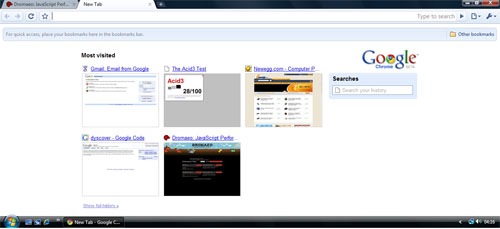
Finally the downloader finished and I was ready to surf on Google Chrome. First thing you’ll notice that it occupies nearly all available screen space. No menubar with File, Edit and the like!! And there is the Opera like UI with SpeedDial for most visited websites and Search History. Also the Address Bar is pretty efficient with all the quick searching and intelligent suggestions.

chrome-speedial

I was expecting Chrome to be memory hog, but it really is pretty light on the memory usage. With less than 10 tabs open, it surely uses less memory than Opera, Safari and surely Firefox. As the tabs increase Chrome seems to take up as much memory as other browsers. The Browser TaskManager, which can be found when you right click on the open Taskbar or TitleBar is another very useful addition to the browser. But what’s interesting to note that with so many security and stability improvements like separate processes and JavaScript sandbox, Chrome has done an excellent job at keeping the memory usage low. May be if addons are introduced, it’ll screw Chrome as well, but for now it’s doing good!!

Google_Chrome

There aren’t many things to be set in the Options that other browsers don’t have, but the search management was interesting. Since, I am from India, it showed me the popular Indian search engines. Yahoo India, MSN India, Rediff, Guruji were the available search engines and that was interesting because it’s always efficient to have a localized search.

This in my opinion is the most important part for a web browser. Like a phone should be best at voice transmission and quality, a browser should be best at displaying websites accurately and swiftly. Chrome uses Webkit (aka Apple Safari’s Engine) for rendering web pages and I wasn’t expecting many differences from Safari. But I found a few changes between the released version of Safari and Chrome. May be Chrome uses a newer version or something. Chrome scores 76/100 on the ACID3 Web Standards test which isn’t really bad, but I was still expecting 100% as Webkit and Opera have already reached 100% in their development products.

JavaScript performance is super fast. You can look at the benchmarks here. The team from Denmark has done an awesome job and Chrome's JavaScript performance is the best among all the browsers.

I'll write more about it later... but you can read what other people at GigaOm, TechCrunch, TheInq and Gizmodo are saying. Its all over the web and no kidding Google OS is really here to stay!!

Google Chrome's Beats Others at JavaScript Performance

With Google Chrome released, one of its most awesome features is the excellent JavaScript performance. It is a complete new re-write of the JavaScript VM and uses what is called the V8 Engine by the Google developers who worked on the new JavaScript engine. Here is a JavaScript Performance Analysis for developers to look at comparing different browsers.

Google uses a lot of AJAX and the new V8 engine is the king in JavaScript performance done using Dromaeo :

Browser Time (lower the better)
Chrome 0.2.149.27 488.80ms
Firefox 3.0.1 1775.00ms
Opera 9.52 1767.60ms
Safari 3.1.2 2075.00ms

The memory usage of Chrome is also pretty good and the built-in task manager for looking at the memory/CPU usage of tabs is interesting and useful. It can also help in analyzing which tab is creating some kind of menace or using more memory. You can close that tab and get some free memory. This is just an initial preview, but the JavaScript performance is top-notch!!

Wednesday, July 16, 2008

Mozilla Releases Firefix v3.0.1

Firefox 3.0 was released with much funfare and with lots of testing. But it turns out a lot of people have problems with the latest version of Firefox, whenFF starting and installing addons. Most perpetual problems are related to hanging up of the GUI when Firefox starts and those missing their old addons that are not working in version 3.0

Mozilla has released Firefox 3.0.1 that solves 2 bugs that are critical vulnerabilities according to the Firefox developers. But the startup problem still remains for a few guys... There will be auto-update out soon, but for all the guys who are in a bit of hurry can download the latest release in their languages from here.

The security fix is also applied on Firefox 2 and has been released as v2.0.0.16 and can be downloaded from here.

Tuesday, July 15, 2008

Opera Users Can Now See Gmail 2 Default

Opera users have always been one of the outsiders to most web developers because of the low market share that the browser holds. Nevertheless, Opera has been implementing web standards quite quickly compared to other popular browsers. And so was the case with Gmail, where Opera users had to use the ”nocheckbrowser” parameter to see the newer Gmail2 interface. But that’s no more required, since Google has made changes and now Opera 9.51 and higher displays the new Gmail2 interface by default.

The newer Gmail2 interface is a little more AJAX-driven and has an initial loading screen after you login to your account. The interface also has a few nifty colored features that many Opera users were not able to see earlier. There was also a project on Google Code that was working towards making Gmail 2 compatible with Opera, just the way it works for other browsers like Firefox or Internet Explorer. The issue was with some incompatibilities between the JavaScript implementation in Firefox/Internet Explorer and Opera. Gmail developers were a little lazy to apply the hack earlier, but now they just finished their work.

So there you have it now... Enjoy Gmail 2 on Opera without any quirks or problems!

Wednesday, July 9, 2008

Opera Starts Classroom For Web Standards

Opera announced today that it has launched an education initiative to teach people about web standards. The first part of the initiative is called the Opera Web Standards Curriculum (WSC) which is a curriculum covering the different web standards available today. The program constitutes of articles that are meant to be learning material for educational institutions as well as web developers.

The topics covered as part of the WSC include CSS, HTML, JavaScript, DOM and different concepts about the Web. All the material that is released as part of WSC will be available completely free under the Creative Commons License and can be found here. Over 50 articles on different topics have been planned and well-known Web developers such as Christian Heilmann and Mark Norman "Norm" Francis of Yahoo!, Peter-Paul Koch of quirksmode.org, Jonathan Lane, Linda Goin, Paul Haine, Roger Johansson of 456bereastreet, and Jen Hanen will be contributing the articles.

Opera has been one of the forefront browser supporting web standards. They were also the first to complete ACID3 test successfully and eventhough they still haven’t released a stable build that passes the test, it shows their commitment to support web standards. With so much talk about web standards, it is really odd to find so many websites that work properly only on IE. Its a shame that developers still don’t follow web standards and such initiative can only be useful if web developers realize that users are pissed off looking at non-standard websites.

Thursday, July 3, 2008

The World’s Most Unexclusive Guinness Certificate By Firefox

As stupid as it sounds, you could gift yourself the world’s most unexclusive Guinness World Record certificate. And this one comes courtesy of of Firefox which had completed 8,002,530 downloads in a single day and set a world record for the highest number of software downloads. After the world record is made, Firefox is giving away a pdf for download to showoff its achievement.

Mozilla-Firefox-Cert

You can visit here and get yourself the world’s most unexclusive Guinness World Record Certificate. And it doesn’t matter if you didn’t pledge your support to Firefox or you didn’t download Firefox, you can still get a certificate. I did pledge though and downloaded Firefox 3 just for the heck of it… not for some stupid record setting!!

Thursday, June 12, 2008

June 17th is Download Day for Firefox 3

Mozilla has announced that it will be releasing Firefox 3 on the 17th of June. Mozilla had earlier announced that it has planned to set a world record of theFF highest downloads in a day and had asked everyone to spread the word. The support pledge can be found here and with the release of RC2 last week, everything is stable and ready to be released.

Firefox 3 has a host of new features, improved performance and better security. Mozilla claims that Firefox 3 has 15,000 tweaks and enhancements compared to earlier version. The download day is important to the open-source world because it is like a show of strength against the corporate closed-source world. Firefox has been grabbing market share rapidly in the last few months and Firefox 3 hopes to improve its browser reach.

Get all set and download from “GetFirefox.com” when the download day arrives on June 17th.

Friday, June 6, 2008

Opera Adds Feature to Block Malicious Websites

Opera has announced that it has made a deal with Haute Secure to add Fraud Protection to Opera 9.5. Haute Secure has a technology where it can prevent Opera malware from being installed or can warn the user that the web page being visited contains some kind of malware. The technology is similar to what Mozilla’s Firefox 2 had and has been extended to default in Firefox 3.

Available in Opera 9.5, the upcoming new version of Opera’s Web browser, Fraud Protection featuring HauteSecure technology prevents users from accidentally or unknowingly downloading rogue malware designed to steal personal data such as credit card numbers, passwords and other identity information. Jon von Tetzchner, CEO, Opera said, “Today we’ve extended that commitment beyond the browser to protect our users from malware that tries to attack when they visit a compromised Web page or that they may unintentionally try to download. Haute Secure’s prevention technology is reinventing Web-based threat detection and we look forward to working together in protecting our users all over the world.”

Firefox 2 had an option to use Google’s list of malware-infected or known malicious websites. With Firefox 3, its on by default. Both Firefox and Opera have realized that a lot of malicious content on the Internet is no longer passed through virus-infected executables or network-propagating worms. Although, these threats are dealt through Antivirus (AV) software, AVs work best after your computer has been infected. Instead, this approach of warning users, when visiting a malicious website is more useful. Credit-card information and phishing are the new ways of money making for hackers and this preventive solution can go a long way to put the hackers out of their jobs.

Opera is not the browser with a large market share, but it definitely has been on the forefront of innovation. It has provided innovative features with great agility and added features found in other browsers very quickly. Opera is available on nearly every Internet enabled platform, and it makes sense to add this new layer of security.

Wednesday, June 4, 2008

Practice Download Day: Firefox 3 RC2 Released

Firefox 3 download is coming closer and Mozilla has just released the latest version of Firefox 3 RC2. The version is faster, smoother and uses lesser memory compared to previous versions. Firefox RC2 is the last one before the final release and is a good time to see if all the bugs are ironed out.

Probably another important thing is to test the server capacity for the download day. Today's release may be useful for the download. Download it from here and Have Fun!!