Showing posts with label testing. Show all posts

Monday, January 28, 2013

Try Netbeans 7.3 RC1

The Netbeans 7.3 RC1 is out for everyone to try. After a lot of hardwork from the Netbeans developers and testing and feedback from the NetCAT community, the latest release of Netbeans is out… for the larger community to accept.

Download from here: http://bits.netbeans.org/netbeans/7.3/rc1/

As has been the tradition, the community will decide if the release is good enough through the Community Acceptance Survey. You’ll need the netbeans.org account to complete the survey. But your feedback is invaluable.

Thursday, September 22, 2011

NetCAT 7.1 Bug Counting

Since, I have signed to NetCAT 7.1 (Community Acceptance Program), I wanted a quick way to see the number of bugs that I have filed compared to the other top 20, I’ve written a small script to go through bugzilla. The one that is on the page seems a little complex to look at and has lots of numbers to look at.

I’ve done this instead:

Beyond the bugs, there is also the email count… We will get to that later!!

Sunday, September 18, 2011

Speeding up Unit Tests by running them in parallel

I just discovered an interesting parameter in the maven-surefire-plugin when using JUnit 4.7+, that tests can be executed in parallel. With multi-threaded CPUs, OS and the like, this helps a lot when you want to decrease the time of your test suites.

So, what are the configurations options that you have:
  1. Running test methods in parallel:
    <plugin>
    <groupId>org.apache.maven.plugins</groupId>
    <artifactId>maven-surefire-plugin</artifactId>
    <version>2.9</version>
    <configuration>
    <parallel>methods</parallel>
    </configuration>
    </plugin>

  2. Running test classes in parallel:
    <plugin>
    <groupId>org.apache.maven.plugins</groupId>
    <artifactId>maven-surefire-plugin</artifactId>
    <version>2.9</version>
    <configuration>
    <parallel>classes</parallel>
    </configuration>
    </plugin>

There are some things to take care when running unit tests in parallel. Some of them might not be independent, isolated and reproducible. There are times when you have some test methods that might depend on other methods in the test class. That time you should use the parallel test class execution. You may also want to tweak the number of threads and core on which these threads run, using this configuration:

<plugin>
<groupId>org.apache.maven.plugins</groupId>
<artifactId>maven-surefire-plugin</artifactId>
<version>2.9</version>
<configuration>
<parallel>methods</parallel>
<threadCount>4</threadCount>
<perCoreThreadCount>true</perCoreThreadCount>
</configuration>
</plugin>

Tuesday, November 16, 2010

Troubleshooting smslib-based applications (DHIS Mobile, SCDRT, InventMobi, StocksTracker)

While I’ve been troubleshooting SMS Applications (based on smslib, Gnokii, Kannel) for over 3 yrs, it is excruciatingly painful to tell people the basics of the troubleshooting again and again. There have been numerous small docs, readme files, emails that have repeated the same things again and again. To people who have gone through with the implementation and fixed problems, I’ve repeatedly requested to document these at some place (…infact as part of their job profiles), but none have sadly been able to produce anything useful. So, here is an attempt to make the troubleshooting process a little more easier for someone who is stuck. There is always websearch that will finally give you the answer to the troubleshooting process, but this is just a reminder to myself where to look at.

    0.) Archive the logs and send it... as basic as it sounds, ALWAYS look at the log file
  1. Check the application/library version – report this as part of any question you are asking
  2. Check the Native Library version and the Java Library version. These should ideally match or should have the same type. i.e if you are using RXTXComm (this is bundled with dhis-web-mobile module), then you should have rxtxSerial.so (Linux) or rxtxSerial.dll (Windows). If using the older version, check the comm.jar and the required dlls is at the right location.
  3. Check the compatibility of the modem (Kannel) and (smslib). If not listed, check if it supports common standard AT command and may just work
  4. If you are using SMSLib for Java on Linux with the RxTx, you can have a no response exception or gnu.io.NoSuchPortException, as if no modem is actually connected to your computer – create a simlink to the dev/ttyS20 and also do start your application (for DHIS this is catalina.sh) with the –Dsmslib.serial.polling parameter as given in this bug filing.
  5. Check if you have the correct port number in the configuration. For Windows, look at the device manager and the modem. Put the COM10 as the port (COM is needed for DHIS, while not for SMSListener), while for Linux add the /dev/tty<whatever> (/dev/ttyUSB0). For linux, try running the “wvdialconf /etc/wvdial.conf” (without quotes) or scanModem script. This will give the modem port
  6. Check the SIM memory location and add it to the configuration file. This is complex, but a Google search on your modem should help. If you don’t find anything obvious leaving it blank should likely work for your modem
  7. If you repeatedly see Framing Errors, it is primarily because the baud-rate mismatch between what you have set and what your modem supports. Running wvdialconf as earlier may give you good indication of what baud-rates are supported and best for your modem. If its windows, then setting to 56000 should be safe enough.
  8. Some modems supports a specialized AT command set. These are init commands and activation AT commands. You should change the manufacturer and model string. If you know the manufacturer, then it is always good to put the exact manufacturer name in that string.

Thursday, August 6, 2009

Garima's Bday


B'day celebrations at office. The interesting thing was 'tester' written on her cake... and that is why this one figures on my "Tech" blog!!

Thursday, January 22, 2009

Windows Vista SP2 to be Delayed by a Month

As everyone including Ubuntu’s king Mark Shuttleworth are eagerly waiting for Windows 7, vista-logo  comes news that Microsoft has delayed the released of Service Pack 2 for Windows Vista by a month. Microsoft now states that Vista SP2 will be available only in the second-half of 2009.

Microsoft was supposed to deliver its first release candidate to beta testers in February, but now has plans to release it in March. This Release Candidate (RC) is now being referred to as “escrow build” (also means frozen and only bug fixes will be done). Showstopper bugs are supposed to be only fixed and regression is to be avoided. Microsoft has in the past indicated that SP2 is very much an optional install to the OEMs and it wants OEMs to instead move to Windows 7 directly, when its released.

Windows 7 is running pretty much on schedule and we expect it release by early next-year. The RTM for Windows 7 may be out from the Microsoft stable even by the end of this year.

By the way for those wondering what changes SP2 will be bringing to Windows Vista, following are some of the known changes in SP2:

  • Windows Search 4.0 for faster and improved search
  • Bluetooth 2.1 Feature Pack, the latest Bluetooth spec
  • Blu-Ray support to write discs directly for explorer
  • Windows Connect Now (WCN) for simpler WiFi configuration
  • Content Protection in Windows Media Center

Also on the blocks with Vista SP2 is Windows Server 2008 SP2 which was released with the label SP1. Hoping to see another Windows 7 beta before the Vista SP2 then!!??

Wednesday, November 19, 2008

Continuous Integration System Roundup

Continuous Integration Systems are one of the most important tools for agile software development. They automate the process of building and testing. A lot of people seem to have realized their importance and there are quite a few products in this arena. I already used Hudson and CruiseControl, but for OpenMRS we need to find one which is best suited to our needs. So I started out about 3 weeks back to create this roundup of continuous integration servers. This should be a useful roundup for any project with similar requirements.

Why does OpenMRS need a Continuous Integration System?

Any software development effort needs to take care that regression doesn’t happen with new code changes. Often a change in the API/module core results in breaking of modules dependent on an earlier method. A Continuous Integration System will rebuild OpenMRS after a change is committed and provide information on how that change is affecting related code.

OpenMRS would also benefit from an easy to understand UI that Continuous Integration Systems provide for number of failing tests. The number of passing or failing Unit Tests will indicate the quality of a build and help implementers/testers realize the stability of a build. We can also set some goals on how many test methods we need to write before an API method can be finalized or deprecated.

The work done in different branches and modules can be monitored and looked at easily by the community.

Building of OpenMRS Installer using NBI can be automated and new users can directly test with the latest build of OpenMRS using the cross-platform installer.

Thus to summarize, a continuous integration system will bring better release quality, more transparency, quicker bug finding and fixing, simplicity and TDD frame-of-mind.

Disadvantages for OpenMRS in using Continuous Integration System

  • Additional Load on Servers
  • Not every developer is motivated to write unit tests ;-)

Features that OpenMRS needs (Not exhaustive)

  1. Easy to monitor tests and easy to understand dashboard
  2. Support for SVN and Ant
  3. Dependency integration
  4. Email/RSS/IRC notifications when a build fails or bad code is committed
  5. Warning flags when a committed code doesn’t follow coding rules (naming, newline format,etc.)
  6. Allow code committers to modify build and test parameters from the GUI
  7. Optimal Performance
  8. Price & Open-source development

Comparison of Continuous Integration Systems:

  CruiseControl Continuum TeamCity Bamboo Hudson
Monitoring UI Dashboard introduced since v2.7 is not intuitive Dashboard only shows tests Advanced UI & dashboard. Advanced UI, Detailed reporting out-of-the-box, Intuitive Simple Dashboard, Plugins enhance reporting, Intuitive, somewhat detailed
SCM Support All Support SVN
Dependency Integration Scripts need to be written for each new dependency. Tracking different versions of dependency jars is very complex Easy for Maven2.0+ projects, but not so easy for other types of projects Dependency can be managed easily. Advanced UI for dependency management Dependency management is easy and intuitive. Different versions of same library not automated. Creating test/build plans allows dependency of different versions Dependency management is easy to configure. file fingerprinting simplifies identification of different versions. Automatically can detect and build project dependencies
Email/RSS/IRC Emails. Plugins - RSS, blog, IM with Jabber Email, IRC, IM with Jabber, MSN Email, Jabber, RSS, external HTML widget Emails, RSS, IM Notification using Jabber or OpenFire Plugin – Emails, RSS, IRC, Jabber, Google Calender, Twitter
Code Quality and Patterns Not very easy to define Could not find a way Can be defined with plugin for IntelliJ IDEA Managed through test plans. Manual test plans have to be created Plugin provides UI. Test plans can be created manually out-of-the-box
Security and User Management Easy to configure with different roles Roles can be easily defined Roles can be easily defined Simplistic UI for user build plan management. Easy integration with JIRA Easy to configure roles for users
Performance Fast Fast Somewhat slower in comparison, but includes a lot of features Fast in build and integration. Slightly slower in reports. Includes lots of features that may not be used. Distributed builds with slaves speeds up performance Comparatively lightweight out-of-the-box, but requires plugins. Distributed builds with slaves speeds up performance
Pricing Free & OpenSource. Paid version called Cruise available. Free & OpenSource Professional version is free, but enterprise is paid Free for opensource projects Free & OpenSource

Friday, July 4, 2008

First Look: Google Test Framework Simplifies Testing

Software Testing is probably one of the most boring and tedious task to a lot of people, but there are still people like me who love writing unit tests. But GoogleTesting among a lot of developers I know, its always the guys from lower-part of the food-chain that write tests. Google has something for testers that will surely make them happy. Google announced today a new Google Testing Framework (GTF) in their Testing Blog.

GTF is a new testing framework for programs written in C++ that Google has open-sourced today. It is a collection of libraries that Google previously used to test their own softwares, but I’m wondering how that could be true, considering Python is Google’s favorite language!! ;-)

But jokes apart, as soon as the new testing framework was released, I set out with a few of my colleagues to test out the framework. We are one of those guys who are excited about testing and ways to simplify testing. The first thing we noticed even before starting with the library was that it was compatible with a host of compilers and versions. We’ve seen a few test frameworks for specific compilers or platforms, but GTF supports Linux, Windows, OSX and host of compilers ranging from gcc to Microsoft’s VC++.

Another excellent thing about the framework was that it’s easy to learn the basics as well has advanced features. Its very similar to xUnit tests and has good features to compare with CppUnit. The basics can be learnt from here and the advanced guide is here. Predicate Assertions are probably one of my favorite features, that we encountered quickly in a program that we were having trouble to debug. There are also a host of other assertions available and we’ve not got into very deep with all the assertions. But from the initial look at the framework, most of us very ranking it as one of the best testing frameworks out there...

There is still some of us who think Boost Framework is very good and some still think Visual Assist plugin tool (of Visual Studio fame) is pretty good. But the first look at Google Testing Framework has definitely made us stand up!

Monday, June 23, 2008

Review: openSuSE 11.0

On the 19th of June 2008, openSuSE 11.0 was released and I was very excited about the new release because my experience with openSuSE 10.3 has been very good and I have been following the development of openSuSE 11.0 closely. In the meantime, I have tried Ubuntu 8.04, Kubuntu, Fedora 9, openSolaris 2008.05, but somehow I’ve been coming back to openSuSE 10.3 because of some or the other nagging problem with the other distros...

Download

I downloaded openSuSE 11.0 the moment it was released and I have to say that the release was very professionally co-ordinated. There were launch events all around the globe where people received their openSUSE 11.0 DVDs and with the counter running all the time, everyone knew when to get their download managers ready. The mirrors were fast and the torrents seemed to have enough seeders. I finished the 4.3GB DVD iso by 20th morning (IST) in just about 4hrs time. There is also a single Live CD KDE iso, GNOME iso as well as a MiniCD (71 MB) for Network installation...

Installation: Image-based Deployment and Sleek

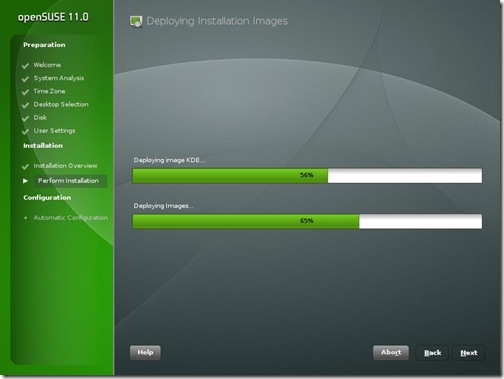
The openSuSE site has a nice installation guide with screenshots and it doesn’t make sense for me to go through the same thing again. But two things are special in openSuSE 11.0 that are worth mention. The first is that they have a gorgeous installation GUI, the best looking installation for any operating system ever!! Its easy to install and intuitive. The second the use of image deployment for the installation of GNOME. This really speeds up the installation if you are just using the basic GNOME-based setup. I generally prefer KDE, but for the test I installed the GNOME and it was fast... really really fast! I was shown the GNOME desktop with all the preferred software installed in straight 15 minutes. That’s faster than any other distro that I’ve ever installed. It was an amazing experience to see such a fast installation!
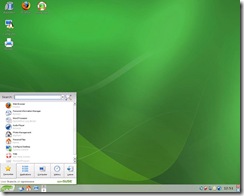
SuSE11-ImageDeploy

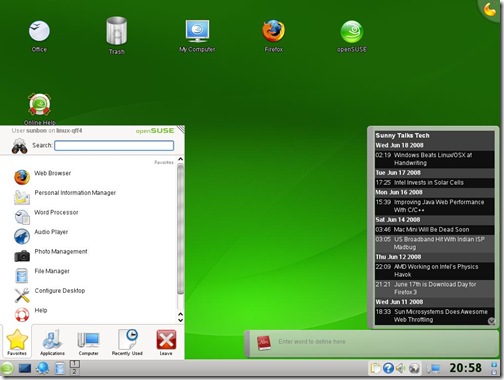
Like previous version, openSuSE 11.0 comes with a variety of useful non-opensource software like flashplayer, java 1.6.0_u6, fonts, Adobe reader 8, etc. Along with these I also installed Jdk6 update 10 (the awesome new Java Plugin), Mono, Netbeans 6.1, GlassFish for my OpenMRS performance test... KDE 4.0 is also there as a separate choice of GUI when installing along with KDE 3.5.9, GNOME 2.22. Since I have never been able to stably run KDE 4.0 and have always switched back to KDE 3.5, I thought I’d try KDE 4.0 in openSUSE 11.0
SuSE11-KDE4

I was pleasantly surprised that KDE 4.0 “just worked”. I had my first KDE 4.0 crash after 1.5 hrs of use whereas earlier it was before 20 min that the SigEnv or Segmentation Fault would throw up. I still didn’t want any crashes and hence I’m back to using KDE 3.5.9. But KDE 4 is really coming good!

As soon as I finished installing, everyone at home wanted me to record the Euro 2008 matches and soon I needed VLC to be installed. I went to videolan.org/vlc and clicked on the SuSE link... and I was greeted with a 1-Click Install button.

SuSE11-VLC-1Click

This was one of the really awesome openSUSE things that was first brought in openSUSE 10.3 and has been improved in openSuSE 11.0. I clicked on it and the installation was finished really quickly.

Improved Installation with YaST

That’s when I realized the most important update to openSuSE 11.0 which is the improved speed of YaST. No other distro has such an easy administration tool where nearly everything can be administered. And in openSuSE 11.0 everything in the YaST module just works. RPM installation is fast and adding community repositories is easy. I am a big fan of apt-get in Ubuntu, but openSUSE 11.0 software installation is just as easy now...
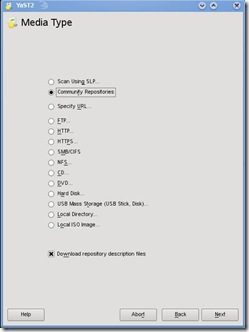
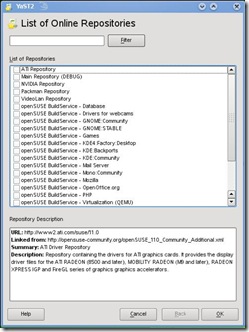
SuSE11-CommunityRepo2 SuSE11-CommunityRepo1

Every piece of hardware worked

I have lots of hardware, old and new on which I often install and test different distros, Windows, OSx86 etc. openSuSE worked with every bit of hardware that was thrown at it out of the box. Every distro struggled with the UMTS 3G card on a laptop, but surprisingly openSuSE 11.0 made it work. Few other distros had trouble with the legacy Nvidia Quadro GoGL card on another laptop, but openSuSE 11.0 worked... Old printers, USB devices, Firewire everything worked. Even the Barcode Reader with PS2-USB converter worked on the USB port which wouldn’t work on Ubuntu 8.04 or other newer distros.

The only change was that on my desktop Intel DG965RY board the surround sound wasn’t working. I followed the Audio Troubleshooting doc, added the model=dell-3stack and all my speakers started trumpeting!

Compiz-Fusion and the Bling

Last time I was not happy with the stability of Compiz-Fusion on openSuSE 10.3. For Ubuntu 8.04, Compiz-Fusion worked well and so I knew it was something to do with the new kernel module driver on my system. With openSuSE 11.0, Compiz-Fusion works perfectly and is able to show all its features. A nice little configuration screen helps manage the amount of effects that you wish to enable. I personally don’t enable effects, but its a good show-off to make people standup and appreciate open-source beauty.
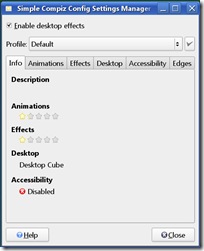
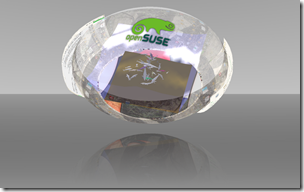
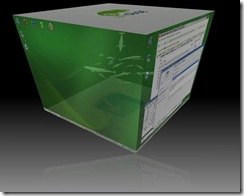
SuSE11-Compiz SuSE11-Sphere

Other features and improvements

  • Linux kernel 2.6.25
  • glibc 2.8
  • GCC 4.3
  • 200 other new features

Conclusion

You can’t miss the ease of use and the sleek looks that openSuSE 11.0 brings to the desktop. Its the perfect distro for a new user coming to linux. For the old pros, openSUSE 11.0 is fast and brings in ease of administration and software installation. Novell support is pretty good for big organizations that can buy a boxed product from them. Xen is my favorite for virtualization and it has good integration and management in YaST. But the strength and momentum of openSUSE is definitely in the desktop space. Earlier, openSuSE lacked the community backing that Ubuntu has generated in a short timespan, but with new initiatives and better responses at openSuSE forums, the openSuSE community and grown leaps and bounds. openSuSE 11.0 has grown from strength to strength and is one of the best ways to give competition to Windows on the desktop!

Other screenshots
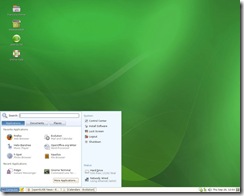
gnome-desktop The GNOME Desktop KDE-desktop The KDE Desktop
Cube-atlantis Compiz-Fusion Cube Atlantis Plugin Animation-burn Compiz-Fusion Burn Animation

Tuesday, June 17, 2008

Windows Beats Linux/OSX at Handwriting

Lately I’ve been trying to code an application which requires some form of natural handwriting recognition. Natural Handwriting is basically the way you write on your Tablet/Pocket PC/Palm/Mobile, either using a stylus on your touch-screen or on the desktop using mouse. And after looking at different options available for handwriting recognition, Windows beats every other operating system including Linux and Mac OSX hands down!!

For the last month or so I’ve tried every possible handwriting recognition software and API out there. Paid, free and open-source API or Programs for Windows, Linux and OSX. Out of all the ones I tried, only one seemed to be perfectly working and easy to develop upon and its from Microsoft. Microsoft has this ultra-amazing API called InkAnalysis, but obviously and sadly for me, works only on Windows. And sad because the application for which I’m developing this handwriting recognition module is a popular open-source kids software and mainly targeted towards Linux distros.

InkAnalysis is a powerful API that performs 2 complementary activities of handwriting recognition and layout classification. InkAnalysis API has very good Interfaces for detecting the layout of any  given document and based on the understanding of the layout it performs handwriting recognition. Even without training it amazingly detects a wide variety of handwriting that even I had a hard time reading as a professor when checking my students’ answer sheets. The API was earlier only available as part of the Windows Vista SDK, but Microsoft has also released the API through the Tablet PC Platform SDK. This means applications that use InkAnalysis API can be run on not only Windows Vista but also Windows XP SP2, SP3 and the future... And the best showcase of the accuracy and strength of the API is through the built-in Windows Vista app called Tablet PC Input (check below screenshot)

TabletInput 

During the trials of all the different APIs and programs, I had high expectations of finding something from Apple that “just works”. With the iPhone they seemed to me like the “touch” geniuses and handwriting would definitely be in touch category. But alas! OSX InkWell isn’t good enough. It makes too many mistakes and correcting them doesn’t work very well. Training or no training it had hard time recognizing natural cursive handwriting. Even the API was pretty complex to use and the didn’t have enough explanation.

OSX

Finally I came back to where I started... Looking for a API that would work with Linux, preferably was open-source licensed. I tried a few and none were close to useable. HRE from Sun was archiac and complex, Tomoe is for Japanese and Chinese script only, LipiTK from HP Labs doesn’t work like advertised and support won’t reply back to emails. Google’s revived Tesseract is only a OCR-engine, good for typed text and not handwriting. OCRopus is also work-in-progress and not working at the moment. With all my hopes down on the project, I finally reached CellWriter. CellWriter seems to be a good working handwriting recognition, but doesn’t work as modestly as InkWell or perfectly as InkAnalysis. CellWriter uses a cell-based, single-character recognizer. It requires training without which it can’t understand much, but once trained is pretty accurate at character recognition. But I tried applying it to multiple cells and it doesn’t quite work. May be a good character recognizer, but not handwriting recognition.

I thus concluded Microsoft is way ahead of the competition on handwriting recognition. Handwritten input system is useful for a lot of people and developers from the open-source community have yet to realize this fact. After all the Vista rant is popular on the web, someone should have seen its good side!!

Wednesday, June 11, 2008

Sun Microsystems Does Awesome Web Throttling

Web Downloads can be a really painful for users as well as companies when you have a sudden surge of downloaders or traffic suddenly increases exponentially.sun_logo Most Linux distros these days ask people to use the Bittorrent downloads as a savior to prevent bottleneck on downloads... And on similar grounds, Sun Microsystems seems to have some excellent throttling going on with the downloads from their servers.

If you have recently downloaded something off Sun's web servers, you must have observed this phenomenon. When you try to download something from Sun's servers, the speed increases initially. Then after sometime the speed falls and steadies to slower than the initial speed. If you happen to use a download manager, you can stop and start the download again. The speed will increase and then fallback again... And then when your download is about to finish, all of a sudden the speed increases and you finish the downloads faster than you thought!!

You are probably guessing this may have been a one time thing, but I have done close to 100 different downloads in the last 1 week from the Sun servers from different locations and ISPs and the same thing happened everytime. May be its something in the Solaris or Apache or Virtualization or something else... Nor was my observation scientific enough...

Have you observed something similar?? Is Sun working on some load balancing web server and experimenting with it?? Either ways, I think web downloads are good places to employ throttling. For companies, large downloads are particularly useful with such practices, but for the users Bittorrent is definitely the way to go!!

Wednesday, June 4, 2008

Practice Download Day: Firefox 3 RC2 Released

Firefox 3 download is coming closer and Mozilla has just released the latest version of Firefox 3 RC2. The version is faster, smoother and uses lesser memory compared to previous versions. Firefox RC2 is the last one before the final release and is a good time to see if all the bugs are ironed out.

Probably another important thing is to test the server capacity for the download day. Today's release may be useful for the download. Download it from here and Have Fun!!

Friday, May 30, 2008

Google's New Favicon Sucks

Update: Google changed their favicon in new year 2009 again coloring what they had done earlier.


Favicons are a common thing on web pages today. Infact it is one of the first things that come to sight, when visiting a webpage. Today, I went to the Google analytics page and the favicon seemed a little different. It looked like Google's 'g' was non-capitalized and was sitting on some egg. I felt newegg had acquired Google Analytics ;-)

You can look at the screenshot below:

Analytics Favicon

I first thought the site has been phished or something happened... But realized it was just a favicon change. I like the capitalized 'G' that was earlier there... Infact I now see gmail also showing the new favicon!

Wednesday, May 28, 2008

Review: Opera Mini 4.1 Rocks

If you have been following my blog, you'll knw that I've been excited about the world of mobile internet. Unfortuantely the mobile internet story in India isOpera pretty poor due to the bad data services provided my the mobile operators. This problems are of every kind: high cost, slow data speeds, low signal on GPRS. CDMA (from both Tata Indicom & Reliance) does provide "ok" data services, but the available handsets choices are pretty bleak!

But for any internet experience, the browser plays a major role. I've been a fan of Opera Mini and have been using it all the while. Its runs on a wide range of handsets and with their latest release, I was excited to try it out. I downloaded Opera Mini 4.1 on my k750i, 2 weeks back and have been running it for some time now. Opera Mini 4.1 introduces the following new features:

  • Opera Mini 4.1 is up to 50% faster than Opera Mini 4.0
  • The new Opera Mini will automatically suggest URL completions, making address input easy and intuitive
  • Web pages can be saved for later off-line viewing
  • Opera Mini 4.1 gives you quick access to the word or phrase you want in Web pages
  • Images, ringtones and other content can be downloaded without leaving Opera Mini.

Opera Mini does bring the full web experience to the mobile phone and makes it usable on the cellphone. The image compression and quick rendering of pages are perfect for low-bandwidth GPRS that I suffer from. I have observed considerable speed improvements in 4.1 compared to 4.0. This blog would take about 26sec to load on Opera Mini 4.0 and now loads in 18sec with the Opera Mini 4.1. That's not exactly 50% faster, but still its quite fast!!

Another feature that I have really found useful and is my favorite on the desktop Opera is the suggest URL. I generally forget the exact URL of the page I visited, but remember some part of it.I just need to type that word I remember and Opera Mini suggests me the URLs with that word. Firefox 3 will be adding a similar feature for the desktop and Opera already has it on the desktop and now adds it to the Mini. Offline viewing is also excellent and very useful when your GPRS connection is poor.

I have been very satisfied by this release of Opera Mini. Anyone who wants to try the mobile web browsing experience should start with Opera Mini. It does have those zooming, full CSS and JavaScript working to show the webpages as it would look on the desktop. Download it from here. Opera Mini 4.1 completely rocks!!

OpenMRS Registration Module Begins

The Google Summer of Code 2008 timeline shows that we start coding from 26th May and I've already started coding. Before the coding there was thislogo "Community Bonding Period", and I'm not sure if I've done bonding with my community members, but sure I've been talking with my mentor Brian... and he's really a cool guy! We talked a lot about technical as well as personal stuff. He invited me to this house virtually through Google Street View and it was really nice talking to him. I bonded with him well !!

In the meantime, I have been pondering and working on the ideas for the OpenMRS Registration Module.  My Introductory post on OpenMRS showed a lot of interest from friends and got a lot of questions from colleagues. Thanks to r0bby, who told me on the IRC about SoC and talked about contributing to OpenMRS.

The work on the Registration Module has begun and I created the Registration Module documentation page. It is still incomplete on the UML diagrams, but is good enough to show the workflow through the Use-case. Brian and I have also worked on my project plan and have made a timeline that I need to follow. The timeline is a good motivator and will be putting that up on the project page as well. OpenMRS and open-source developers in general, advocate the idea of quick and early commits. OpenMRS shares the Story of FLOSS to make this idea stand out. I'm still trying to get into this mould of development, coz I mainly advocate the planning/design approach. You take twice as much time to design compared to code, but I need to get agile and work on the Bazaar way of open-source. More eyes... More interest and faster working deliverable!!

With this in mind, I tried to commit the basic module changed to registration module, but it gives me a 403 error:

Error: CHECKOUT of '/!svn/ver/4193/openmrs-modules/registration': 403 Forbidden (http://svn.openmrs.org)

I can login through the trac web page. So probably some issue with either my SVN client (TortoiseSVN) settings... or something on the SVN server side!!

Tuesday, May 27, 2008

Dress Up Orkut With Themes

Orkut is one of the big social networks on the web. With other social networks evolving everyday, Orkut doesn't want to be left behind in the race. And with this in mind, Orkut has added a new feature of "Themes". Themes allow users to change the look-and-feel of the scrapbook, profile pages. Earlier users had to use 3rd-party JavaScript (with GreaseMonkey only on Firefox)  to use custom-themes, but now Google has added themes for everyone to enjoy.

Orkut currently shows only 4 themes:

Spring Theme:

Orkut-Spring-Theme

Country Theme:

Orkut-Country-Theme

Beach Theme:

Orkut-Beach-Theme

and the Classic Blue Theme...

You can also disable the themes if you wish... You will also be allowed to create your own themes and just like Orkut apps these will be downloadable and sharable with your friends. Themes have not been rolled out to all the users, but will take a few more weeks to be shown to all the users. Just like the success of Orkut Apps gave an opportunity to developers, Orkut Themes will give designers a chance to monetize their skills.

Saturday, May 17, 2008

Adobe Flash Player 10 Shows 3D

Adobe's play with Acrobat 3D didn't go too well. Acrobat 3D was for creating 3D models and save them as PDF. It was a nifty and useful idea, but didn't sell much flash as everyone used their favorite 3D tool and printed (PDF using Distiller) the different views. But now Adobe has added 3D to its latest Flash Player 10. Adobe is showcasing the feature through a beta.

Flash Player 10 is available for Windows, Linux and OSX and features new 3D filters. The latest beta known by codename "Astro" has 3D filters and custom effects and allows native GPU acceleration for 3D animations. Thus this brings the power of the GPU to be web through Flash animations and videos. And Flash being the de-facto for animation on the web, its an excellent thing for the web developers and users alike.

From Adobe's Press Release:

Adobe Systems Incorporated (Nasdaq:ADBE) today announced that the pre-release version of Adobe® Flash® Player 10 software is now available in beta on Adobe Labs with new expressive features for interactive designers and developers to build richer and more immersive Web experiences.... Custom filters and effects are created with the Adobe Pixel Bender™ toolkit, also available for no charge on Adobe Labs. Adobe Pixel Bender is the same technology behind many filters and special effects in Adobe After Effects® CS3 software. Flash Player 10 beta can now create their own filters, blend modes and fills with Adobe Pixel Bender by writing small pixel-shading functions that can be parameterized to create animated effects or change the effect on rich media content at runtime.

The downloads can be done from here... and you can view some exciting new demo videos from here.

Thursday, May 15, 2008

Does Firefox Tracking You Make You Fear ?

Mozilla, the guys behind the popular open-source web browser Firefox are in the works to create a "Stealth Data" project. The project known as Test Pilot,FF which I  initially thought was a pre-April Fool's Joke is the project which will take user-data from the browser and monitor user's browsing behavior. This will be anonymously aggregated and displayed to everyone.

The main idea behind project Test Pilot is that it will enable a web to share data in open and free way. We can have lots of data mashups and link user surfing habits. John Lilly essentially talked about this project with TechCrunch and highlights some of its usefulness...

Overview of Test Pilot
We can provide a much more satisfying experience all around by putting in place some basic infrastructure. Here’s the idea:

  • We develop and promote a formal Test Pilot program with a Firefox add-on at its core.
  • The first time the Test Pilot add-on is run, it asks a few simple non-personally-identifiable questions in order to put the user into a demographic bucket, e.g. technical level, locale, etc., and to let them opt in to additional anonymous instrumentation.
  • Test Pilot will then notify its users when a new experiment is available for testing. If the user opts in, it will download the required software (if any) and load any information required to get started with the new experiment, e.g. overview, use cases, etc.
  • After either a specified amount of time or upon completion of a specific action, Test Pilot will prompt the user for feedback. The feedback form will only ask a few questions selected from a much larger set. A link will be provided to provided more comprehensive unstructured feedback or bug reports.
  • The set of questions posed for feedback will be randomly distributed within each demographic bucket to ensure statistical significance of the results.
  • Anonymized aggregate results and analysis will then be posted automatically to the Test Pilot site.
  • All participants will receive a “flight badge” displayed in their Test Pilot profile and available to embed on blogs, social networks, etc.

The idea is that by reducing the amount of required feedback to only a few clicks we can increase overall rates of participation.

So what are the odds of this becoming a privacy threat?? This is supposed to be an opt-in thing unlike what Facebook thought doing with Beacon. It will be anonymous aggregation of data and will probably be displayed for the world to see. Hopefully, we don't have to pay anything to see that data or else we already have ComScore!!

But what if Microsoft was doing the same thing?? There would be a huge noise on privacy!! May be Firefox is open-source and hence the favorism, but then how easy would it be for someone to play with the stats?? Would it truly be able to show how the web data is being accessed?? Is this how we will move to Web 3.0?? Is it enough to provide data from the browsers??... Quite a lot of questions to answer before we can start clapping and move to the semantic web!!

Monday, April 14, 2008

NetBeans 6.1 RC1 Needs Your Feedback

If you have been among the people using netBeans 6.1, then its your time to give some feedback to the netBeans developer team. netBeans 6.1 has just nbday08_logofinished on a release candidate and your comments can be invaluable to ironing out the final bugs that you may have faced.

If you haven't yet looked into netBeans 6.1, then probably this is your time to look at the really fast and cool new netBeans. netBeans 6.1 has improved a lot on the performance and startup of the IDE. Some other important updates include the fast javascript debugger, Spring 2.5 support, JSF CRUD Generator and a lot of other useful features.

You have to go here and fill the survey.

In netBeans news, there is also the upcoming NetBeans Day 2008 held alongside JavaOne. You can get into it FREE and does not require a JavaOne registration. From that room probably you can sneak your way into the JavaOne Conference free, but don't tell anyone I told you to do that :))

Tuesday, April 8, 2008

Mozilla Has Own Book of Testament in Firefox 3

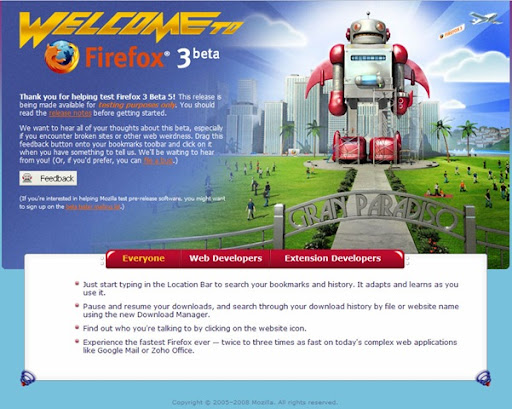
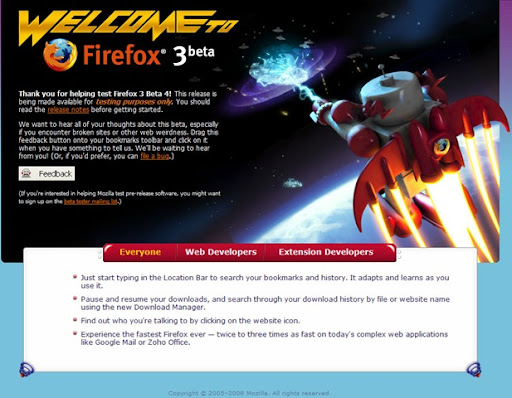
Mozilla has been playing a lot lately with Firefox 3 and has been running this marketing of a robot image that's protecting the world. The what's new from the latest Firefox 3 beta 5 has the Robot in a park. Other ones from Beta 4 also features something like this.. (see below)

Mozillabeta5 Mozillabeta4

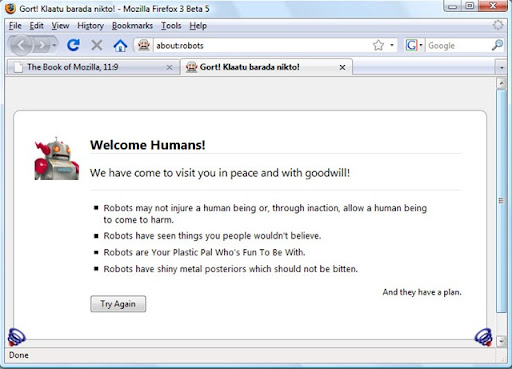
Continuing the rounds of fun that they are having there are few more robot things inside latest Firefox 3 Beta 5. Type about:robots in the address bar and you'll see a nice fun thing about robots and how they welcome you. Watch the screenshot below:

Mozilla-Robot

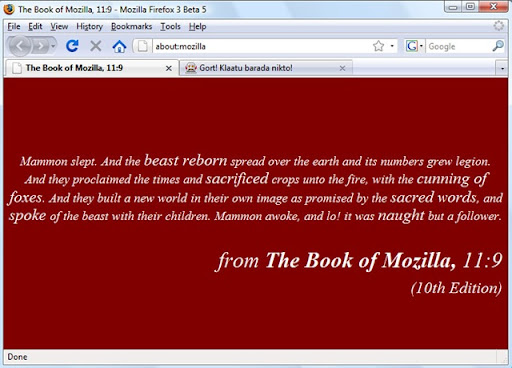
And another good thing is that Mozilla is also in the midst of making a "Book of the Testament". If the old Testament had Book of Samuels, Book of Kings... then Mozilla is creating a new Book of Mozilla. They are expecting it to be the web surfers holy grail. Type about:mozilla in your address bar or see the screenshot below.

Mozilla-Book

There are few more things to be discovered in Firefox 3. Few more lands to be conquered. If you have the Columbus in you, go find America!!