Showing posts with label Java. Show all posts

Saturday, May 25, 2013

Windows Locked files in Jetty Maven Plugin

If you are developing Java webapps using maven on Windows and using jetty:run to deploy, you have surely come across the problem when you cannot save html, js or vm files. JSPs work fine because they are compiled and deployed. Its surely irritating when that happens.

Jetty has documentation to explain the problem. Many web searches will point to this document. The problem is basically with the NIO connector that jetty uses. Others have suggested that using the old BIO connector is easy way to solve this. The problem is that the Jetty documentation solution requires using a hardcoded location for the new webdefaults.xml. We don’t want to make changes to the source of our project, just because we are on Windows.

My suggested solution is to just edit the maven jetty plugin to not use the FileMappedBuffer. Edit the webdefault.xml that is found in the jar file and that’s all. Browse to your maven repo location. e.g. for 6.1.26 of the plugin go here – USERHOME\.m2\repository\org\mortbay\jetty\jetty\6.1.26\jetty-6.1.26.jar . Open the jar file and find the file at org/mortbay/jetty/webapp/webdefault.xml , and edit the file:

<init-param>
<param-name>useFileMappedBuffer</param-name>
<param-value>false</param-value> <!—change from true to false -->
</init-param>

Save the file and replace the jar with this file. Now whenever you run jetty:run, it will use this file and you will not find windows locking the files when jetty deploys it

Sunday, September 18, 2011

Speeding up Unit Tests by running them in parallel

I just discovered an interesting parameter in the maven-surefire-plugin when using JUnit 4.7+, that tests can be executed in parallel. With multi-threaded CPUs, OS and the like, this helps a lot when you want to decrease the time of your test suites.

So, what are the configurations options that you have:
  1. Running test methods in parallel:
    <plugin>
    <groupId>org.apache.maven.plugins</groupId>
    <artifactId>maven-surefire-plugin</artifactId>
    <version>2.9</version>
    <configuration>
    <parallel>methods</parallel>
    </configuration>
    </plugin>

  2. Running test classes in parallel:
    <plugin>
    <groupId>org.apache.maven.plugins</groupId>
    <artifactId>maven-surefire-plugin</artifactId>
    <version>2.9</version>
    <configuration>
    <parallel>classes</parallel>
    </configuration>
    </plugin>

There are some things to take care when running unit tests in parallel. Some of them might not be independent, isolated and reproducible. There are times when you have some test methods that might depend on other methods in the test class. That time you should use the parallel test class execution. You may also want to tweak the number of threads and core on which these threads run, using this configuration:

<plugin>
<groupId>org.apache.maven.plugins</groupId>
<artifactId>maven-surefire-plugin</artifactId>
<version>2.9</version>
<configuration>
<parallel>methods</parallel>
<threadCount>4</threadCount>
<perCoreThreadCount>true</perCoreThreadCount>
</configuration>
</plugin>

Monday, August 8, 2011

Maven dependency for tools.jar in JDK7

Although it has been known for sometime now that JDK7 will bring the change to vendor properties name change from “Sun Microsystems Inc.” to “Oracle Corporation”, I thought it would serve as a good reminder since Java 7 final was just released.

If you have a maven project that uses tools.jar and adds that as a dependency to the project as follows:

...
<profiles>
<profile>
<id>default-tools.jar</id>
<activation>
<property>
<name>java.vendor</name>
<value>Sun Microsystems Inc.</value>
</property>
</activation>
<dependencies>
<dependency>
<groupId>com.sun</groupId>
<artifactId>tools</artifactId>
<version>1.4.2</version>
<scope>system</scope>
<systemPath>${java.home}/../lib/tools.jar</systemPath>
</dependency>
</dependencies>
</profile>
</profiles>
...

For making this work with JDK 7, you have to change the java.vendor value to Oracle Corporation like this:

...
<profiles>
<profile>
<id>default-tools.jar</id>
<activation>
<property>
<name>java.vendor</name>
<value>Oracle Corporation</value>
</property>
</activation>
<dependencies>
<dependency>
<groupId>com.sun</groupId>
<artifactId>tools</artifactId>
<version>1.4.2</version>
<scope>system</scope>
<systemPath>${java.home}/../lib/tools.jar</systemPath>
</dependency>
</dependencies>
</profile>
</profiles>
...

Monday, June 1, 2009

The Mobile Phone Tool for Indian HMIS

As you have already found out, I haven’t been blogging lately because of the travel and development work I have been doing for HISP India. One of the new developments that I have been working over the last 3 months is a mobile phone application for routine health data collection, obscurely called “Mobile-SCDRT”. Its a Java ME MIDP that runs on all those commodity mobile phones and is used by a community health Sub-Center for Data Reporting and Transmission (SCDRT). Now you know where that obscure acronym came from and I am unsure who gave it that “wanna-be” name.

That apart, the mobile application is being deployed part of a pilot in the 5 states of Himachal Pradesh, Kerala, Rajasthan, Nagaland and Gujarat. As part of the pilot 200 health workers from the above states receive a Nokia 3110c mobile phone with the application installed and use the application to report the routine health-related data that is collected by the Government of India as part of Health Management Information System (HMIS).

The following is an architectural overview of how the application works for those of you interested in the technical details:

clip_image002

So, DHIS2 is where the data gets added after being sent from the mobile phone and in DHIS2 you can do all the analysis and “use of data” for health program decisions. There are other nitty-gritty details of the application and lots of new learnings for me, but I’ll leave that to another blog entry for another day.

We have started the pilot in 2 states: Himachal Pradesh and Kerala. Its been running for close to a month now in these 2 states and from the looks of it, people are happy and excited to use it. Recalling an incident from the launch in Kerala:- When just about 15 minutes of looking into the application, a JPHN (Junior Public Health Nurse - as health workers are called in Kerala) could explain the whole application, its use and reporting procedure to her colleagues better than most of us could. It was a wonderful and humbling experience for us to see that people were so much wanting to use the application and learnt it so quickly. It was satisfying to see that it was helping the health worker to make her reporting process more efficient. What was more rewarding for her, as I understand now, was the job perk that she thought she got in the mobile phone. The mobile phone was not just a tool for reporting, but also something that she would use for calls and show it to her kids and family. Few JPHNs were instantly taking photographs of our launch using the mobile phones we provided. I hope I can have many such satisfying moments through my work in health informatics.

But not everything was perfect in all this. I for one realized, that logistics required for a project of this magnitude is not an easy job. Having a team of people in the state and within us at Delhi is a challenge. Discussions of inefficiencies and incapability of the team is a burden in itself to manage. Not everyone may have the goal to change the world and some might even be in it for the money. As for the logistics, we learnt early in the pilot at Himachal Pradesh that a “Step-by-Step” reference manual on using the application was a necessity for the health worker which she can refer to, when she’s at her home and using the application to report. Then there was the purchase of state-specific SIM cards and allocating mobile phone numbers to each health-worker and her reporting office. All this requires lots of planning and managing the logistics and repeated changing of plans has been a tough one for me.

The technical preparation of installing the application, creating the database and installing the server at the primary health centers, block hospitals and district health offices have also been somewhat of a mismanagement. Its been a complex process involving people with different work cultures and behaviors. But in the end the 2 pilots have been successful because its been an opportunity for health workers to report data more efficiently. Final results of the pilot await us, but the start has been great!

Saturday, April 18, 2009

Free JavaOne Entry for Students

JavaOne at the Moscone Center is the biggest conference for the Java world. It's one heck of an experience to meet all the world's Java developers and interact with the Java programmers of the world.

This year Sun has put up a page where students and educators can get in free at the conference. The JavaOne 2009 from June 2-5, 2009, Moscone Center, San Francisco, California has a normal entry fee of $1750-$2000 depending on the sessions.

It is a great opportunity for students to meet some of great programmers. Great learning experience and exposure to the Java world.

Saturday, March 14, 2009

Working for HISP India on Health Informatics

I haven't been blogging for quite a while now, but the reason is partly because I'm moving into a new job and also not getting enough motivation to blog. But I thought it's a good time that I start to blogging again and what better topic that introducing my new job.

I have joined HISP India (Health Information System Programme) as a Director of Research and Development. I will be working with the National Health Systems Resource Center (NHSRC), a part of the Ministry of Health & Family Welfare of India. Our primary job at the moment is Health Management Information System (HMIS) for the National Rural Health Mission (NRHM). I know it sounds like a lot of abbreviations, but thats the thing about government organizations I guess!!

My primary test starts with a pilot test of a mobile application for data entry for DHIS 2. I will in the next few weeks talk about DHIS 2, but also talk about other research areas that I will be working on and hopefully get ideas from you guys on how I could improve the health of people in rural India through technology. Lots more to talk about, but may be more in the next few weeks on all technology

Wednesday, September 3, 2008

A Look At Free/OpenSource Cross-Platform Installers

Software Distribution is an essential part of Software Development and can sometimes be the first impression that can make or break the user's opinion about a software. We, as software programmers forget the importance of easy distribution and easy installation of software that we develop. We do not understand the problems that a new computer user or a non-programmer may face. And I experienced this first hand about 2 weeks back, when a physician friend of mine heard that I was working on OpenMRS.

I was lucky enough to work on OpenMRS this summer and learnt a lot more about Medical Informatics during this period than I expected. Hearing this, my friend openrmswanted to install OpenMRS at his clinic which already used Tally (hehe... isn't that innovative??) for storing patient records, observations and prescriptions. He practices at Kolkata, visits different hospitals and sometimes the patients he attended at a hospital come to his clinic. When I told him that OpenMRS was a webapp, he got all excited and I narrated him all the features that OpenMRS could provide and help him manage his patients better through the web, only if he could host OpenMRS from his clinic. I'll skip the other interesting parts and his extra-terrestrial expressions ;-), since we are actually talking about software distribution.

So then came the day when I was about to leave office and he was in his clinic trying to install OpenMRS. It was Independence Day and the clinic was closed but he was excited to experience the new-age medical informatics :-)) When I first got his call he had downloaded the Windows Installer. I was pretty sure it was for an older version and hence told him to instead download the OpenMRS Appliance, which is a VM Image that can be run from one of the virtual machine softwares. Yaw Anokwa made this wonderful Virtual Image with Ubuntu + All Necessary Stuff (tomcat, mysql, demo data) and OpenMRS running. You just have to have VirtualBox or VMPlayer or VmWare Workstation and load the VMimage and wait for Ubuntu to start. It is simple, fast and safe to play with... But for novice users, I just realized it wasn't easy enough. My friend installed VirtualBox and loaded the image. It booted fine, but the network wasn't working and OpenMRS webapp could not be reached from the Windows host. After being on call for close to an hour, we just couldn't make the networking work!! I advised him to install VMPlayer instead and run the image. This time everything ran fine, but some changes had to be made in the Norton 360 Firewall. He kept complaining that Windows XP was punishably slow and then I realized that his 512Mb wasn't enough to virtualize :-( ... So we were back to where it all started!! The Windows Installer that OpenMRS distributes is based on Bitrock. He first tried the OpenMRS 1.1 Installer, but it is an older version that hasn't been upgraded for a year or so... Everything installed fine and he was happy to use it, but it didn't have the features I talked about that were added in newer releases of OpenMRS. I walked him through the manual installation and finally we managed to get OpenMRS up-and-running at 2am in the morning and he having spent about 8hrs on it. Last week when I asked him, he still wasn't using OpenMRS for his clinic and hospital. May be the first experience made him bitter!!

With that episode in my mind, I pledged him that within the next month or so I'll give him and easy to install setup and he'll be happy using OpenMRS. And that's when began my chase to find an easy to use, cross-platform installer framework. OpenMRS has lots of implementations on different platforms (Windows, Linux and Mac) and hence I wanted the installer to be cross-platform. At my office, we generally use Windows Installer or NSIS for making installers. But those are only for Windows. These 2 frameworks are so simple and extensible to use that I was thinking if there was something similar and cross-platform, I could make an OpenMRS Installer in an hour. But sadly, that wasn't the case... I tried a variety of installer frameworks, but couldn't find any of them as simple as NSIS or Windows Installer (msi). The following are the installer frameworks I tried working on:

Installer Framework Short Description Problems
1.) Antigen Antigen (Ant Installer Generator) is a tool to take an Ant build script, combine it with a GUI and wrap it up as an executable jar file. Its primary purpose is to create powerful graphical installers from Ant scripts. Couldn't get it to execute ant-calls at lots of places. Didn't work in openSuSE 11.0 due to some incomplete ant configurations. Hasn't been updated in a long time
2.) IzPack IzPack-generated installers require Java. They are simple, efficient and fast to use. Simple executable deployment is best done through IzPack. Isn't very powerful. Good for simple image deployment, but isn't highly configurable and powerful.
3.) OpenInstaller A newer cross-platform installer framework that is completely customizable and written in Java. Glassfish uses this installer framework. Not much documentation. Complex to implement and doesn't look native on all platforms
4.) Netbeans Installer (nbi) A completely customizable and powerful installer framework. Configuration Logic is written in Java and can be used to do anything and everything that Java programs can do. Old documentation. Requires some effort to get up and running with all the scripts.

So finally, I decided to work on using the Netbeans Installer. Netbeans Installer already has components like Tomcat, MySQL, Glassfish, OpenESB and their deployment scripts. And I thought it will simplify my effort... Dmitry Lipin of Sun Microsystems, the lead developer of the NBI team has been of great help over the past weeks and has helped a lot in explaining about nbi... While I was building the installer, 2 other colleagues of mine got interested in OpenMRS and have helped build some parts and want to contribute to OpenMRS code in a larger way!!

I have successfully been able to build an Installer/Uninstaller that can deploy Tomcat/Glassfish, MySQL and the OpenMRS web application on Windows, Linux, OSX, Solaris. The demo data set, JRE/JDK and starting the respective servers are yet to be completed.

Update: The OpenMRS Windows Installer based on Bitrock has been upgraded to install the latest version of OpenMRS. Is it useful for the OpenMRS community to have a cross-platform installer?? Or do the Windows guys only need an Installer ??

Wednesday, August 13, 2008

Netbeans 6.5 Beta Released

Netbeans, “the only IDE that you need” is undergoing a major overhaul and the new version is called Netbeans 6.5. Today after weeks of development and testing, Netbeans passed a few test criteria and has been decided to be stable enough by the Netbeans team to be called a Beta. Now begins the real stabilizing process and ironing out the bugs that remain.

netbeans6.5

Since, I’ve been doing the Netbeans Community Acceptance Testing (NETCAT 6.5) Program, I’ve been closely watching how the entire development has gone through. New features were quickly implemented and each development team co-ordinated with all the quality managers and community to get the best features out in this version. Congratulations to the Netbeans development team on the release and I’m sure a lot of other developers are excited to use the new features.

The following are some noteworthy features, and the complete list can be found here:

1.) PHP – Php support has vastly improved and will ship out-of-the-box with Netbeans, unlike previously where a plugin from the plugin center had to be installed.

2.) Database Tools – The new database tools for designing queries, viewing connections, tables, views, procedures is great. It still a work in progress, but I must say its a pretty good job for a first-time release.

3.) Glassfish v3 has been integrated with Netbeans 6.5 and Glasshfish v3 is surely more sleeker, faster and modular than v2.

4.) There are host of other improvements like Groovy and Grails, SQL Editor Improvements (code completion, save/recall queries, and more), RESTful web services from database tables or from JPA entities, JavaScript debugging on Firefox 2 and IE.

You can download the beta from here and please report any errors that prop up in your work. Enjoy the build and happy coding!!

Thursday, June 26, 2008

Barcode Fun With OpenMRS

The Registration Module is supposed to generate Barcode images that will be printed on stickers and given to patients on their ID cards. This will help easier logo  identification of patients and quicker patient registration. For this purpose, we use the “Patient Identifier” to create barcodes. The “Patient Identifier” is hopefully unique and will help create bug-free barcodes.

Barcodes have a lot of different standards like Code39, Code128, UPC-A, UPC-E etc. Each of these standards were designed for a specific industry and application. And the Registration Module should support different standards so that it can be easy for the implementers of OpenMRS to choose any standard that they want. Thus, began my journey to find a way to generate customizable and easy barcodes.

Having just finished with the commit for the barcode generation in my registration module, I am extremely happy to say that Barcode Generation through the Registration Module is very easy. Still have to implement a print dialog box, but then the way to generate barcode is done through a pre-built servlet... I used an open-source barcode library called Barcode4j, which can generate barcodes in a variety of standards as well as image formats.

Barcode4j is an excellent library and after comparing about 15 different barcode libraries, I found it to be the most easy-to-use and extensible. Barcode4j already provides a Java Servlet which needs to be passed different parameters and it generates the barcode image “just-like-that”. The only thing I had to do was create a mapping for the servlet in the modules “config.xml”.

And that was it... Those nice black lines were shown on screen beside the patient search results. Now I needed to see if the barcodes are accurate and working. I took a printout of the image and scanned it through the barcode scanner. Hurray!! It worked!! And thus I realized that the servlet was accurately creating barcodes. Now moving onto creating a nice AJAX print dialog and probably some useful UI for creating identity cards.

Monday, June 16, 2008

Improving Java Web Performance With C/C++

From the very first day that I had been working on OpenMRS, I felt that OpenMRS ran a little slower than I expected. Probably the old OpenMRS demo server openmrs_logo adds to the slowness. Later, when we were discussing about how Hibernate sessions should be implemented in OpenMRS and Java Web Apps in general, I was again brought to think about OpenMRS performance.

Since OpenMRS community generally implements on Tomcat, my main aim was to improve performance of the servlet container. One simple way to improve performance, which I had heard of earlier was the use of Apache has the “Apache Portable Runtime” (APR) project with Native Libraries. The APR uses native libraries with JNI to improve the server performance on a specific platform. In short, Tomcat is given some local OS steroids and currently works on Windows and POSIX-based systems.

The APR library is somewhat an irony for 2 main reasons:

  • I’ve heard this argument that Tomcat runs faster than Apache in some benchmarks. These guys argue that Java is faster than C/C++ and hence Tomcat wins.
  • On the other hand, APR and Native Tomcat uses JNI code written in C/C++ to improve performance.

Either ways, I think generalizing the above statements isn’t correct and hence I went forward to see if APR does improve performance of our web application. I used Windows Vista and Tomcat 6.0.16 for the test and Windows is probably what most OpenMRS implementations use. You can download the native binaries for Windows from here & APR from here.  Add the extracted files to Path and place the tcnative-1.dll in APR’s bin folder.

And the first thing I observed tomcat started little faster and even OpenMRS initialized slightly faster.

 
Before
After
OpenMRS initialization 192ms 183ms
Tomcat Server Startup 12892ms 11449ms

But startup improvement is not all. We want to check how good the application is performing and Apache Benchmark (ab) is a good way to test static content, but isn’t very good at dynamic content... I wanted to use Faban after I remembered Scott Oak’s writeup from last year, but couldn’t find enough time for the testing with Faban...

Instead, I used JMeter which is a nice generalized test that replicates how a user interacts with the web application. You can send POST requests with parameters and also simulate your test plan, just like a normal web user would use your application. Here are some of the results on different OpenMRS pages with 10 concurrent requests and average of 3 runs on my dual core server:

 
Without APR
With APR
OpenMRS homepage 225.7ms/request 185.7ms/request
User Login 1464.2ms/request 1185.3ms/request
Find patient 95ms/request 80ms/request
Patient dashboard 2887.6ms/request 1984.3ms/request

My first observation was that the first run on the test completely sucks. The later runs improve performance drastically. This is because of tomcat 6 has good caching mechanism and was shown with or without APR. Another thing I observed was that beyond 500 concurrent users the application was crying and tomcat was hanging up. APR or no APR didn’t matter much... I’ve yet to analyze why it wouldn’t scale any further, but must be something related to Hibernate sessions. May be some experienced developer can look into these figures, perform some more specific benchmarks and improve scalability.

Monday, June 9, 2008

Second Week For OpenMRS Coding

Last week was really a hectic time for me and hence haven’t found much time to code or blog. A close friend Debojit is in a new Idol-like reality show called “Jo Jeeta Wohi Superstar” and we are back in the publicity campaign like we were when last time he won Saregamapa Challenge 2005. The good thing is that I’m still writing code (to game the online voting), but not exactly for OpenMRS… But I did some work on OpenMRS and nearly had a deliverable basic patient search.

The patient search on my Registration Module has taught me a few important lessons. OpenMRS’s web application uses the Model-View-Controller (MVC) through Spring Framework. I have a controller which calls some methods from the OpenMRS API and retrieves patient information. Normally, the practice is to return values from the Controller to the View (JSP here) is through the use of a bean’s getter methods. This means that the Controller sets the Bean object with the values from the database and the View (i.e. JSP) page uses to the getter methods to get values.

But instead of a bean, I tried to return a double-dimensional array and got stuck with the following... I’m still wondering why I can’t access length variable of the array. Look at the code snippets below and may be I’ll get some hints from you!!

RegistrationController:

protected String[][] formBackingObject(HttpServletRequest request) throws Exception {
        String[][] searchedPatients = new String[0][0];
        if (request.getParameter("phrase") != null) {
            List<Patient> patients = Context.getPatientService().getPatients(request.getParameter("phrase"));
            searchedPatients = new String[patients.size()][8];
            for (int i = 0; i < patients.size(); i++) {
                searchedPatients [i][0] = (patients.get(i)).getPatientIdentifier().getIdentifier();
                searchedPatients [i][1] = (patients.get(i)).getGivenName();
                searchedPatients [i][2] = (patients.get(i)).getMiddleName();
                searchedPatients [i][3] = (patients.get(i)).getFamilyName();
                searchedPatients [i][4] = String.valueOf((patients.get(i)).getAge());
                searchedPatients [i][5] = (patients.get(i)).getGender();
                searchedPatients [i][6] = (patients.get(i)).getTribe().getName();
                searchedPatients [i][7] = (patients.get(i)).getBirthdate().toString(); 
        } 
        log.info("# of patients found: "+searchedPatients.length); 
        return searchedPatients;           
        }
        return searchedPatients; 
}

This String[][] called searchedPatients can be accessed as registrationForm according to my moduleApplicationContext mapping. But in my JSP page when I try to access the .length variable of the registration form there seems to be a problem.

registrationForm.jsp

<c:forEach var="row" begin="0" end="${registrationForm.length}">
    <tr>
        <td>${registrationForm[row][0]}</td>
        <td>${registrationForm[row][1]}</td>
        <td>${registrationForm[row][2]}</td>
        <td>${registrationForm[row][3]}</td>
        <td>${registrationForm[row][4]}</td>
        <td>${registrationForm[row][5]}</td>
        <td>${registrationForm[row][6]}</td>
        <td>${registrationForm[row][7]}</td>
    </tr>
    </c:forEach>

I get an error where the JSP page throws a NumberFormatException for “length” input. Now I was baffled why it was trying to take “length” as input string, when it should have taken the length of the array as its input.

Anyways, with the Bean the current patient search is working, but I have to get back to coding quickly and build a good UI, for which I’m using jQuery. With jQuery I plan to implement AJAX and also some simple but useful UI improvements. Next in-line is searching using the barcode reader and a lot more left to do… Hopefully, I’ll do more!!

Monday, May 19, 2008

Netbeans 6.1 Vs Visual Studio 2008

Its been a while that Netbeans 6.1 has been released and I thought it would be a good time to update my previous comparison between Visual Studio 2008 and NetBeans 6.0. Netbeans 6.0 added major features and NetBeans 6.1 comparatively is a minor upgrade, but nonetheless added lots of new improvements. Visual Studio 2008 was also in beta at that time. In light of new improvements and changes, I thought it'd be good to have an updated comparison between the two IDEs.

We need to understand that each IDE has something better and makes the developer more productive. Also, please keep in mind that I'm not comparing .NET and Java here, but only 2 IDEs, so we discuss features that can be applied to both languages/platforms.

Feature
Netbeans 6.1
Visual Studio 2008
Comments
Supported Languages C/C++, Java, Ruby, Php, Javascript, HTML/CSS, JSP, JavaFX, XSL, WSDL, UML, Groovy, Scala, Prolog, Tcl C/C++, C#, VB.net, XAML, HTML/CSS, JavaScript, LINQ (Language INtegrated Query), ASP.net, XML/XSLT. Both Visual Studio and Netbeans are extensible and can support new programming languages.

VS2008 uses languages services through which VS supports languages like Ruby, Python and F#. These are not out-of-the-box though and are difficult to add to the IDE. You even have to pay some bucks to get those languages integrated with VS and different vendors sell configured IDEs for those languages.

Netbeans on the other hand has an excellent plugin system and finding and installing new language support is simple and easy. The plugin manager shows available plugins that support the new languages and anyone can create/install these new plugins free of cost.
Supported OS/Platforms Windows, Linux, Unix, Solaris (SPARC, x86/x64), Mac OSX (Intel, PowerPC) Windows and different versions of Windows Netbeans 6.1 can be installed and run on a host of different platforms. It's open-source and it's Java. So, it generally means it can run anywhere with the JRE installed. VS2008 on the other hand is only targeted towards the windows developer.
Code Completion Excellent code completion for a host of different languages and understands lot more language docs. Fast code completion, but less options at a time. Need to use arrow keys. Visual Studio 2008 has a snappier code completion compared to Netbeans 6.1. Code completion and hints speed has improved in 6.1, over previous versions, but still slower than VS2008.

VS2008 requires using the arrows to scroll through different parameters of methods while Netbeans shows all at one go. Thus, learning through Netbeans is better for newer programmers, who want to find the best method.
Source Code Editor Editing code is simple and easy. Provides different events when you right-click on the component and code can be written for that specific event. Editing is simple and easy. Switching between the designer and code screen is double-clicking the control Source code editing is equally good in both. Netbeans 6.1 has a better feature where it can highlight a variable that used at different places. So you can easily identify the lines at which the variables are used when you are writing code.

Refactoring code is slightly better in Netbeans and offers a lot more options compared to VS2008. Moving code is slightly better in Netbeans 6.1 than VS2008.

Visual Studio's code editing is lot more integrated across different types of projects. Netbeans still seems to be separate IDE for Java EE and Java SE or Java ME development. Like #region works on all projects for code folding, but Netbeans doesn't have such a common code folding (i.e. <editor-fold> doesn't work in all projects). 

Netbeans 6.1 has an excellent JavaScript Editor which is on par with VS2008's Intellisense JScript & AJAX Editor. The JavaScript docs integration in Netbeans 6.1 is better and code hints are better in Netbeans 6.1. Check this video to see the strength of the new JaavScript editor in Netbeans 6.1.
GUI and RAD Tools Netbeans Matisse, JSF Components, Database Application, Beans Binding, Excellent UML design tools, Mobile Designer, BPEL designer are some RAD tools not found in VS2008.

Java ME GUI development is excellent. Excellent device management in Netbeans 6.1. SVG support helps create great looking scalable mobile applications. Useful common components from Netbeans for MIDP.
WinForms, ASP Form designer are great. XAML visual designer, Database schema managers, VB-XML bindings, Vista UAC manager are some of the enhancements to the VS2008's RAD/GUI tools. Both IDEs are probably the best GUI builders and RAD tools. VS2008 Team System Database Edition has excellent database-code integration tools. LINQ code generators are another excellent feature in VS, not found in Netbeans. Netbeans plans to add similar features in Netbeans 6.5 and it makes more sense to add these features, since MySQL is now part of Sun Microsystems.

Visual Studio's VB designer was excellent and probably helped VB reach great popularity. Today Microsoft expects same with XAML designer which can import designs made in Microsoft Blend. Winforms and ASP forms are great as always, may be sometimes better than Netbeans. You can create the Ribbon UI of Office 2007 very easily using VS2008.

Netbeans until version 4 not much of a RAD tool, but today is probably the best RAD Java IDE out-of-the-box. JSF web app designer is great, maybe not be better than ASP forms, but its not behind as more JSF components are added. Swing Application Framework and Database applications are awesome and you can build amazing dB driven apps in minutes. Check out the video and you'll realize how?? Netbeans 6.1 features an even better Mobile Application Designer for JavaME (J2ME), which can design screens and play with SVG menus. Haven't seen a simpler mobile app designer ever, with nice flow designer. RAD tools are something netBeans 6.1 scores higher than most other IDE
Compiler /Loader / Debugger Newer Lexer makes faster runtime compilation, JavaScript debugger with Phobos support and jMaki. GWT is also supported. Parallel compilation on multicore systems, Standard Template Library (STL) for C++ devs to use .net framework, Web Services hosting for WCF-based apps.

Debugging AJAX scripts and AJAX components within ASP.net pages are excellent.
Multicore compilation in VS2008 does improve performance by a good 25-30% over previous versions on C# apps. I wonder how much of multi-processors or multicore, the java compiler uses. Really couldn't compare compiler benchmarks since they are different languages.

Visual Studio 2008 brings integrates web services hosting, which earlier had to be done separately by the users. netBeans has tomcat 6 and glassfish v2 integrated, so VS2008 comes on par with netBeans 6.1.
Netbeans 6.1 still takes about 30sec to start whereas VS2008 starts in 20sec. But for Netbeans it really depends on how many modules you've installed. I've seen Netbeans load within 20s with only the basic modules installed.
Profiling NetBeans 6.1 has a profiler integrated and a really good one too. VS2008 improves load testing capabilities by providing a multiple machine graph view that brings together the test results, performance, and health of all the machines under test. A new area in VS2008 is the ability to drive system performance tuning and diagnostics through the VS test tools. This enables developers to run profiling during tests.

Profiler is great addition to Netbeans. While coding you can experiment and choose the best algorithms/implementations by checking memory, processes through the profiler. A load analyzer like Mercury's LoadRunner is a highly specialized 3rd-party tool, but people who want simple stuff should really be happy with the Netbeans profiler.
Designing / UML UML, BPEL, Flow Designers for Mobile apps and web apps. Not much Designing tools, but Visual Studio 2008 Team System does have some improvements. Team System does have nice code tracking features. Netbeans scores pretty high on this one. Although you can always use 3rd-party software, but its great to have it in the IDE itself. VS2008 is not much of a software designers tool, although the Visual Studio Team System is a great improvement. IBM's Rational is great, but then for the money-saver there's Netbeans UML tools.

Code comparison and tracking isn't available in Netbeans. VS 2008's Code Metrics does an excellent job at analyzing code and reporting about code. Excellent stats can be found through Code Metrics

Testing/Maintenance
& Collaboration
CVS, Subversion and Mercurial are integrated in Netbeans 6.1. Unit Testing tools have slightly improved, Source Control System is added to Team System Unit Testing is excellent in Netbeans compared to VS2008. Ant tools are useful, but VS2008 creates scripts in Team System that can do nearly similar things.

CVS, Subversion and Mercurial make Collaboration Tools in Netbeans better than VS2008. Clearcase is also available as a plugin for Netbeans.
Installation Size & Price Netbeans 6.1 has increased in size, but is very small compared to VS2008. Netbeans 6.1 available with different bundles.

Netbeans can be downloaded free online or you can request a free DVD to be shipped.
Visual Studio installation size is huge and so is the size for the setup program.

It is also costly. But developers can try Express Editions free of cost to get the basic IDE.

Not much here to say, but VS2008 has .Net Framework 3.5 integrated with it and is a requirement. Also SilverLight CLR is added. A lot of other required libraries for WPF and WCF, which makes it larger in size.

After MySQL buy, we also have Netbeans 6.1 bundle available with MySQL. Netbeans 6.1 bundles are also available with JDK 6.
Misc Specialities Visual Studio 2008 has a something called "Visual Studio 2008 Shell". Its just like the Netbeans RCP or Eclipse platform. It allows developers to create their own IDEs based on the platform and we know how successful eclipse has been to do that. Read here for the discussion

Netbeans 6.1 also has Ruby on Rails Template for making quick blogs. Netbeans 6.1 has derby as an integrated database (since JDK 6 provides derby out-of-the-box). It means you can have databases embedded within your application and no requirement for an external database server like SQL Server or MySQL. Netbeans 6.1 is ideally suited for creating Web services. Axis2 is supported for Web Services in Netbeans 6.1. Netbeans also allows faster creation of apps that make use of web services. Developers can simply drag and drop operations under those services into a POJO, Servlet, JSP or RESTful web service and the IDE will generate all the plumbing code to access those services.

VS 2008 does not include specific tools for editing WCF's XML configuration files. After Microsoft Blend import, web designs cannot be exported back to Blend.

The performance improvement in Netbeans 6.1 is a welcome change. Performance has improved as much as 40% in Netbeans 6.1 compared to Netbeans 6.0. Visual Studio on the other hand has slowed down over the years starting from VS.NET.

Both the IDEs still need to improve a lot more on RIA development with the focus slowly shifting towards a more desktop looking web. Expression Blend is moving pretty good for Microsoft and is an excellent tool for XAML/Silverlight designing. On the other hand, Netbeans isn't doing enough to support JavaFX Script yet. With all the talk about JavaFX at JavaOne 2008, we hope to see JavaFX come better in Netbeans 7!!

Tuesday, May 13, 2008

JRuby Won & It Was Fun

JavaOne is all about interesting demos, latest buzz around Java and some painful marketing talks. I didn't attend JavaOne this year, but I've read a few stories online about the different keynotes, demos and followup discussions. I just finished a conversion with a group of friends/colleagues who attended JavaOne 2008 and most of them enjoyed the show.

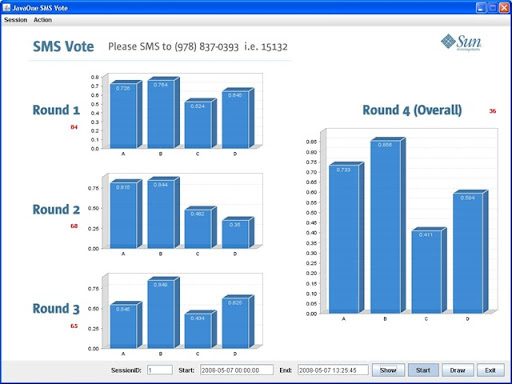
One interesting session at JavaOne 2008 was hosted by Raghavan aka Rags from Sun Microsystems. The session was called the Script Bowl and was a war between the scripting gurus from Groovy, JRuby, Jython and Scala. All the four languages are dynamic scripting languages that run on the JVM. LaForge represented Groovy, Nutter represented JRuby, Wierzbicki represented Jython and Jorge Ortiz represented Scala. All four showcased excellent skills and I watched the video one of my friends had taken.

And like the Idol (American - Indian whatever...), there was SMS voting and it was awesome competition between the scripting languages and their crowd of supporters watching the session. Finally JRuby won the day and it was a close fight. JRuby won big points at Round 3 (Best Language Features). You can read the full competition details and look below for the result details:.

A = Groovy; B = JRuby; C = Jython and D = Scala

voting

Wednesday, April 30, 2008

Project Capuchin - Sony Ericsson Mates JavaME & Flash Lite

Sony Ericsson announced today that they are experimenting with a new technology which plans to integrate Flash inside JavaME applications. This will enablephone developers to show Adobe's FlashLite interfaces inside JavaME applications. The project is called Project Capuchin and will be shown to the world at the JavaOne Conference 2008.

Adobe's Flashlite has been one of the easier UI development platform for mobile phones, but there aren't many popular business applications in Flashlite. On the other hand JavaME is popular for mobile application development, but the user-interface built using JavaME (especially CLDC) is boring and tough to build. With Project Capuchin, the guys from Sony Ericsson want to provide developers with the combined power of Adobe's Flash and Java's programming capabilities.

The main advantage of Project Capuchin is that developers will not have a new technology to learn. Designers are already acquainted with Flash and Developers already have existing JavaME applications. This will make the new technology easier to learn and will mean faster porting of existing applications with a better UI. The details about the performance and the runtime are still unknown, but most probably it'll be a single Java runtime that'll be able to run the applications. For this technology to be successful, Sony Ericsson should license the platform to other handset manufacturers, so that applications can be run on different handsets. May be Steve Jobs wanted something like this when he said Flash wasn't good enough for the iPhone...

The release date for the project and availability on handsets is still unknown and the technology is very much in the experimentation stage. The idea of such a mashup is exciting and it'll be interesting to see the response towards the technology at the JavaOne Conference. Hoping it'll become a quick and stable release from Sony Ericsson because the mobile platform does need something of this sort.

Monday, April 14, 2008

Java Applets Don't Run In Browser Anymore

If you had your Java textbooks tell you that "Applets are defined as programs that run in the browser", then you probably have to get a new revision of that textbook. Probably even authors and Java gurus need to change their definitions and refresh their ideas. And all this because from Java 6 update 10, applets will be able to execute on a process outside the browser through a nice new plugin.

Java 6 update 10 brings a whole new paradigm of applet development through the use of a new plugin for browsers. The applets running through the new plugin will feel like they are running inside the browser, but actually are executing on a different process outside the browser. The idea is that there is a lot of baggage that Applets carry when executing within the browser, thus slowing the user experience and taking an awful amount of time to load. The new browser plugin is supposed to work on:

  • Internet Explorer 6 and 7 on Windows XP and Windows Vista
  • Firefox 3 pre-release builds on Windows XP, Windows Vista, Solaris and Linux

The plugin does not work with Firefox 2, but Sun Microsystems expects someone from Mozilla to backport it. Opera, Safari and other people need to talk to Sun to get the plugin implemented. There is also a feature where you can switch between the old plugin and the new plugin. It all depends on which one do you want to use.

Applets have been a failed bet on Sun Microsystems part and you won't find many takers for Applets on today's Internet. Not that its a bad thing to use, but probably its download time, slow startup and not-so-seamless integration on webpages, made it a miss rather than a hit. Applets were supposed to be the defacto for active documents, but somehow didn't turn out to be that way. This is another push towards active documents or web deployed applications, but this time probably its more JavaFX.

The Kernel and Improved Updates

Another problem Java deployment generally faces is that it needs the JRE (Java Runtime Environment) to be deployed first on the client machine. Any update to JRE is a huge download and the size has been increasing with the addition of new APIs. A new feature, part of Java 6 update 10 (Java6u10) is the "Kernel" which only includes typical components required for your programs. It is a small package of 4-5 MB instead of the regular ~20MB.

JavaDwnld KernelDwnld

Download and Update Improvements

The complete list of new features can be found here. You can download the Java 6 update 10, which is still in beta from here and decide for yourself if its the right thing for you. I have downloaded it and from my assessment it seems to be an excellent release. Applications are a lot faster and cold startup of Java applications have improved dramatically.

The guys from Sun mention that its the biggest update release of Java that they have ever shipped without the API changes. One thing I love about Java and JRE is that they have improved the API quite a bit, but don't make the old programs incompatible. I hate the way for .NET we had completely separate v1.0, v1.1 and v2... for the .NET Framework.

Finally all the new improvements to JRE feels like the year2000 internet boom prediction where everything on the web is going to change. Silverlight, Adobe Air, JavaFX Script, and many many more technologies are all lined up to take the developer share. Which technology will rule in the end is a tough call to make, but this time all the buzz seems more real than the last bubble!!

Tuesday, November 27, 2007

Results from NetCAT 6.0 Community Acceptance Survey

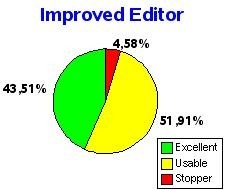
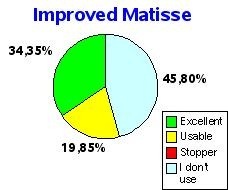
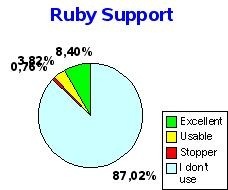
The survey gives an idea about how the community of netBeans 6.0 users have responded to the development of netBeans 6.0. Initially the survey was meant to be for the NETCAT users only, but was later opened to everyone from the netBeans community. The results seem to be fairly acceptable to the community...

editormatisse ruby

Of all the different parts of netBeans 6.0, The new Editor seems to have the largest number of showstoppers. But most users have responded positively to the work on the editor and seem to agree that improvements can be further done on the next release.

The Swing GUI Builder doesn't seem to have a lot of users from the community, but I know that quite a lot of new users as well as teams love this feature. Along with the Swing Application Framework, the GUI builder is an excellent feature from netBeans 6.0

As for Ruby/JRuby support in netBeans 6.0, I completely love the work the netBeans team has put on Ruby. A lot of Java developers think of Ruby as a competitor, but certainly not the netBeans team. One comment from the survey says that "Ruby is the flavor of the month scripting language". Just goes to show the normal Java developer's hostility.

There are other results from the survey on new Javascript Editor, Profiling and Consolidation & Installation. Read the full survey results here.

Wednesday, November 14, 2007

10 Reasons Why Android Will Be Successful

I was always skeptical about the Gphone. I thought the entire idea of Google making a phone seemed silly to me. Google being a software/web company making hardware seemed too big a step. There were obvious comparisons with the iPhone and I was one of the biggest critics of Gphone for my colleagues and friends.

But a few weeks back when I first saw Google's press release about the Android, I got a little more interested. But my doubts were still there... And on 12th Nov, when I downloaded the SDK and saw the presentation videos, I realized this is what programming on mobile phones will be in the near future. I try to present a developer perspective on why programming on Android will be successful. May be the handset manufacturers and operators would want to differ, but for the developers I think Google's done a great job.

1.) Free & Easy Access: Its "free" as in beer as well as "free" as in freedom. Operators and manufacturers will be able to customize and install for free. Thus, it'll be cheaper to build compared to say Windows Mobile, UIQ or Symbian. Also, Google/OHA intends to provide enough support for everyone which will be free or cheaper than anything else in the market.

2.) Promise of JavaME: If you downloaded the SDK, you know that its like JavaME and programmed on Eclipse. JavaME (earlier, J2ME) already has a huge developer base and the learning curve to develop applications for Android is going to be a small one. The porting of already developed application would be easy. You could add new functionality to old JavaME applications very easily.

3.) Good interfaces: The UI parts like Layouts, AdapterViews and using XML to design the UI, make Android what J2ME interfaces should always have been. Its more like J2MEPolish if you think of it as a developer. Something like Matisse (GUI Builder/ WYSIWYG Visual Designer) should have been done by Google for faster & easier GUI design... (I don't mean adding Swing, 'coz not every mobile device would be capable enough. Only a GUI builder).... 3D/2D with the openGL system is also easy to use. Its more like JSR239, so small learning curve again!

4.) Great apps: Being able to use Google's applications like Google maps, Gmail.... and WebKit (not Google's tech) within your application reduces a lot of effort for the developer and helps new innovative features. The use of the notification area across the platform is another exciting feature for developers. It feels like being able to use the system like Symbian development with Java...

5.) Linux based: Being Linux based is not new. Motorola among others already have a few Linux phones. But its worth mention because with Linux you know that there are fewer bugs as its been a few years that Linux is being used for mobiles. A lot of ironing as already been done, which means its stable than anything new Google would have developed.

6.) Hardware requirement: The hardware requirements with Android are not yet to be found. But the promise seems like it'll be available on most devices. If this turns out to be true then it means that our application is available to a larger audience. May be the Optional APIs like LBS (Location-based services), Media API, 3D and Low-level hardware access will be device specific, but other than that, it'll be probably common. For the developer it means you have to think less about which JSRs the device supports

7.) Eclipse & Developer love: Google's "Don't Do Evil" philosophy means that quite a lot of people love them including developers. Google's earlier tools like GWT, Google Gears are examples of excellent tools that developers love. The SDK is Eclipse and this means there are lot of developers who already know to use the IDE and platform.

8.) Publicity: As developers, the added advantage of developing for the Android is the publicity you may be able to get. Being the first apps to be built for Android, its obviously gonna catch the eye of a lot of other developers and consumers.

9.) Cash prize: Its part of publicity as well as getting rich. If money and fame are motivations for you as a developer, then Google has hit it right!

10.) Hype: Like they say, "Any kind of publicity is good publicity". Look at Apple's iPhone and you'll know that the hype created around it helped quite a lot of sales for the product. There so much hype around Android these days. Since Android/Gphones are already so much in the news, its pretty evident that

Thursday, November 8, 2007

NetBeans 6.0 Begins RC1

The netBeans 6.0 IDE which is under heavy development begins RC1 (Release Candidate). The nightly builds can be downloaded from here. This means that it is very close to release. I had previously covered the features from netBeans 6.0 and much of it has remained same through the development phase.

netBeans 6.0 added a lot of new features and when you add a lot of features, it generally means you have lot more bugs. Infact, netBeans has added so many features, that I dont think any other IDE could have dared to add these many changes in one version. netBeans 6.0 also has its share of bugs and we at the netcat team had some discussions on how many bugs were acceptable. From the netBeans 6.0 Quality Criteria:

Code Freeze (Entry) - FCS QC
All P1 bugs must be fixed (not waived)
All P2 bugs must be fixed or waived
All P2 bugs reported after cutoff date must be evaluated for showstopper status
All bugs must be evaluated before submitting for waive request

Based on the quality requirements, the netBeans 6.0 developers have already had a delay of 2 weeks during the beta 1 release. A lot of people who haven't had their favorite bug fixed want the date of release to be extended, but I think the netBeans developers have set a more realistic goal and I'm confident the final product released wont have any of the show-stoppers!!

Just a look at the Bugs Dashboard for people wanting to look at the different bugs:

Image Hosted by ImageShack.us

The final version for netBeans 6.0 is supposed to be released on 3rd Dec, 2007 and if everything goes like planned then I'm all excited for this one.

Why Did RedHat Choose OpenJDK ?

RedHat just got itself into the openJDK community and this is apparently big news. Even Jonathan Schwartz, thinks its a momentum for Java!! I'm sure most of you remember the open letters that were written to Sun to make Java open source... OpenJDK was Sun's response to those letters. But all this is history... RedHat's promise has just taken its first step to contribute openly to Java...

But just integrating openJDK with its distribution is not going to help Java... not that Linux never had JRE (Java Runtime Environment). Every DVD distribution with had non-OSS software included jre or anyone could download it from Sun's website.

So what's RedHat going to do with an openJDK?? Firstly, it will be able to test compatibility with Sun's JDK 6 and make sure Java remains "Write Once Run Anywhere"... Only time will tell if it remains this way with the other JDKs

Secondly openJDK does not have classes that are Sun proprietary. RedHat will contribute open-source variants of these classes... I'm wondering how much time will it take to reinvent the wheel ;-)

Thirdly, it had to do it since it was one of those that pressurized Sun to open source Java. I'm wondering why it took RedHat so much time to join the openJDK community if it had it in mind since long!!

All those explanations do not make much sense to me... Sun was already doing very good with all the work in keeping Java version-compatible and language changes didn't have steep learning curves. Any answers from you guys why RedHat's joined openJDK??

Tuesday, October 9, 2007

AMD Joins Eclipse Foundation

We do use a lot of different IDEs within our organization and like I mentioned earlier in my Visual Studio 2008 vs netBeans comparison, I'm not an IDE fanatic... Eclipse is a very popular IDE that we use in our organization. So, have a few friends at Eclipse.

Just heard that AMD will be joining hands with Eclipse's team. AMD has recently given support to a few software projects and openSuSE seems to be one of them. Eclipse leaders will be announcing this new friendship with AMD at the Eclipse Summit Europe.

The exact details of what interest AMD has in Eclipse is yet to be understood, but may be we'll have some announcement at the summit on what the exact collaboration is all about. Will there be any money exchanged... is also another question?? Eclipse is not just an IDE, but also popular as a platform on which other companies have made different tools. BEA and IBM quickly come to mind, when talking of using Eclipse as a platform to make developer tools!!

Let's wait and see what AMD gets from this partnership!! May be some compiler advantage or plugin for AMD's processors in store... Or just some community goodwill