Showing posts with label OS. Show all posts

Friday, September 24, 2010

Prefox: Firefox for the Palm WebOS

One mobile operating system that has not got enough consumer appreciation, but has got critical reviews is WebOS. I’ve played with WebOS in the Palm Pixi and it is indeed the most intuitive mobile platform, in my opinion beating iPhone OS, Android, Windows Mobile and Blackberry OS in terms of pure usability. HP also realized this and bought Palm (and all its assets) earlier this year. What the WebOS lacks, is the rich set of applications that other platforms have and love from the application developers.

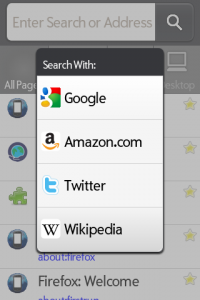
To fill an important gap in WebOS, Firefox is in the works to be ported to WebOS platform. The product is under development and is called PreFox. It is based on the source-code of the Mozilla Firefox for Mobile. As developer Dave Townsend states “PreFox requires webOS 1.4.5 and so far has only been tested on a Sprint Palm Pre. It probably works a little better on a Palm Pre Plus but I have no idea whether it would even start on a Palm Pixi.”

Monday, June 23, 2008

Review: openSuSE 11.0

On the 19th of June 2008, openSuSE 11.0 was released and I was very excited about the new release because my experience with openSuSE 10.3 has been very good and I have been following the development of openSuSE 11.0 closely. In the meantime, I have tried Ubuntu 8.04, Kubuntu, Fedora 9, openSolaris 2008.05, but somehow I’ve been coming back to openSuSE 10.3 because of some or the other nagging problem with the other distros...

Download

I downloaded openSuSE 11.0 the moment it was released and I have to say that the release was very professionally co-ordinated. There were launch events all around the globe where people received their openSUSE 11.0 DVDs and with the counter running all the time, everyone knew when to get their download managers ready. The mirrors were fast and the torrents seemed to have enough seeders. I finished the 4.3GB DVD iso by 20th morning (IST) in just about 4hrs time. There is also a single Live CD KDE iso, GNOME iso as well as a MiniCD (71 MB) for Network installation...

Installation: Image-based Deployment and Sleek

The openSuSE site has a nice installation guide with screenshots and it doesn’t make sense for me to go through the same thing again. But two things are special in openSuSE 11.0 that are worth mention. The first is that they have a gorgeous installation GUI, the best looking installation for any operating system ever!! Its easy to install and intuitive. The second the use of image deployment for the installation of GNOME. This really speeds up the installation if you are just using the basic GNOME-based setup. I generally prefer KDE, but for the test I installed the GNOME and it was fast... really really fast! I was shown the GNOME desktop with all the preferred software installed in straight 15 minutes. That’s faster than any other distro that I’ve ever installed. It was an amazing experience to see such a fast installation!
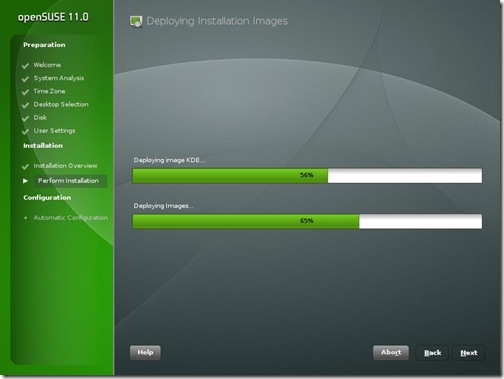
SuSE11-ImageDeploy

Like previous version, openSuSE 11.0 comes with a variety of useful non-opensource software like flashplayer, java 1.6.0_u6, fonts, Adobe reader 8, etc. Along with these I also installed Jdk6 update 10 (the awesome new Java Plugin), Mono, Netbeans 6.1, GlassFish for my OpenMRS performance test... KDE 4.0 is also there as a separate choice of GUI when installing along with KDE 3.5.9, GNOME 2.22. Since I have never been able to stably run KDE 4.0 and have always switched back to KDE 3.5, I thought I’d try KDE 4.0 in openSUSE 11.0
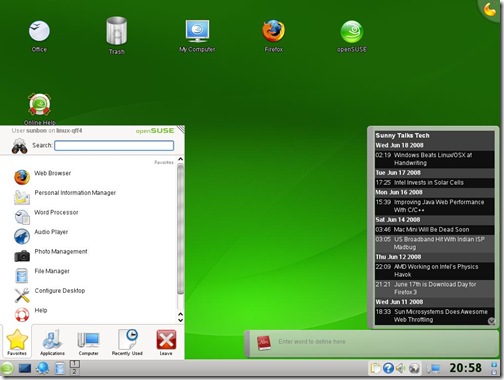
SuSE11-KDE4

I was pleasantly surprised that KDE 4.0 “just worked”. I had my first KDE 4.0 crash after 1.5 hrs of use whereas earlier it was before 20 min that the SigEnv or Segmentation Fault would throw up. I still didn’t want any crashes and hence I’m back to using KDE 3.5.9. But KDE 4 is really coming good!

As soon as I finished installing, everyone at home wanted me to record the Euro 2008 matches and soon I needed VLC to be installed. I went to videolan.org/vlc and clicked on the SuSE link... and I was greeted with a 1-Click Install button.

SuSE11-VLC-1Click

This was one of the really awesome openSUSE things that was first brought in openSUSE 10.3 and has been improved in openSuSE 11.0. I clicked on it and the installation was finished really quickly.

Improved Installation with YaST

That’s when I realized the most important update to openSuSE 11.0 which is the improved speed of YaST. No other distro has such an easy administration tool where nearly everything can be administered. And in openSuSE 11.0 everything in the YaST module just works. RPM installation is fast and adding community repositories is easy. I am a big fan of apt-get in Ubuntu, but openSUSE 11.0 software installation is just as easy now...
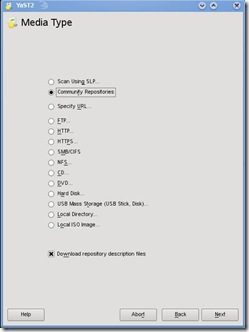
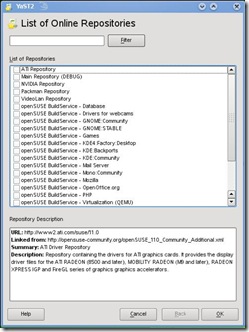
SuSE11-CommunityRepo2 SuSE11-CommunityRepo1

Every piece of hardware worked

I have lots of hardware, old and new on which I often install and test different distros, Windows, OSx86 etc. openSuSE worked with every bit of hardware that was thrown at it out of the box. Every distro struggled with the UMTS 3G card on a laptop, but surprisingly openSuSE 11.0 made it work. Few other distros had trouble with the legacy Nvidia Quadro GoGL card on another laptop, but openSuSE 11.0 worked... Old printers, USB devices, Firewire everything worked. Even the Barcode Reader with PS2-USB converter worked on the USB port which wouldn’t work on Ubuntu 8.04 or other newer distros.

The only change was that on my desktop Intel DG965RY board the surround sound wasn’t working. I followed the Audio Troubleshooting doc, added the model=dell-3stack and all my speakers started trumpeting!

Compiz-Fusion and the Bling

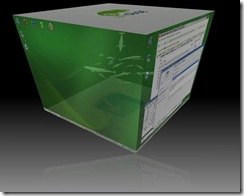
Last time I was not happy with the stability of Compiz-Fusion on openSuSE 10.3. For Ubuntu 8.04, Compiz-Fusion worked well and so I knew it was something to do with the new kernel module driver on my system. With openSuSE 11.0, Compiz-Fusion works perfectly and is able to show all its features. A nice little configuration screen helps manage the amount of effects that you wish to enable. I personally don’t enable effects, but its a good show-off to make people standup and appreciate open-source beauty.
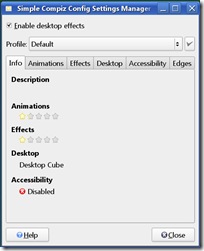
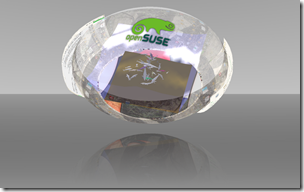
SuSE11-Compiz SuSE11-Sphere

Other features and improvements

  • Linux kernel 2.6.25
  • glibc 2.8
  • GCC 4.3
  • 200 other new features

Conclusion

You can’t miss the ease of use and the sleek looks that openSuSE 11.0 brings to the desktop. Its the perfect distro for a new user coming to linux. For the old pros, openSUSE 11.0 is fast and brings in ease of administration and software installation. Novell support is pretty good for big organizations that can buy a boxed product from them. Xen is my favorite for virtualization and it has good integration and management in YaST. But the strength and momentum of openSUSE is definitely in the desktop space. Earlier, openSuSE lacked the community backing that Ubuntu has generated in a short timespan, but with new initiatives and better responses at openSuSE forums, the openSuSE community and grown leaps and bounds. openSuSE 11.0 has grown from strength to strength and is one of the best ways to give competition to Windows on the desktop!

Other screenshots
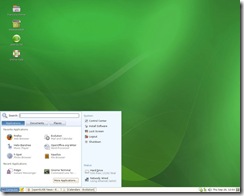
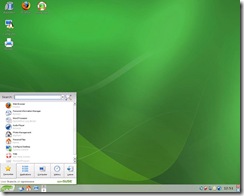
gnome-desktop The GNOME Desktop KDE-desktop The KDE Desktop
Cube-atlantis Compiz-Fusion Cube Atlantis Plugin Animation-burn Compiz-Fusion Burn Animation

Tuesday, May 13, 2008

Bill Gates Creates Hype For Windows 7

Not that I'm against Windows or Bill Gates, but then the recent speech from Bill Gates really feels more like marketing than anything else. Bill Gates has been Windows7 recently traveling to different countries around the world, and is trying to make governments to use Windows. Bill Gates has also been offering software as a medium for change in society to developing countries for free.

At the Windows Digital Lifestyle Consortium in Tokyo last week, Gates talked a few times about Windows 7. Gates said that Microsoft will be shipping Windows 7 sometime in 2010 and highlighted the fact that it will use less power and have lesser memory requirement. Now both these claims are not very believable looking at Microsoft's track record. Vista really blew it off with the system requirements and we all know how much minimum RAM and graphics are required for the promised Windows Vista.

Windows 7 is supposed to be based on Windows Vista and the current builds of Windows 7 don't seem to be much different than Windows Vista. How Microsoft plans to make Windows 7 more energy efficient wasn't mentioned by Gates. He also promised that Microsoft will be shipping a new version of Windows every 3 years. Wasn't it Bill Gates who said IE would ship every 9-12 months... IE8 hasn't been released, even though IE7 was released way back in Nov 2006.

So, it seems Bill Gates is on a marketing spree for Windows these days. Philanthropy is something the guy's really good at, marketing should be left to someone else...

Saturday, March 22, 2008

Is KB950627 News For You ??

I was just looking at my favorite news aggregator, Techmeme when I saw a news link ==> Microsoft Security Advisory (950627) for Microsoft Word. And I asked myself, does Techmeme always show every of these vulnerability messages?? Coz I never thought these to be " tech news" in the real sense unless they were really something serious and has already caused havoc around the world.

If you look at the vulnerability being talked about, you'll realize that similar vulnerabilities have existed previously without much wide-spread exploit. And not just for Microsoft products, but a lot of other products and OS. Infact these "zero-day" exploits are pretty much available for someone who can find exploits in every OS, software and quite a few other things in life :))

But the problem I think here is that Microsoft is always the favorite target of journalists and media people. It also happens to be the favorite punch-bag for a lot of tech evangelists. There are lots of other "real news" that can be aggregated or linked by popular sites. Or is it just a flaw with algorithmic aggregators, where links are all that matters and not the content or significance??

Wednesday, November 14, 2007

10 Reasons Why Android Will Be Successful

I was always skeptical about the Gphone. I thought the entire idea of Google making a phone seemed silly to me. Google being a software/web company making hardware seemed too big a step. There were obvious comparisons with the iPhone and I was one of the biggest critics of Gphone for my colleagues and friends.

But a few weeks back when I first saw Google's press release about the Android, I got a little more interested. But my doubts were still there... And on 12th Nov, when I downloaded the SDK and saw the presentation videos, I realized this is what programming on mobile phones will be in the near future. I try to present a developer perspective on why programming on Android will be successful. May be the handset manufacturers and operators would want to differ, but for the developers I think Google's done a great job.

1.) Free & Easy Access: Its "free" as in beer as well as "free" as in freedom. Operators and manufacturers will be able to customize and install for free. Thus, it'll be cheaper to build compared to say Windows Mobile, UIQ or Symbian. Also, Google/OHA intends to provide enough support for everyone which will be free or cheaper than anything else in the market.

2.) Promise of JavaME: If you downloaded the SDK, you know that its like JavaME and programmed on Eclipse. JavaME (earlier, J2ME) already has a huge developer base and the learning curve to develop applications for Android is going to be a small one. The porting of already developed application would be easy. You could add new functionality to old JavaME applications very easily.

3.) Good interfaces: The UI parts like Layouts, AdapterViews and using XML to design the UI, make Android what J2ME interfaces should always have been. Its more like J2MEPolish if you think of it as a developer. Something like Matisse (GUI Builder/ WYSIWYG Visual Designer) should have been done by Google for faster & easier GUI design... (I don't mean adding Swing, 'coz not every mobile device would be capable enough. Only a GUI builder).... 3D/2D with the openGL system is also easy to use. Its more like JSR239, so small learning curve again!

4.) Great apps: Being able to use Google's applications like Google maps, Gmail.... and WebKit (not Google's tech) within your application reduces a lot of effort for the developer and helps new innovative features. The use of the notification area across the platform is another exciting feature for developers. It feels like being able to use the system like Symbian development with Java...

5.) Linux based: Being Linux based is not new. Motorola among others already have a few Linux phones. But its worth mention because with Linux you know that there are fewer bugs as its been a few years that Linux is being used for mobiles. A lot of ironing as already been done, which means its stable than anything new Google would have developed.

6.) Hardware requirement: The hardware requirements with Android are not yet to be found. But the promise seems like it'll be available on most devices. If this turns out to be true then it means that our application is available to a larger audience. May be the Optional APIs like LBS (Location-based services), Media API, 3D and Low-level hardware access will be device specific, but other than that, it'll be probably common. For the developer it means you have to think less about which JSRs the device supports

7.) Eclipse & Developer love: Google's "Don't Do Evil" philosophy means that quite a lot of people love them including developers. Google's earlier tools like GWT, Google Gears are examples of excellent tools that developers love. The SDK is Eclipse and this means there are lot of developers who already know to use the IDE and platform.

8.) Publicity: As developers, the added advantage of developing for the Android is the publicity you may be able to get. Being the first apps to be built for Android, its obviously gonna catch the eye of a lot of other developers and consumers.

9.) Cash prize: Its part of publicity as well as getting rich. If money and fame are motivations for you as a developer, then Google has hit it right!

10.) Hype: Like they say, "Any kind of publicity is good publicity". Look at Apple's iPhone and you'll know that the hype created around it helped quite a lot of sales for the product. There so much hype around Android these days. Since Android/Gphones are already so much in the news, its pretty evident that

Wednesday, October 10, 2007

New Linux Kernel v2.6.23 Released

I got an email just now from a colleague that, the new Linux kernel v2.6.23 was released today. This released was greatly delayed due to a lot of bugfixing and some noise regarding the process schedular.

For those who haven't followed the story read here, about the CFS Vs SD. Linus finally chose to integrate CFS and this is the first major release of the kernel with the CFS process schedular.

The ChangeLog at linux.org, will be able to give you complete details of a lot of improvements in this kernel. If the changeLog seems a little complex, the summary can be read here at Kernelnewbies. We expect this kernel to be rolled into major distros in the coming months!!


This is a group photo from the Kernel Summit 2007 at Cambridge U.K. (courtesy: LWN.net) Was trying to lookup for a friend there, couldn't find him!!

Update: The guys at Phoronix.com have done some preliminary benchmarks on the new kernel and it doesn't show as much performance. Its truly preliminary, so take it with a pinch of salt!!