Showing posts with label community. Show all posts

Wednesday, September 26, 2012

NetCAT 7.2 goodies and 7.3 just got started

The Netbeans Community Acceptance Testing (NetCAT) for v7.2 concluded at the end of July 2012. It was a very productive testing process for the Netbeans community. Details about the NetCAT 7.2 are here. Beyond improving the quality of our favourite IDE, depending on how much you have contributed, Oracle also gives out goodies to the participants.

netbeans-goodies

The goodies I received this time around includes a very large towel, a nice t-shirt, 2GB memory stick, notebook and pen, an acknowledgement letter detailing my contributions and points to the program and this new Oracle-branded mint!! Strong mint!! At least from the envelope, Sun is still alive… Hurray!!

If you’d like to get similar goodies or just improve the quality of Netbeans, participate in the NetCAT 7.3 which started 10 days back. Its not too late to participate. Signup to the mailing list and add yourself to this wiki page. You’ll get points for participating in discussions over email/forums, reporting bugs, participating in surveys and following a manual testing script by being part of Tribes that test specific functionality. So its not very hard… you just have to simply use the daily or beta builds and give feedback to the developers. Go for it!!

Friday, January 27, 2012

NetCAT goodies

Some people might have followed on the blog that I had been participating in the NetbeansDSC00501 Community Acceptance Test (NetCAT) program for the 7.1 release. The release in my opinion is one of the most stable versions of Netbeans ever. This should be attributed to the co-operative effort between the developers, quality managers, community of testers and Jiri Kovalsky, who manages the NetCAT program.

There are some points for bugs, fixes, RFE, feedback, surveys etc. during the alpha and beta phase of the development and the NetCAT final tally for 7.1 is here. The best part in my opinion during this NetCAT release compared to earlier years was the quick bug fixes delivered by the Netbeans Engineering Team.

I also got some goodies for participating in NetCAT.

Thursday, September 22, 2011

NetCAT 7.1 Bug Counting

Since, I have signed to NetCAT 7.1 (Community Acceptance Program), I wanted a quick way to see the number of bugs that I have filed compared to the other top 20, I’ve written a small script to go through bugzilla. The one that is on the page seems a little complex to look at and has lots of numbers to look at.

I’ve done this instead:

Beyond the bugs, there is also the email count… We will get to that later!!

Tuesday, November 9, 2010

Netbeans Community Testing for 7.0 starts

Netbeans has just started its Community Acceptance Program (NetCAT 7.0) for Netbeans 7.0. Basically developers who are using Netbeans as their IDE need to download latest builds and report bugs. Good experience to get involved with testing and learn more about Netbeans. Also makes some friends with community and developers at Sun Microsystems.

Helps improve the IDE you use daily!!

Go HERE: http://wiki.netbeans.org/NetCAT

Monday, August 16, 2010

Netbeans UML Moves to Community

Today after the hand over conference call, we are proud to be the first set of community developers (The Since 2010 developers) of the Netbeans UML plugin. I’ve been a fan of the Netbeans UML plugin, as it was simple and helped produce neat looking UML diagrams, without a lot of fuss. When the Netbeans developers from Sun decided to abandon the UML plugin, I was pretty disappointed. Nevetheless, a few weeks earlier, some members of the Netbeans community were contacted to get involved in reviving the module and I was among the interested developers.

The primary goal of the community developers will be to create a stable release that can be put back on the Plugin Center. This means eliminating the P1 bugs and then P2 bugs which are listed on the dashboard against UML. I hope we can do this before the next release of Netbeans, which is Netbeans 6.10. There are about 3 P1 bugs and 19 P2 bugs today and I’m sure there are more coming on the way as we move to committing fixes and reaching code that works with Netbeans 6.9… It is indeed a milestone that UML has been handed over to the community. Next is the tough part of make it available to the users, so that they can then start filing more bugs and enhancement request and make our contributions more interesting. The developer wiki pages will be updated soon as we start committing code.

NetBeans IDE UML Features is listed under Netbeans 6.9 Features

I guess we aren’t yet here, but we wanna be there soon…

Saturday, August 7, 2010

Tabbed Interface to OpenMRS Global Properties

I’ve always hated to scroll through long lists when trying to find the thing I’m looking for. Computer interfaces which are designed as long list and give you a hard time to look through all of the things without a filter is definitely bad design. But even with a text field filter, long lists take a lot of time to load... The two applications that I’m working with these days, OpenMRS and DHIS2, both have these long lists that in my opinion are a pain to use.

The DHIS2 uses lists for data elements, indicators, users and these are not divided into pages. There is a text filter, but the time it takes to load the page when the list is long is excruciating. One of the recent examples, where we had over 5000 users in DHIS2 Punjab mobile application, it was excruciatingly slow to load that list of users. And then finding through that list to change anything is also quite slow and painful.

Similarly in OpenMRS, one of the things I often use for our modules is the global properties. Modules can use the global properties infrastructure to store options and it is a quick solution when you want to store some settings that can be configured by the user for your module. But as the number of modules or the number of options in a module increases, it becomes a pain to search the exact option from that long list of options. It also does not have a text filter, but you can always use the browser search to reach what you are looking for and text filters, don’t really solve much. Infact, may be the text filter in your application does not have a shortcut, while Ctrl+F would quickly give you a browser search text field.

Nevertheless, a quick hack by our developer Viet Nguyen (the JavaScript Ninja), was an OpenMRS module called moduleoptions. This is his first module, just to understand the OpenMRS framework and to me is quite a useful thing. It divides the global properties in tabs and makes the properties more manageable in my opinion. It provides better management to the long list of global properties and looks more convenient to use. It was developed in a few hours time and is definitely something that I would want to see as default when managing global properties. Below is a screenshot of how the global properties looks now:

module-options-screenshot

Tuesday, August 3, 2010

Slow JSP Editing in Netbeans 6.9

Haven’t blogged in a while, but today was reminded by a friend, that I need to write about this… We’ve been using Netbeans as our IDE for some years now.

I have been acknowledged as the most significant contributor in the Netbeans 6.9 NetFIX program, which is a where community members fix bugs in the Netbeans release… But this is something that I’ve completely missed. The JSP editor performance for free-form projects sucks real bad in the Netbeans 6.9 final release. The problem started somewhere in the beta1 release where the whole IDE hangs after any change in made through the JSP editor. This has been one of the showstopper bugs and yet it became part of the 6.9 release. The issue has been filed here.

Thankfully, the issue has been fixed and is part of the latest release of Netbeans and is a candidate for the Netbeans 6.9.1 which should be sometime during this month. In the meantime, if you have been affected by the slow performance, I suggest that you download the latest release from here. Also keep a watch of the final release of Netbeans 6.9.1 from the dashboard below:

Saturday, August 8, 2009

OpenOffice Moving to Microsoft’s “Ribbon” Interface

Although a host of online word processors have come up, OpenOffice has been the only real competitor to Microsoft’s Office Productivity Suite. It is widely regarded as “one day will beat Microsoft” dream for most open-source evangelists. It supports Microsoft Office formats and provides great compatibility to edit documents and presentations in Linux. Infact, its been one of the goals of OpenOffice to be like Microsoft Office so that people can easily switch to it and get the same features for “free”.

And moving in that direction, in the next release, they are planning to copy the Ribbon interface of Office 2007. The Ribbon Interface has been one of the most talked about UI changes, some people hate it while others love it. In Windows 7, Microsoft has moved some basic applications like Paint, Notepad to the Ribbon interface. May be OpenOffice is just trying to get ready for Windows 7.

Ooo 

Try the new interface demo for Impress (Powerpoint alternative) with the new ribbon-like interface.

Saturday, June 6, 2009

Netbeans 6.7 RC2 Released & Your Feedback Required

The new and shiny Netbeans 6.7 RC2 was released today and if you haven’t tried it out yet, please go and download it. It has host of new features which you cannetbeans 128 1 read here. My favorite feature in Netbeans 6.7 has been the out-of-the-box Maven integration and the ability to create Hudson continuous integration servers.

But more importantly, after you have downloaded Netbeans 6.7 RC2 and played with it enough, please give feedback to the Netbeans developer team about the release. There is a survey called the Community Acceptance survey which is integral to guarantee that the release is acceptable to the community. Isn’t that what open-source software is all about – the community. Please fill in the survey and give your very important feedback.

Wednesday, May 13, 2009

Realpolitik of Health Management Information System

HMIS or Health Management Information System has been quite a buzz-word around the Indian health machinery for sometime now. Its just that health-workers are now starting to understand. From the lay-man’s point-of-view, HMIS is a system of managing health related information. It is the process of collecting health-related data, making sense of that data to become information, understanding the relevance of information and making plans on how to use the information.

HMIS being an information system, surely has the scope of being managed through computers and it is done pan-India using an application called DHIS 2 (District Health Information Software v2). DHIS2 is an open-source Java web application and it is free for anyone to use. Free as in Freedom and free as in beer. And this has caused a stir of sorts because there aren’t a lot of things that you get free in life. I am sure some philosopher’s would be quick to tell me that nothing in life is free and so its true with DHIS as well!! But its for fact, cheaper than most other pieces of software competing in the HMIS space.

But we are not here to talk about DHIS, we are here to know the realpolitik of HMIS. Since NRHM (National Rural Health Mission) has poured in money into the health sector, lot of things have changed. It has improved health infrastructure, changed government’s outlook towards public health, generated employment and done a lot more. But it has also brought in realpolitik.

Realpolitik is a theory of politics that focuses on considerations of power, not ideals, morals, or principles. Its “real” instead of “idealistic” and that is sometimes not a bad thing. Politics, in-fact isn’t a bad thing at all!! Health forever has been idealistic, doctors forever revered as people who save lives and government health machinery thought as part of goodwill governance. With these ideals, the Constitution of India enlists “Health as a state matter”. But who has the money and who gives the money, when we are talking about health??

Software systems have enormously increased the reach and speed of information exchange and data collection for health. DHIS2 and pro-HMIS crowd has created a nation-wide awareness on the usefulness of software systems for health monitoring. This has led to a power struggle within different groups not just within the government, but NGOs working in the health sector and consulting groups that work with the states. The power game has just begun with software and technology proving as powerful weapons for whosoever wants to use it. In this hype for HMIS, simple portals that capture data for national level have fetched huge chunks of money and each day additional money is spent on building many more such systems. Then there is the power struggle to capture the market on who trains the cadre of health workers on these new technological advances that has somehow no relevance on health services.

I am just starting to see the “realpolitik”, which is definitely not bad as an ideology... Its just that health always seemed like a noble cause. I am now seeing it as a realist.

Saturday, April 18, 2009

Free JavaOne Entry for Students

JavaOne at the Moscone Center is the biggest conference for the Java world. It's one heck of an experience to meet all the world's Java developers and interact with the Java programmers of the world.

This year Sun has put up a page where students and educators can get in free at the conference. The JavaOne 2009 from June 2-5, 2009, Moscone Center, San Francisco, California has a normal entry fee of $1750-$2000 depending on the sessions.

It is a great opportunity for students to meet some of great programmers. Great learning experience and exposure to the Java world.

Wednesday, November 19, 2008

Netbeans 6.5 Final Released

After some delay in the release due to quality issues, Netbeans 6.5 is out for download. It is netbeans 128 2 indeed a feature-rich build and some great changes have been added for this new release. Along with the new features, I can vouch that Netbeans 6.5 is also a pretty stable release since I was part of NetCAT 6.5 (Netbeans Community Acceptance Program).

The list of new features can be found here… My favorite features are the improvements in Database Query, Python, HTTP Client Monitor, JavaScript Debugger and PHP. If you are a developer from the php world, I would really suggest that you take a closer look at Netbeans 6.5. I love the documentation and code hints that Netbeans will give you.

Netbeans also completed 10yrs a few weeks back and celebrate by downloading Netbeans 6.5 here.

Wednesday, August 13, 2008

Netbeans 6.5 Beta Released

Netbeans, “the only IDE that you need” is undergoing a major overhaul and the new version is called Netbeans 6.5. Today after weeks of development and testing, Netbeans passed a few test criteria and has been decided to be stable enough by the Netbeans team to be called a Beta. Now begins the real stabilizing process and ironing out the bugs that remain.

netbeans6.5

Since, I’ve been doing the Netbeans Community Acceptance Testing (NETCAT 6.5) Program, I’ve been closely watching how the entire development has gone through. New features were quickly implemented and each development team co-ordinated with all the quality managers and community to get the best features out in this version. Congratulations to the Netbeans development team on the release and I’m sure a lot of other developers are excited to use the new features.

The following are some noteworthy features, and the complete list can be found here:

1.) PHP – Php support has vastly improved and will ship out-of-the-box with Netbeans, unlike previously where a plugin from the plugin center had to be installed.

2.) Database Tools – The new database tools for designing queries, viewing connections, tables, views, procedures is great. It still a work in progress, but I must say its a pretty good job for a first-time release.

3.) Glassfish v3 has been integrated with Netbeans 6.5 and Glasshfish v3 is surely more sleeker, faster and modular than v2.

4.) There are host of other improvements like Groovy and Grails, SQL Editor Improvements (code completion, save/recall queries, and more), RESTful web services from database tables or from JPA entities, JavaScript debugging on Firefox 2 and IE.

You can download the beta from here and please report any errors that prop up in your work. Enjoy the build and happy coding!!

Tuesday, August 12, 2008

iPhone App Store’s $30 Million May Be Second Best

Apple CEO Steve Jobs said in an interview yesterday to Wall Street Journal that the iPhone AppStore made $30 Million in the first month of sales. That is  approximately close to $1 million everyday for July. Its an amazing feat when you think about the problems with the launch of App Store & iPhone 2... And $1 million a day is not a small amount, but will the business scale?? Will it be the winner for online content distribution??

Steve Jobs has already proved his amazing entrepreneurship in the past with the iPod and iTunes Store. Apple has changed the face of online music sales with AppStore-Vs-Steamits iTunes store and is surely building it up everyday by adding more and more content. The iPhone is also one of the most successful smartphone product, which in its first-generation already got a cult status and has been a hit in its second re-incarnation as well. But with all the success coming its way, there aren’t too many people who are looking at Apple’s shortcomings.

Apple’s failure in web services like .mac and MobileMe is probably its biggest recent failure. But then there is also the bad sales of AppleTV and Jobs Cube (oops MacMini) which still isn’t in the living room!! Apple desktop and laptop sales may be growing, but they still aren’t anywhere outside the US. But with those products not working as well, Apple still rocks with the iPhone.

The App Store fetches 30% of total revenue to Apple and the remaining 70% to the application developers/publisher. 30% does sound a lot for just hosting your App, but then with the developers getting rich for their not-as-much efforts, why would anyone have a problem with Apple getting an even bigger share?? For example, Super Monkey Ball is the most successful paid app on the App Store and has sold more than 300,000 copies in 20 days at $10 each. This means Sega (…and OtherOcean Interactive) made $2.1 million in 20 days. This has made OtherOcean create a new iPhone apps division, which obviously shows that they want to make many more such wonderful apps. I expect many more such developers coming up with interesting apps for the iPhone in the future.

But what we need to think is how much will people keep spending on the App Store and what will be the kind of competition that will come up for developers on the app store... If you need comparisons, most people will obviously look at iTunes, but I don’t think music and games/apps can be considered to be similar content. Obviously music can be downloaded and used whenever, where-ever you want. You could be playing your favorite tunes all through the day, but is it the same with games/apps on a mobile device?? How many hours can you game on the iPhone ?? How many apps do you need on the iPhone?? How much more will you really spend on the iPhone after that purchase??

On the PC side of things, there’s another company getting big on the online content distribution front. And its Valve Software, with its Steam Content Delivery System, which I think has more “steam” in the long run. Desktops/wired networks have lot more bandwidth to download and gaming hardware is lot more capable on PCs. Also we may be moving to specialized gaming consoles from desktop computers, but then Steam could very well be moved to consoles in the future. Steam already has 15million users, who use Steam servers for multiplayer gaming, buying new content, social networking and the like. Steam also has the support of many game developers and studios. And new studios are getting interested everyday to share their content on the Steam system. With all that and improving PC gaming numbers from other countries than the US, it feels that Steam could very well be the leading content delivery system of the future.

How Apple scales its App Store and how developers come up with new and interesting applications/games on the App Store will determine its future success. But the start is surely on track!! Probably, App Store is the constant stream of revenue for Apple, since someone somewhere is going to need an app, but then $1 billion revenue which Steve Jobs is expecting from the App Store is way... way too much!! Atleast not until every kid on the block owns an iPhone!!

Monday, August 4, 2008

Microsoft’s New Clubhouse and Windows Live

Microsoft has just launched a revamped website for Windows Live in hopes to make navigation simpler and easier access to all its services. Along with the windows_live_logo revamped Windows Live website, Microsoft has also launched a new community website called Windows Live Clubhouse, a community for the most avid users of Windows Live products.

Windows Live Clubhouse is a place where users can share their experience of using Windows Live products. Users also share the best tricks and tips for using the Windows Live products and provide help in using Windows Live products. Currently Live Clubhouse is an invite-only service which Microsoft plans to open for all Windows Live users by the end of this year, if the first set of users are satisfied.

Microsoft off-late has been trying to improve its web services and has hopes that Windows Live will help catch up with Google. In the wake of Google’s success, Microsoft has been trying different things to compete. With the new Wave 3 of Live Services under development and testing, Microsoft is hoping to turn a new leaf in web services market... Surely the Yahoo fiasco has pumped up Microsoft to build better web services.

Wednesday, July 16, 2008

Linus Thinks “OpenBSD crowd is a bunch of masturbating monkeys”

If you’ve had some pain fixing a Windows issue, I’m sure you’ve heard of the word “Linux” from one of the other “geeks” that visit around forums, helpinglinux_logo people out. Linus Trovalds was the person who started the Linux operating system project and owns the copyright to the name, “Linux”. Recently when discussing a security issue in the Linux kernel, Linus did some disrespectful “name-calling” in a public readable mailing list.

The following is an excerpt from the mail:

Security people are often the black-and-white kind of people that I can't stand. I think the OpenBSD crowd is a bunch of masturbating monkeys, in that they make such a big deal about concentrating on security to the point where they pretty much admit that nothing else matters to them.

Linus is known to be a little outspoken and as a person who can be little rude at times, but when you treat other competitive developers with so much disrespect, it obviously means there is something wrong with him or his team. Linus invented the Linux OS, but today there are lots of other developers who are working hard towards improving Linux. The other developers do all the hardwork these days and Linus just supervises and controls which patches are to be applied to the kernel and what direction the Linux kernel should follow.

Look at the backdrop of events happening at Linux and OpenBSD, you’ll realize why Linus is a little upset with OpenBSD/BSD in general. The last release of FreeBSD v7.0, which is based on OpenBSD’s trunk4 and is a spectacular release with performance better than Linux on most grounds. Also, a lot of other Linux developers are in constant debate with Linus on what direction Linux should take. Someday its about the schedular or one day its about the security. There is some unrest in the Linux community, which feels the desktop neglect in terms of efforts in the kernel.

You can read his insane reply here and the whole discussion here.

But whatever the problem, such harsh words are completely unacceptable from the leader of such a big community of developers and users. Linus definitely needs some spiritual counselling to heal his internal turmoil.

Thursday, July 3, 2008

The World’s Most Unexclusive Guinness Certificate By Firefox

As stupid as it sounds, you could gift yourself the world’s most unexclusive Guinness World Record certificate. And this one comes courtesy of of Firefox which had completed 8,002,530 downloads in a single day and set a world record for the highest number of software downloads. After the world record is made, Firefox is giving away a pdf for download to showoff its achievement.

Mozilla-Firefox-Cert

You can visit here and get yourself the world’s most unexclusive Guinness World Record Certificate. And it doesn’t matter if you didn’t pledge your support to Firefox or you didn’t download Firefox, you can still get a certificate. I did pledge though and downloaded Firefox 3 just for the heck of it… not for some stupid record setting!!

Monday, June 23, 2008

Review: openSuSE 11.0

On the 19th of June 2008, openSuSE 11.0 was released and I was very excited about the new release because my experience with openSuSE 10.3 has been very good and I have been following the development of openSuSE 11.0 closely. In the meantime, I have tried Ubuntu 8.04, Kubuntu, Fedora 9, openSolaris 2008.05, but somehow I’ve been coming back to openSuSE 10.3 because of some or the other nagging problem with the other distros...

Download

I downloaded openSuSE 11.0 the moment it was released and I have to say that the release was very professionally co-ordinated. There were launch events all around the globe where people received their openSUSE 11.0 DVDs and with the counter running all the time, everyone knew when to get their download managers ready. The mirrors were fast and the torrents seemed to have enough seeders. I finished the 4.3GB DVD iso by 20th morning (IST) in just about 4hrs time. There is also a single Live CD KDE iso, GNOME iso as well as a MiniCD (71 MB) for Network installation...

Installation: Image-based Deployment and Sleek

The openSuSE site has a nice installation guide with screenshots and it doesn’t make sense for me to go through the same thing again. But two things are special in openSuSE 11.0 that are worth mention. The first is that they have a gorgeous installation GUI, the best looking installation for any operating system ever!! Its easy to install and intuitive. The second the use of image deployment for the installation of GNOME. This really speeds up the installation if you are just using the basic GNOME-based setup. I generally prefer KDE, but for the test I installed the GNOME and it was fast... really really fast! I was shown the GNOME desktop with all the preferred software installed in straight 15 minutes. That’s faster than any other distro that I’ve ever installed. It was an amazing experience to see such a fast installation!
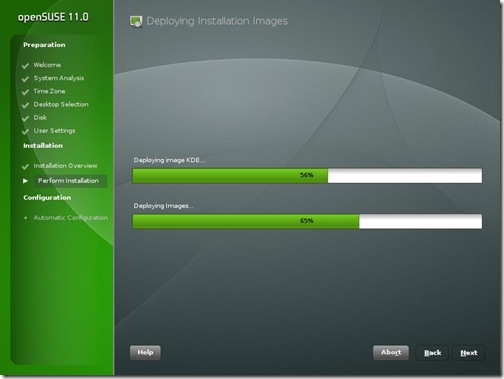
SuSE11-ImageDeploy

Like previous version, openSuSE 11.0 comes with a variety of useful non-opensource software like flashplayer, java 1.6.0_u6, fonts, Adobe reader 8, etc. Along with these I also installed Jdk6 update 10 (the awesome new Java Plugin), Mono, Netbeans 6.1, GlassFish for my OpenMRS performance test... KDE 4.0 is also there as a separate choice of GUI when installing along with KDE 3.5.9, GNOME 2.22. Since I have never been able to stably run KDE 4.0 and have always switched back to KDE 3.5, I thought I’d try KDE 4.0 in openSUSE 11.0
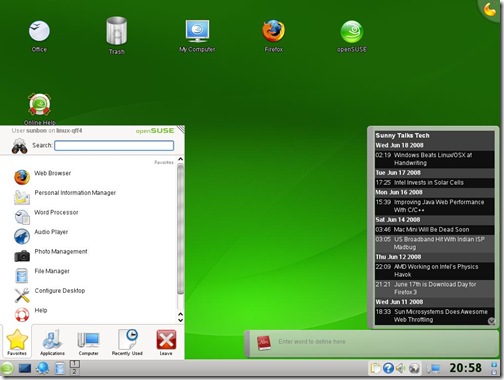
SuSE11-KDE4

I was pleasantly surprised that KDE 4.0 “just worked”. I had my first KDE 4.0 crash after 1.5 hrs of use whereas earlier it was before 20 min that the SigEnv or Segmentation Fault would throw up. I still didn’t want any crashes and hence I’m back to using KDE 3.5.9. But KDE 4 is really coming good!

As soon as I finished installing, everyone at home wanted me to record the Euro 2008 matches and soon I needed VLC to be installed. I went to videolan.org/vlc and clicked on the SuSE link... and I was greeted with a 1-Click Install button.

SuSE11-VLC-1Click

This was one of the really awesome openSUSE things that was first brought in openSUSE 10.3 and has been improved in openSuSE 11.0. I clicked on it and the installation was finished really quickly.

Improved Installation with YaST

That’s when I realized the most important update to openSuSE 11.0 which is the improved speed of YaST. No other distro has such an easy administration tool where nearly everything can be administered. And in openSuSE 11.0 everything in the YaST module just works. RPM installation is fast and adding community repositories is easy. I am a big fan of apt-get in Ubuntu, but openSUSE 11.0 software installation is just as easy now...
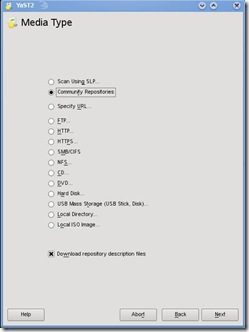
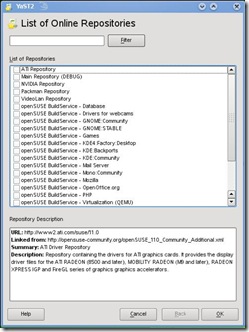
SuSE11-CommunityRepo2 SuSE11-CommunityRepo1

Every piece of hardware worked

I have lots of hardware, old and new on which I often install and test different distros, Windows, OSx86 etc. openSuSE worked with every bit of hardware that was thrown at it out of the box. Every distro struggled with the UMTS 3G card on a laptop, but surprisingly openSuSE 11.0 made it work. Few other distros had trouble with the legacy Nvidia Quadro GoGL card on another laptop, but openSuSE 11.0 worked... Old printers, USB devices, Firewire everything worked. Even the Barcode Reader with PS2-USB converter worked on the USB port which wouldn’t work on Ubuntu 8.04 or other newer distros.

The only change was that on my desktop Intel DG965RY board the surround sound wasn’t working. I followed the Audio Troubleshooting doc, added the model=dell-3stack and all my speakers started trumpeting!

Compiz-Fusion and the Bling

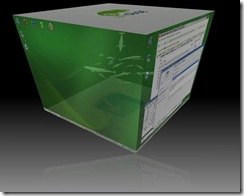
Last time I was not happy with the stability of Compiz-Fusion on openSuSE 10.3. For Ubuntu 8.04, Compiz-Fusion worked well and so I knew it was something to do with the new kernel module driver on my system. With openSuSE 11.0, Compiz-Fusion works perfectly and is able to show all its features. A nice little configuration screen helps manage the amount of effects that you wish to enable. I personally don’t enable effects, but its a good show-off to make people standup and appreciate open-source beauty.
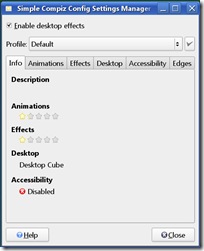
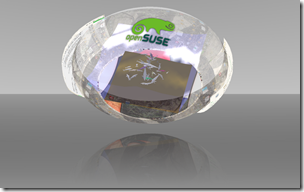
SuSE11-Compiz SuSE11-Sphere

Other features and improvements

  • Linux kernel 2.6.25
  • glibc 2.8
  • GCC 4.3
  • 200 other new features

Conclusion

You can’t miss the ease of use and the sleek looks that openSuSE 11.0 brings to the desktop. Its the perfect distro for a new user coming to linux. For the old pros, openSUSE 11.0 is fast and brings in ease of administration and software installation. Novell support is pretty good for big organizations that can buy a boxed product from them. Xen is my favorite for virtualization and it has good integration and management in YaST. But the strength and momentum of openSUSE is definitely in the desktop space. Earlier, openSuSE lacked the community backing that Ubuntu has generated in a short timespan, but with new initiatives and better responses at openSuSE forums, the openSuSE community and grown leaps and bounds. openSuSE 11.0 has grown from strength to strength and is one of the best ways to give competition to Windows on the desktop!

Other screenshots
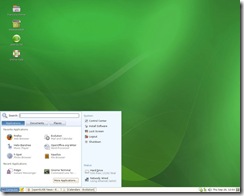
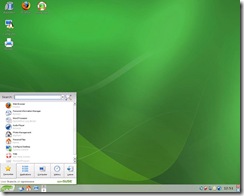
gnome-desktop The GNOME Desktop KDE-desktop The KDE Desktop
Cube-atlantis Compiz-Fusion Cube Atlantis Plugin Animation-burn Compiz-Fusion Burn Animation

Wednesday, May 21, 2008

Office 2007 to Support ODF in SP2

According to News.com, Microsoft will be supporting ODF (Open Document Format) in Office 2007 through Service Pack 2 (SP2). Office 2007 SP2 is expected to be released in Q1 2009 and will be adding support for saving and opening ODF files, just like other competing office suites like OpenOffice has been doing.

Microsoft recently had been criticized widely for the ISO standardization of its OOXML format (docx, pptx...etc). The entire community of open-source document suites was against the standardization of OOXML. Thus, this announcement comes as a surprise after the recent tussle with the ODF community. Along with ODF, Microsoft will be increasing compatibility and support for Adobe's Portable Document Format (PDF) and XML Paper Specification (XPS).

Tom Robertson, general manager of Interoperability and Standards at Microsoft, said:

"We have heard from customers and governments that they would like to see us do this. Now is the time to announce this support. It's also important to announce this now because we want to get involved in the maintenance of ODF. We have ongoing dialogue with the EC, so we will absolutely have a discussion with them about these steps [supporting ODF] and get whatever feedback they may have on it".

Microsoft also has plans to join the Organization for the Advancement of Structured Information Standards, or OASIS, which is the primary body for the standardization and improvement of the ODF format. How Microsoft is going to affect the future of document standards is really an important question that everyone needs to be asking? We will really have to see how Microsoft is welcomed by others in the community after the recent clash between the two formats!

Monday, April 14, 2008

NetBeans 6.1 RC1 Needs Your Feedback

If you have been among the people using netBeans 6.1, then its your time to give some feedback to the netBeans developer team. netBeans 6.1 has just nbday08_logofinished on a release candidate and your comments can be invaluable to ironing out the final bugs that you may have faced.

If you haven't yet looked into netBeans 6.1, then probably this is your time to look at the really fast and cool new netBeans. netBeans 6.1 has improved a lot on the performance and startup of the IDE. Some other important updates include the fast javascript debugger, Spring 2.5 support, JSF CRUD Generator and a lot of other useful features.

You have to go here and fill the survey.

In netBeans news, there is also the upcoming NetBeans Day 2008 held alongside JavaOne. You can get into it FREE and does not require a JavaOne registration. From that room probably you can sneak your way into the JavaOne Conference free, but don't tell anyone I told you to do that :))